Vertex AI
Overview
Vertexai is a machine learning platform. Learn more in the official Vertexai documentation.
The DataHub integration for Vertexai covers ML entities such as models, features, and related lineage metadata. It also captures table-level lineage and stateful deletion detection.
Concept Mapping
| Source Concept | DataHub Concept | Notes |
|---|---|---|
Model | MlModelGroup | The name of a Model Group is the same as Model's name. Model serve as containers for multiple versions of the same model in Vertex AI. |
Model Version | MlModel | The name of a Model is {model_name}_{model_version} (e.g. my_vertexai_model_1 for model registered to Model Registry or Deployed to Endpoint. Each Model Version represents a specific iteration of a model with its own metadata. |
| Dataset | Dataset | A Managed Dataset resource in Vertex AI is mapped to Dataset in DataHub. Supported types of datasets include ( Text, Tabular, Image Dataset, Video, TimeSeries) |
Training Job | DataProcessInstance | A Training Job is mapped as DataProcessInstance in DataHub. Supported types of training jobs include ( AutoMLTextTrainingJob, AutoMLTabularTrainingJob, AutoMLImageTrainingJob, AutoMLVideoTrainingJob, AutoMLForecastingTrainingJob, Custom Job, Custom TrainingJob, Custom Container TrainingJob, Custom Python Packaging Job ) |
Experiment | Container | Experiments organize related runs and serve as logical groupings for model development iterations. Each Experiment is mapped to a Container in DataHub. |
Experiment Run | DataProcessInstance | An Experiment Run represents a single execution of a ML workflow. An Experiment Run tracks ML parameters, metricis, artifacts and metadata |
Execution | DataProcessInstance | Metadata Execution resource for Vertex AI. Metadata Execution is started in a experiment run and captures input and output artifacts. |
PipelineJob | DataFlow | A Vertex AI Pipeline is mapped to a stable DataFlow entity in DataHub (one per pipeline template). The compiled pipeline spec name (pipelineInfo.name, i.e. the @pipeline(name="...") argument) is used as the stable identifier; non-Kubeflow pipelines fall back to display_name with any timestamp suffix stripped. Each pipeline run creates a DataProcessInstance, and pipeline tasks are modeled as DataJobs nested under the parent DataFlow. This enables proper incremental lineage aggregation across multiple pipeline runs. Breaking Change (v1.4.0): Previously, each pipeline run created a separate DataFlow entity. Existing pipeline entities from earlier versions will appear as separate entities from new ingestion runs. Enable stateful ingestion with stale entity removal to clean up old pipeline entities. |
PipelineJob Task | DataJob | Each task within a Vertex AI pipeline is modeled as a DataJob in DataHub, nested under its parent pipeline DataFlow. Tasks represent individual steps in the pipeline workflow. |
PipelineJob Task Run | DataProcessInstance | Each execution of a pipeline task is modeled as a DataProcessInstance, linked to its DataJob (task definition). This captures runtime metadata, inputs/outputs, and lineage for each task execution. |
Vertex AI Concept Diagram
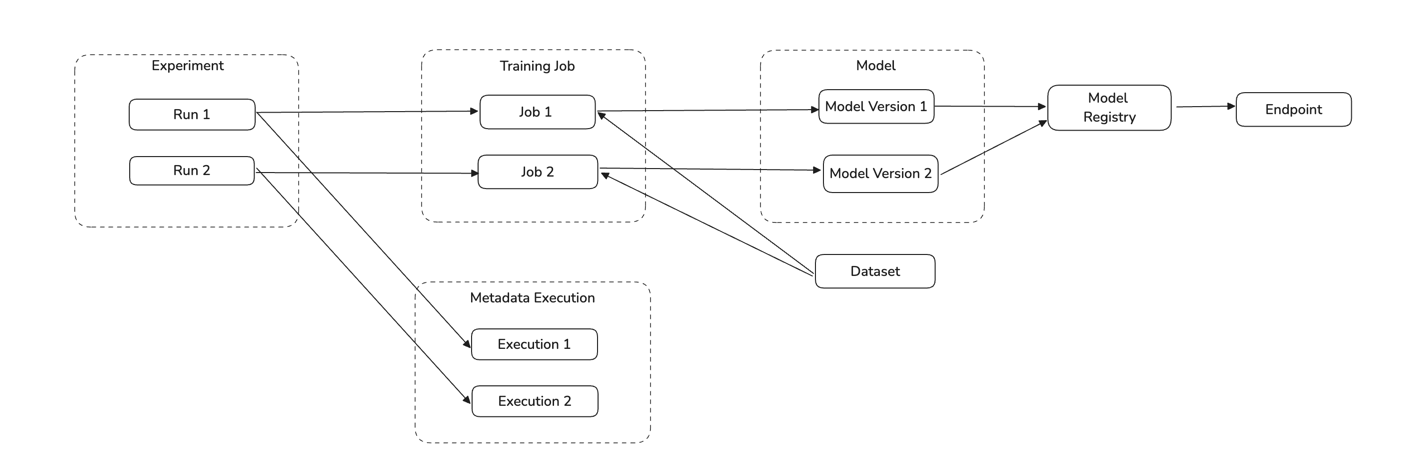
Module vertexai

Important Capabilities
| Capability | Status | Notes |
|---|---|---|
| Asset Containers | ✅ | Enabled by default: Experiments are modeled as Container entities; model groups and pipeline templates create folder containers. |
| Descriptions | ✅ | Extract descriptions for Vertex AI Registered Models and Model Versions. |
| Detect Deleted Entities | ✅ | Enabled by default via stateful ingestion. |
| Platform Instance | ✅ | Optionally set via the platform_instance config field to namespace resources when ingesting from multiple Vertex AI setups. |
| Table-Level Lineage | ✅ | Enabled by default: training job → model, dataset → training job, and cross-platform lineage to GCS, BigQuery, S3, Snowflake, and Azure Blob Storage. |
Overview
The vertexai module ingests metadata from Vertex AI into DataHub. It extracts Models, Datasets, Training Jobs, Endpoints, Experiments, Experiment Runs, Model Evaluations, and Pipelines from Vertex AI.
The source supports ingesting across multiple GCP projects by specifying project_ids, project_labels, or project_id_pattern. Use env (e.g., PROD, DEV, STAGING) to distinguish between environments. The optional platform_instance field namespaces resources to avoid URN collisions when ingesting from multiple Vertex AI setups.
Deprecation Notice: The
project_id(singular) configuration field is deprecated and will be removed in a future release. Useproject_ids(list) instead:# Deprecated
project_id: my-project
# Preferred
project_ids:
- my-projectMigration behavior: If
project_idis set andproject_idsis not, the value is automatically moved toproject_idsand a deprecation warning is logged. If both are set with the same value,project_idis silently ignored. If both are set with conflicting values, ingestion fails with a validation error. No manual migration is required — update your recipe at your convenience to silence the warning.
Performance: Resources are fetched ordered by update time (most recently updated first). Limits like max_training_jobs_per_type cap how many resources are processed per run — for example, max_training_jobs_per_type: 1000 will process only the 1000 most recently updated training jobs of each type.
Rate limiting: If you see 429 Quota Exceeded errors, enable rate limiting with rate_limit: true. The default requests_per_min: 600 matches Google's standard quota of 600 resource-management requests per minute per region. Lower this value (e.g. 300) if you share quota with other workloads running in the same project and region.
Enabling stateful_ingestion has two effects: (1) resources not updated since the previous run are skipped, reducing redundant API calls on subsequent runs; and (2) entities deleted from Vertex AI are automatically soft-deleted in DataHub. Use stateful_ingestion.ignore_old_state: true to get soft-deletion only without the incremental skip behaviour.
For improved organization in the DataHub UI:
- Model versions are organized under their respective model group folders
- Pipeline tasks and task runs are nested under their parent pipeline folders
Prerequisites
Before running ingestion, ensure network connectivity to the source, valid authentication credentials, and read permissions for metadata APIs required by this module.
Vertex AI setup
Refer to Vertex AI documentation for Vertex AI basics.
GCP Authentication
Set up Application Default Credentials (ADC) following GCP docs.
Permissions
Grant the following permissions to the service account on all target projects.
Default GCP Role: roles/aiplatform.viewer
| Permission | Description |
|---|---|
aiplatform.models.list | Allows a user to view and list all ML models in a project |
aiplatform.models.get | Allows a user to view details of a specific ML model |
aiplatform.endpoints.list | Allows a user to view and list all prediction endpoints in a project |
aiplatform.endpoints.get | Allows a user to view details of a specific prediction endpoint |
aiplatform.trainingPipelines.list | Allows a user to view and list all training pipelines in a project |
aiplatform.trainingPipelines.get | Allows a user to view details of a specific training pipeline |
aiplatform.customJobs.list | Allows a user to view and list all custom jobs in a project |
aiplatform.customJobs.get | Allows a user to view details of a specific custom job |
aiplatform.experiments.list | Allows a user to view and list all experiments in a project |
aiplatform.experiments.get | Allows a user to view details of a specific experiment in a project |
aiplatform.metadataStores.list | Allows a user to view and list all metadata stores in a project |
aiplatform.metadataStores.get | Allows a user to view details of a specific metadata store |
aiplatform.executions.list | Allows a user to view and list all executions in a project |
aiplatform.executions.get | Allows a user to view details of a specific execution |
aiplatform.datasets.list | Allows a user to view and list all datasets in a project |
aiplatform.datasets.get | Allows a user to view details of a specific dataset |
aiplatform.pipelineJobs.list | Allows a user to view and list all pipeline jobs in a project |
aiplatform.pipelineJobs.get | Allows a user to view details of a specific pipeline job |
ML Metadata extraction (enabled by default for enhanced lineage tracking) requires the aiplatform.metadataStores.* and aiplatform.executions.* permissions listed above. If your service account lacks these permissions, the connector will gracefully fall back with warnings. To disable ML Metadata features, set use_ml_metadata_for_lineage: false, extract_execution_metrics: false, and include_evaluations: false.
When using project_labels or project_id_pattern to auto-discover projects, the service account also needs resourcemanager.projects.get (granted via roles/browser) on each candidate project. This is in addition to the Vertex AI permissions listed above and is required so the Cloud Resource Manager search_projects API can return the project. If you specify project_ids explicitly, no Resource Manager permissions are needed.
Create a service account and assign roles
Create a service account following GCP docs and assign the role above
Download the service account JSON keyfile
Example credential file:
{
  "type": "service_account",
  "project_id": "project-id-1234567",
  "private_key_id": "d0121d0000882411234e11166c6aaa23ed5d74e0",
  "private_key": "-----BEGIN PRIVATE KEY-----\nMIIyourkey\n-----END PRIVATE KEY-----",
  "client_email": "test@suppproject-id-1234567.iam.gserviceaccount.com",
  "client_id": "113545814931671546333",
  "auth_uri": "https://accounts.google.com/o/oauth2/auth",
  "token_uri": "https://oauth2.googleapis.com/token",
  "auth_provider_x509_cert_url": "https://www.googleapis.com/oauth2/v1/certs",
  "client_x509_cert_url": "https://www.googleapis.com/robot/v1/metadata/x509/test%suppproject-id-1234567.iam.gserviceaccount.com"
}
To provide credentials to the source, you can either:
Set an environment variable:
$ export GOOGLE_APPLICATION_CREDENTIALS="/path/to/keyfile.json"or
Set credential config in your source based on the credential json file. For example:
credential:
  private_key_id: "d0121d0000882411234e11166c6aaa23ed5d74e0"
  private_key: "-----BEGIN PRIVATE KEY-----\nMIIyourkey\n-----END PRIVATE KEY-----\n"
  client_email: "test@suppproject-id-1234567.iam.gserviceaccount.com"
  client_id: "123456678890"
Install the Plugin
pip install 'acryl-datahub[vertexai]'
Starter Recipe
Check out the following recipe to get started with ingestion! See below for full configuration options.
For general pointers on writing and running a recipe, see our main recipe guide.
source:
  type: vertexai
  config:
    project_ids:
      - "acryl-poc"
    # project_id: "acryl-poc"  # [deprecated] Still works — auto-migrated to project_ids with a warning
    # region: "us-west2"  # [deprecated] Prefer 'regions' or 'discover_regions'
    # regions:
    #   - "us-west2"
    #   - "us-central1"
    # discover_regions: true  # Enumerate available regions and scan all
    # project_labels:
    #   - "env:prod"
    # project_id_pattern:
    #   allow:
    #     - ".*-prod"
# You must either set GOOGLE_APPLICATION_CREDENTIALS or provide credential as shown below
#   credential:
#      private_key: '-----BEGIN PRIVATE KEY-----\\nprivate-key\\n-----END PRIVATE KEY-----\\n'
#      private_key_id: "project_key_id"
#      client_email: "client_email"
#      client_id: "client_id"

sink:
  type: "datahub-rest"
  config:
    server: "http://localhost:8080"
Config Details
- Options
- Schema
Note that a . is used to denote nested fields in the YAML recipe.
| Field | Description |
|---|---|
bucket_uri One of string, null | Bucket URI used in your project Default: None |
discover_regions boolean | If true, discover available Vertex AI regions per project and scan all. Default: False |
extract_execution_metrics boolean | Extract hyperparameters and metrics from ML Metadata Executions. Useful for training jobs that don't use Experiments but log to ML Metadata. Default: True |
include_evaluations boolean | Ingest model evaluations and evaluation metrics. Default: True |
include_experiments boolean | Ingest experiments and experiment runs. Default: True |
include_models boolean | Ingest models and model versions from the registry. Default: True |
include_pipelines boolean | Ingest pipelines and tasks. Default: True |
include_training_jobs boolean | Ingest training jobs and related run events. Default: True |
incremental_lineage boolean | When enabled, emits lineage as incremental to existing lineage already in DataHub. When disabled, re-states lineage on each run. Default: False |
max_evaluations_per_model One of integer, null | Maximum evaluations per model. Default: 10, Max: 100. Set to None for unlimited (not recommended). Default: 10 |
max_experiments One of integer, null | Maximum number of experiments to ingest. Experiments are ordered by update_time descending (most recently updated first). Default: 1000, Max: 10000. Set to None for unlimited (not recommended). Default: 1000 |
max_models One of integer, null | Maximum number of models to ingest. Models are ordered by update_time descending (most recently updated first). Default: 10000, Max: 50000. Set to None for unlimited (not recommended). Default: 10000 |
max_runs_per_experiment One of integer, null | Maximum experiment runs per experiment. Runs are ordered by update_time descending (most recently updated first). Default: 100, Max: 1000. Set to None for unlimited (not recommended). Default: 100 |
max_training_jobs_per_type One of integer, null | Maximum training jobs per type (CustomJob, AutoML, etc.). Jobs are ordered by update_time descending (most recently updated first). Default: 1000, Max: 10000. Set to None for unlimited (not recommended). Default: 1000 |
ml_metadata_max_execution_search_limit integer | Maximum number of ML Metadata executions to retrieve when searching for a training job. Ordered by LAST_UPDATE_TIME descending. Lower this if ingestion is slow or timing out. Default: 500 |
normalize_external_dataset_paths boolean | Strip partition segments from external dataset paths (GCS/S3/ABS) to create stable dataset URNs. When enabled, 'gs://bucket/data/year=2024/month=01/' becomes 'gs://bucket/data/'. Partition-level information is captured via DataProcessInstance. Default is False for backward compatibility. Will default to True in a future major version. Default: False |
platform_instance One of string, null | The instance of the platform that all assets produced by this recipe belong to. This should be unique within the platform. See https://docs.datahub.com/docs/platform-instances/ for more details. Default: None |
rate_limit boolean | Slow down ingestion to avoid hitting Vertex AI API quota limits. Enable if you see '429 Quota Exceeded' errors during ingestion. Default: False |
region One of string, null | [deprecated] Single Vertex AI region. Prefer 'regions' or 'discover_regions'. Default: None |
requests_per_min integer | Max API requests per minute when rate_limit is enabled. 600 is Google's quota ceiling for resource management requests per project per region (see https://cloud.google.com/vertex-ai/docs/quotas). Lower this only if you share quota with other workloads running in the same project and region. Default: 600 |
use_ml_metadata_for_lineage boolean | Extract lineage from Vertex AI ML Metadata API for CustomJob and other training jobs. This enables input dataset → training job → output model lineage for non-AutoML jobs. Default: True |
vertexai_url One of string, null | VertexUI URI |
env string | The environment that all assets produced by this connector belong to Default: PROD |
credential One of GCPCredential, null | GCP credential information Default: None |
credential.client_email ❓ string | Client email |
credential.client_id ❓ string | Client Id |
credential.private_key ❓ string(password) | Private key in a form of '-----BEGIN PRIVATE KEY-----\nprivate-key\n-----END PRIVATE KEY-----\n' |
credential.private_key_id ❓ string | Private key id |
credential.auth_provider_x509_cert_url string | Auth provider x509 certificate url |
credential.auth_uri string | Authentication uri |
credential.client_x509_cert_url One of string, null | If not set it will be default to https://www.googleapis.com/robot/v1/metadata/x509/client_email Default: None |
credential.project_id One of string, null | Project id to set the credentials Default: None |
credential.token_uri string | Token uri Default: https://oauth2.googleapis.com/token |
credential.type string | Authentication type Default: service_account |
experiment_name_pattern AllowDenyPattern | A class to store allow deny regexes. Patterns are matched against the start of the string only, not the entire string - a pattern does not need to match to the end to be considered a match. For example, the pattern "prod" matches "prod", "prod_east", and "production". To require an exact match, anchor your pattern explicitly, e.g. "^prod$". |
experiment_name_pattern.ignoreCase One of boolean, null | Whether to ignore case sensitivity during pattern matching. Default: True |
model_name_pattern AllowDenyPattern | A class to store allow deny regexes. Patterns are matched against the start of the string only, not the entire string - a pattern does not need to match to the end to be considered a match. For example, the pattern "prod" matches "prod", "prod_east", and "production". To require an exact match, anchor your pattern explicitly, e.g. "^prod$". |
model_name_pattern.ignoreCase One of boolean, null | Whether to ignore case sensitivity during pattern matching. Default: True |
partition_pattern_rules array | Regex patterns to identify and strip partition segments from paths. Applied when normalize_external_dataset_paths is enabled. Patterns are applied in order. Default: ['/[^/]+=([^/]+)', '/dt=\d{4}-\d{2}-\d{2}', '/... |
partition_pattern_rules.string string | |
platform_instance_map map(str,PlatformDetail) | Platform instance configuration for external datasets referenced in Vertex AI lineage. |
platform_instance_map. key.platform_instanceOne of string, null | Platform instance for URN generation. If not set, no platform instance in URN. Default: None |
platform_instance_map. key.convert_urns_to_lowercaseboolean | Convert dataset names to lowercase. Set to true for Snowflake (which defaults to lowercase URNs). Leave false for GCS, BigQuery, S3, and ABS. Default: False |
platform_instance_map. key.envstring | Environment for all assets from this platform Default: PROD |
project_id_pattern AllowDenyPattern | A class to store allow deny regexes. Patterns are matched against the start of the string only, not the entire string - a pattern does not need to match to the end to be considered a match. For example, the pattern "prod" matches "prod", "prod_east", and "production". To require an exact match, anchor your pattern explicitly, e.g. "^prod$". |
project_id_pattern.ignoreCase One of boolean, null | Whether to ignore case sensitivity during pattern matching. Default: True |
project_ids array | Ingest specified GCP project ids. Overrides project_id_pattern. |
project_ids.string string | |
project_labels array | Ingest projects with these labels (key:value). Applied before project_id_pattern. |
project_labels.string string | |
regions array | List of Vertex AI regions to scan. If empty and discover_regions is false, falls back to 'region'. |
regions.string string | |
training_job_type_pattern AllowDenyPattern | A class to store allow deny regexes. Patterns are matched against the start of the string only, not the entire string - a pattern does not need to match to the end to be considered a match. For example, the pattern "prod" matches "prod", "prod_east", and "production". To require an exact match, anchor your pattern explicitly, e.g. "^prod$". |
training_job_type_pattern.ignoreCase One of boolean, null | Whether to ignore case sensitivity during pattern matching. Default: True |
stateful_ingestion One of StatefulStaleMetadataRemovalConfig, null | Stateful ingestion configuration for tracking and removing stale metadata. Default: None |
stateful_ingestion.enabled boolean | Whether or not to enable stateful ingest. Default: True if a pipeline_name is set and either a datahub-rest sink or datahub_api is specified, otherwise False Default: False |
stateful_ingestion.fail_safe_threshold number | Prevents large amount of soft deletes & the state from committing from accidental changes to the source configuration if the relative change percent in entities compared to the previous state is above the 'fail_safe_threshold'. Default: 75.0 |
stateful_ingestion.remove_stale_metadata boolean | Soft-deletes the entities present in the last successful run but missing in the current run with stateful_ingestion enabled. Default: True |
The JSONSchema for this configuration is inlined below.
{
  "$defs": {
    "AllowDenyPattern": {
      "additionalProperties": false,
      "description": "A class to store allow deny regexes.\n\nPatterns are matched against the start of the string only, not the entire\nstring - a pattern does not need to match to the end to be considered a match.\nFor example, the pattern \"prod\" matches \"prod\", \"prod_east\", and \"production\".\nTo require an exact match, anchor your pattern explicitly, e.g. \"^prod$\".",
      "properties": {
        "allow": {
          "default": [
            ".*"
          ],
          "description": "List of regex patterns to include in ingestion. Patterns match from the start of the string only, not the entire string - anchor with '^...$' for an exact match, e.g. '^prod$'.",
          "items": {
            "type": "string"
          },
          "title": "Allow",
          "type": "array"
        },
        "deny": {
          "default": [],
          "description": "List of regex patterns to exclude from ingestion. Patterns match from the start of the string only, not the entire string - anchor with '^...$' for an exact match, e.g. '^prod$'.",
          "items": {
            "type": "string"
          },
          "title": "Deny",
          "type": "array"
        },
        "ignoreCase": {
          "anyOf": [
            {
              "type": "boolean"
            },
            {
              "type": "null"
            }
          ],
          "default": true,
          "description": "Whether to ignore case sensitivity during pattern matching.",
          "title": "Ignorecase"
        }
      },
      "title": "AllowDenyPattern",
      "type": "object"
    },
    "GCPCredential": {
      "additionalProperties": false,
      "properties": {
        "project_id": {
          "anyOf": [
            {
              "type": "string"
            },
            {
              "type": "null"
            }
          ],
          "default": null,
          "description": "Project id to set the credentials",
          "title": "Project Id"
        },
        "private_key_id": {
          "description": "Private key id",
          "title": "Private Key Id",
          "type": "string"
        },
        "private_key": {
          "description": "Private key in a form of '-----BEGIN PRIVATE KEY-----\\nprivate-key\\n-----END PRIVATE KEY-----\\n'",
          "format": "password",
          "title": "Private Key",
          "type": "string",
          "writeOnly": true
        },
        "client_email": {
          "description": "Client email",
          "title": "Client Email",
          "type": "string"
        },
        "client_id": {
          "description": "Client Id",
          "title": "Client Id",
          "type": "string"
        },
        "auth_uri": {
          "default": "https://accounts.google.com/o/oauth2/auth",
          "description": "Authentication uri",
          "title": "Auth Uri",
          "type": "string"
        },
        "token_uri": {
          "default": "https://oauth2.googleapis.com/token",
          "description": "Token uri",
          "title": "Token Uri",
          "type": "string"
        },
        "auth_provider_x509_cert_url": {
          "default": "https://www.googleapis.com/oauth2/v1/certs",
          "description": "Auth provider x509 certificate url",
          "title": "Auth Provider X509 Cert Url",
          "type": "string"
        },
        "type": {
          "default": "service_account",
          "description": "Authentication type",
          "title": "Type",
          "type": "string"
        },
        "client_x509_cert_url": {
          "anyOf": [
            {
              "type": "string"
            },
            {
              "type": "null"
            }
          ],
          "default": null,
          "description": "If not set it will be default to https://www.googleapis.com/robot/v1/metadata/x509/client_email",
          "title": "Client X509 Cert Url"
        }
      },
      "required": [
        "private_key_id",
        "private_key",
        "client_email",
        "client_id"
      ],
      "title": "GCPCredential",
      "type": "object"
    },
    "PlatformDetail": {
      "additionalProperties": false,
      "description": "Platform instance configuration for external datasets referenced in Vertex AI lineage.",
      "properties": {
        "platform_instance": {
          "anyOf": [
            {
              "type": "string"
            },
            {
              "type": "null"
            }
          ],
          "default": null,
          "description": "Platform instance for URN generation. If not set, no platform instance in URN.",
          "title": "Platform Instance"
        },
        "env": {
          "default": "PROD",
          "description": "Environment for all assets from this platform",
          "title": "Env",
          "type": "string"
        },
        "convert_urns_to_lowercase": {
          "default": false,
          "description": "Convert dataset names to lowercase. Set to true for Snowflake (which defaults to lowercase URNs). Leave false for GCS, BigQuery, S3, and ABS.",
          "title": "Convert Urns To Lowercase",
          "type": "boolean"
        }
      },
      "title": "PlatformDetail",
      "type": "object"
    },
    "StatefulStaleMetadataRemovalConfig": {
      "additionalProperties": false,
      "description": "Base specialized config for Stateful Ingestion with stale metadata removal capability.",
      "properties": {
        "enabled": {
          "default": false,
          "description": "Whether or not to enable stateful ingest. Default: True if a pipeline_name is set and either a datahub-rest sink or `datahub_api` is specified, otherwise False",
          "title": "Enabled",
          "type": "boolean"
        },
        "remove_stale_metadata": {
          "default": true,
          "description": "Soft-deletes the entities present in the last successful run but missing in the current run with stateful_ingestion enabled.",
          "title": "Remove Stale Metadata",
          "type": "boolean"
        },
        "fail_safe_threshold": {
          "default": 75.0,
          "description": "Prevents large amount of soft deletes & the state from committing from accidental changes to the source configuration if the relative change percent in entities compared to the previous state is above the 'fail_safe_threshold'.",
          "maximum": 100.0,
          "minimum": 0.0,
          "title": "Fail Safe Threshold",
          "type": "number"
        }
      },
      "title": "StatefulStaleMetadataRemovalConfig",
      "type": "object"
    }
  },
  "additionalProperties": false,
  "properties": {
    "incremental_lineage": {
      "default": false,
      "description": "When enabled, emits lineage as incremental to existing lineage already in DataHub. When disabled, re-states lineage on each run.",
      "title": "Incremental Lineage",
      "type": "boolean"
    },
    "env": {
      "default": "PROD",
      "description": "The environment that all assets produced by this connector belong to",
      "title": "Env",
      "type": "string"
    },
    "platform_instance": {
      "anyOf": [
        {
          "type": "string"
        },
        {
          "type": "null"
        }
      ],
      "default": null,
      "description": "The instance of the platform that all assets produced by this recipe belong to. This should be unique within the platform. See https://docs.datahub.com/docs/platform-instances/ for more details.",
      "title": "Platform Instance"
    },
    "stateful_ingestion": {
      "anyOf": [
        {
          "$ref": "#/$defs/StatefulStaleMetadataRemovalConfig"
        },
        {
          "type": "null"
        }
      ],
      "default": null,
      "description": "Stateful ingestion configuration for tracking and removing stale metadata."
    },
    "normalize_external_dataset_paths": {
      "default": false,
      "description": "Strip partition segments from external dataset paths (GCS/S3/ABS) to create stable dataset URNs. When enabled, 'gs://bucket/data/year=2024/month=01/' becomes 'gs://bucket/data/'. Partition-level information is captured via DataProcessInstance. Default is False for backward compatibility. Will default to True in a future major version.",
      "title": "Normalize External Dataset Paths",
      "type": "boolean"
    },
    "partition_pattern_rules": {
      "default": [
        "/[^/]+=([^/]+)",
        "/dt=\\d{4}-\\d{2}-\\d{2}",
        "/\\d{4}/\\d{2}/\\d{2}"
      ],
      "description": "Regex patterns to identify and strip partition segments from paths. Applied when normalize_external_dataset_paths is enabled. Patterns are applied in order.",
      "items": {
        "type": "string"
      },
      "title": "Partition Pattern Rules",
      "type": "array"
    },
    "credential": {
      "anyOf": [
        {
          "$ref": "#/$defs/GCPCredential"
        },
        {
          "type": "null"
        }
      ],
      "default": null,
      "description": "GCP credential information"
    },
    "region": {
      "anyOf": [
        {
          "type": "string"
        },
        {
          "type": "null"
        }
      ],
      "default": null,
      "description": "[deprecated] Single Vertex AI region. Prefer 'regions' or 'discover_regions'.",
      "title": "Region"
    },
    "include_models": {
      "default": true,
      "description": "Ingest models and model versions from the registry.",
      "title": "Include Models",
      "type": "boolean"
    },
    "include_training_jobs": {
      "default": true,
      "description": "Ingest training jobs and related run events.",
      "title": "Include Training Jobs",
      "type": "boolean"
    },
    "include_experiments": {
      "default": true,
      "description": "Ingest experiments and experiment runs.",
      "title": "Include Experiments",
      "type": "boolean"
    },
    "include_pipelines": {
      "default": true,
      "description": "Ingest pipelines and tasks.",
      "title": "Include Pipelines",
      "type": "boolean"
    },
    "include_evaluations": {
      "default": true,
      "description": "Ingest model evaluations and evaluation metrics.",
      "title": "Include Evaluations",
      "type": "boolean"
    },
    "use_ml_metadata_for_lineage": {
      "default": true,
      "description": "Extract lineage from Vertex AI ML Metadata API for CustomJob and other training jobs. This enables input dataset \u2192 training job \u2192 output model lineage for non-AutoML jobs.",
      "title": "Use Ml Metadata For Lineage",
      "type": "boolean"
    },
    "extract_execution_metrics": {
      "default": true,
      "description": "Extract hyperparameters and metrics from ML Metadata Executions. Useful for training jobs that don't use Experiments but log to ML Metadata.",
      "title": "Extract Execution Metrics",
      "type": "boolean"
    },
    "experiment_name_pattern": {
      "$ref": "#/$defs/AllowDenyPattern",
      "default": {
        "allow": [
          ".*"
        ],
        "deny": [],
        "ignoreCase": true
      },
      "description": "Regex allow/deny pattern for experiment names."
    },
    "training_job_type_pattern": {
      "$ref": "#/$defs/AllowDenyPattern",
      "default": {
        "allow": [
          ".*"
        ],
        "deny": [],
        "ignoreCase": true
      },
      "description": "Regex allow/deny pattern for training job class names (e.g., CustomJob)."
    },
    "model_name_pattern": {
      "$ref": "#/$defs/AllowDenyPattern",
      "default": {
        "allow": [
          ".*"
        ],
        "deny": [],
        "ignoreCase": true
      },
      "description": "Regex allow/deny pattern for model display names."
    },
    "max_models": {
      "anyOf": [
        {
          "maximum": 50000,
          "type": "integer"
        },
        {
          "type": "null"
        }
      ],
      "default": 10000,
      "description": "Maximum number of models to ingest. Models are ordered by update_time descending (most recently updated first). Default: 10000, Max: 50000. Set to None for unlimited (not recommended).",
      "title": "Max Models"
    },
    "max_training_jobs_per_type": {
      "anyOf": [
        {
          "maximum": 10000,
          "type": "integer"
        },
        {
          "type": "null"
        }
      ],
      "default": 1000,
      "description": "Maximum training jobs per type (CustomJob, AutoML, etc.). Jobs are ordered by update_time descending (most recently updated first). Default: 1000, Max: 10000. Set to None for unlimited (not recommended).",
      "title": "Max Training Jobs Per Type"
    },
    "max_experiments": {
      "anyOf": [
        {
          "maximum": 10000,
          "type": "integer"
        },
        {
          "type": "null"
        }
      ],
      "default": 1000,
      "description": "Maximum number of experiments to ingest. Experiments are ordered by update_time descending (most recently updated first). Default: 1000, Max: 10000. Set to None for unlimited (not recommended).",
      "title": "Max Experiments"
    },
    "max_runs_per_experiment": {
      "anyOf": [
        {
          "maximum": 1000,
          "type": "integer"
        },
        {
          "type": "null"
        }
      ],
      "default": 100,
      "description": "Maximum experiment runs per experiment. Runs are ordered by update_time descending (most recently updated first). Default: 100, Max: 1000. Set to None for unlimited (not recommended).",
      "title": "Max Runs Per Experiment"
    },
    "max_evaluations_per_model": {
      "anyOf": [
        {
          "maximum": 100,
          "type": "integer"
        },
        {
          "type": "null"
        }
      ],
      "default": 10,
      "description": "Maximum evaluations per model. Default: 10, Max: 100. Set to None for unlimited (not recommended).",
      "title": "Max Evaluations Per Model"
    },
    "ml_metadata_max_execution_search_limit": {
      "default": 500,
      "description": "Maximum number of ML Metadata executions to retrieve when searching for a training job. Ordered by LAST_UPDATE_TIME descending. Lower this if ingestion is slow or timing out.",
      "title": "Ml Metadata Max Execution Search Limit",
      "type": "integer"
    },
    "rate_limit": {
      "default": false,
      "description": "Slow down ingestion to avoid hitting Vertex AI API quota limits. Enable if you see '429 Quota Exceeded' errors during ingestion.",
      "title": "Rate Limit",
      "type": "boolean"
    },
    "requests_per_min": {
      "default": 600,
      "description": "Max API requests per minute when rate_limit is enabled. 600 is Google's quota ceiling for resource management requests per project per region (see https://cloud.google.com/vertex-ai/docs/quotas). Lower this only if you share quota with other workloads running in the same project and region.",
      "title": "Requests Per Min",
      "type": "integer"
    },
    "project_ids": {
      "description": "Ingest specified GCP project ids. Overrides project_id_pattern.",
      "items": {
        "type": "string"
      },
      "title": "Project Ids",
      "type": "array"
    },
    "project_labels": {
      "description": "Ingest projects with these labels (key:value). Applied before project_id_pattern.",
      "items": {
        "type": "string"
      },
      "title": "Project Labels",
      "type": "array"
    },
    "project_id_pattern": {
      "$ref": "#/$defs/AllowDenyPattern",
      "default": {
        "allow": [
          ".*"
        ],
        "deny": [],
        "ignoreCase": true
      },
      "description": "Regex patterns for project ids to include/exclude."
    },
    "regions": {
      "description": "List of Vertex AI regions to scan. If empty and discover_regions is false, falls back to 'region'.",
      "items": {
        "type": "string"
      },
      "title": "Regions",
      "type": "array"
    },
    "discover_regions": {
      "default": false,
      "description": "If true, discover available Vertex AI regions per project and scan all.",
      "title": "Discover Regions",
      "type": "boolean"
    },
    "bucket_uri": {
      "anyOf": [
        {
          "type": "string"
        },
        {
          "type": "null"
        }
      ],
      "default": null,
      "description": "Bucket URI used in your project",
      "title": "Bucket Uri"
    },
    "vertexai_url": {
      "anyOf": [
        {
          "type": "string"
        },
        {
          "type": "null"
        }
      ],
      "default": "https://console.cloud.google.com/vertex-ai",
      "description": "VertexUI URI",
      "title": "Vertexai Url"
    },
    "platform_instance_map": {
      "additionalProperties": {
        "$ref": "#/$defs/PlatformDetail"
      },
      "description": "Map external platform names (gcs, bigquery, s3, azure_blob_storage, snowflake) to their platform instance and env. Ensures URNs match native connectors for lineage connectivity.",
      "title": "Platform Instance Map",
      "type": "object"
    }
  },
  "title": "VertexAIConfig",
  "type": "object"
}
Capabilities
Use the Important Capabilities table above as the source of truth for supported features and whether additional configuration is required.
Lineage
The connector captures comprehensive lineage relationships including cross-platform lineage to external data sources:
Core Vertex AI Lineage:
- Training job → Model (AutoML and CustomJob)
- Dataset → Training job (AutoML and ML Metadata-based)
- Training job → Output models (ML Metadata Executions)
- Model → Training datasets (direct upstream lineage via TrainingData aspect)
- Experiment run → Model (outputs)
- Model evaluation → Model and test datasets (inputs)
- Pipeline task runs → Models and datasets (inputs/outputs via DataProcessInstance aspects)
Cross-Platform Lineage (external data sources):
The connector links Vertex AI resources to external datasets when referenced in job configurations or ML Metadata artifacts. Supported platforms:
- Google Cloud Storage (gs://...) →
gcsplatform - BigQuery (bq://project.dataset.table or projects/.../datasets/.../tables/...) →
bigqueryplatform - Amazon S3 (s3://..., s3a://...) →
s3platform - Azure Blob Storage (wasbs://..., abfss://...) →
absplatform - Snowflake (snowflake://...) →
snowflakeplatform
Use platform_instance_map to configure platform instances and environments for external platforms, ensuring URNs match those from native connectors for proper lineage connectivity.
CustomJob Lineage
The connector supports extracting lineage and metrics from CustomJob training jobs using the Vertex AI ML Metadata API. This enables:
- Full lineage tracking for CustomJob: input datasets → training job → output models
- Hyperparameters and metrics extraction from training jobs that log to ML Metadata Executions
- Model evaluation ingestion with evaluation metrics and lineage to models
These features are controlled by the following configuration options:
use_ml_metadata_for_lineage(default:true) — Extracts lineage from ML Metadata for CustomJob and other non-AutoML training jobsextract_execution_metrics(default:true) — Extracts hyperparameters and metrics from ML Metadata Executionsinclude_evaluations(default:true) — Ingests model evaluations and evaluation metrics
For CustomJob lineage to work, your training jobs must log to Vertex AI ML Metadata. This happens automatically when using Vertex AI Experiments SDK or manually logging artifacts/executions to ML Metadata.
from google.cloud import aiplatform

aiplatform.init(project="your-project", location="us-central1")

dataset_artifact = aiplatform.Artifact.create(
    schema_title="system.Dataset",
    uri="gs://your-bucket/data/train.csv",
    display_name="training-dataset",
)

with aiplatform.start_execution(
    schema_title="system.ContainerExecution",
    display_name=f"training-job-{job_name}",
) as execution:
    execution.assign_input_artifacts([dataset_artifact])
    # ... training logic ...
    model_artifact = aiplatform.Artifact.create(
        schema_title="system.Model",
        uri=model_uri,
        display_name="trained-model",
    )
    execution.assign_output_artifacts([model_artifact])
Cross-Platform Lineage Configuration
To ensure external datasets are linked with the correct platform instances and environments (so URNs match those from native connectors), configure platform_instance_map:
source:
  type: vertexai
  config:
    project_ids:
      - my-project
    platform_instance_map:
      gcs:
        platform_instance: prod-gcs
        env: PROD
      bigquery:
        platform_instance: prod-bq
        env: PROD
      s3:
        platform_instance: prod-s3
        env: PROD
      snowflake:
        platform_instance: prod-snowflake
        env: PROD
        convert_urns_to_lowercase: true # Required - Snowflake defaults to lowercase URNs
      abs:
        platform_instance: prod-abs
        env: PROD
Platform-specific notes:
- Snowflake: Must set
convert_urns_to_lowercase: trueto match the Snowflake connector's default behavior - All other platforms (GCS, BigQuery, S3, ABS): Use the default
convert_urns_to_lowercase: false
Limitations
Module behavior is constrained by source APIs, permissions, and metadata exposed by the platform. Refer to capability notes for unsupported or conditional features.
Troubleshooting
If ingestion fails, validate credentials, permissions, connectivity, and scope filters first. Then review ingestion logs for source-specific errors and adjust configuration accordingly.
Code Coordinates
- Class Name:
datahub.ingestion.source.vertexai.vertexai.VertexAISource - Browse on GitHub
If you've got any questions on configuring ingestion for Vertex AI, feel free to ping us on our Slack.
This page is auto-generated from the underlying source code. To make changes, please edit the relevant source files in the metadata-ingestion directory.
Tip: For quick typo fixes or documentation updates, you can click the ✏️ Edit icon directly in the GitHub UI to open a Pull Request. For larger changes and PR naming conventions, please refer to our Contributing Guide.