Data Products
🤝 Version compatibility
DataHub Core: 0.10.3 | DataHub Cloud: 0.2.8
Data Product Marketplace and Hierarchy requires DataHub Cloud 2.2.0
What are Data Products?
Data Products are an innovative way to organize and manage your Data Assets, such as Tables, Topics, Views, Pipelines, Charts, Dashboards, etc., within DataHub. These Data Products belong to a specific Domain and can be easily discovered from Govern > Data Products or from Domain by various teams or stakeholders within your organization.
Why Data Products?
A key concept in data mesh architecture, Data Products are independent units of data managed by a specific domain team. They are responsible for defining, publishing, and maintaining their data assets while ensuring high-quality data that meets the needs of its consumers.
Benefits of Data Products
Data Products help in curating a coherent set of logical entities, simplifying data discovery and governance. By grouping related Data Assets into a Data Product, it allows stakeholders to discover and understand available data easily, supporting data governance efforts by managing and controlling access to Data Products.
How Can You Use Data Products?
Data Products can be easily published to the DataHub catalog, allowing other teams to discover and consume them. By doing this, data teams can streamline the process of sharing data, making data-driven decisions faster and more efficient.
Data Products Setup, Prerequisites, and Permissions
Data Product operations use two different privileges depending on whether you are acting from the asset or from the Data Product itself.
| What you're doing | Where in the UI / API | Required privilege | Policy resource |
|---|---|---|---|
| Create from Data Product sidebar | Data Product → Create; createDataProduct | Manage Data Products | The Domain selected on create |
| Browse from Data Product sidebar, open product profiles | Govern → Data Product; dataproduct | View Entity (default) | Data Products the actor can see |
| Move / nest / detach a product | Profile menu → Move; moveDataProduct | Manage Data Products | The data product's own Domain (not the parent's) |
| Add or remove assets from a Data Product page | Data Product → Add Assets; batchSetDataProduct | Manage Data Products | At least one Domain on the product |
| Link or unlink a Data Product from an asset profile | Asset sidebar → Set Data Product; batchAddToDataProducts / batchRemoveFromDataProducts | Edit Data Product | The asset being updated |
| Create, update, or delete a Data Product from Domain | Domain → Data Products tab; createDataProduct, updateDataProduct, deleteDataProduct | Manage Data Products | Each Domain associated with the product |
Grant these via Metadata Policies.
Manage Data Products is a Domain privilege, not a Data Product entity privilege. To change membership from the product side, the actor must hold Manage Data Products on at least one Domain associated with the Data Product. The product and assets do not need to share a Domain — product-side manage access is evaluated independently from asset-side Edit Data Product checks. If the product has no Domain associations, product-side manage operations are denied (fail-closed); asset-side authorization may still allow the change when the actor has Edit Data Product on every changed asset.
In normal operation each Data Product belongs to a single Domain. The UI and createDataProduct enforce this. Authorization still evaluates the full set of unique Domains on the product's domains aspect (preferring domainAssociations, falling back to the legacy domains array) so misconfigured metadata cannot bypass checks.
Renaming a Data Product via updateName additionally allows Edit Entity on the Data Product URN itself as an alternative to domain-level manage access.
Edit Data Product on an asset controls whether someone can change which Data Product(s) that asset belongs to (including add and remove via batchAddToDataProducts, batchRemoveFromDataProducts, and unsetting via batchSetDataProduct). It does not authorize rewriting a Data Product's membership list from the product page — that requires Manage Data Products on at least one of the product's Domains.
Direct metadata writes (MCP, ingestion) allow membership changes when either product-side manage or asset-side edit authorization succeeds.
Membership authorization runs only when dataProductProperties.assets changes. Re-domaining a Data Product or asset (Edit Domains) does not re-check or remove existing membership. Assets can remain linked after the product or asset moves to a different domain.
Using Data Products
Data Products can be created using the UI or via a YAML file that is managed using software engineering (GitOps) practices.
Creating a Data Product (UI)
Option 1 Create a Data Product from Govern > Data Product > Create Data Product.
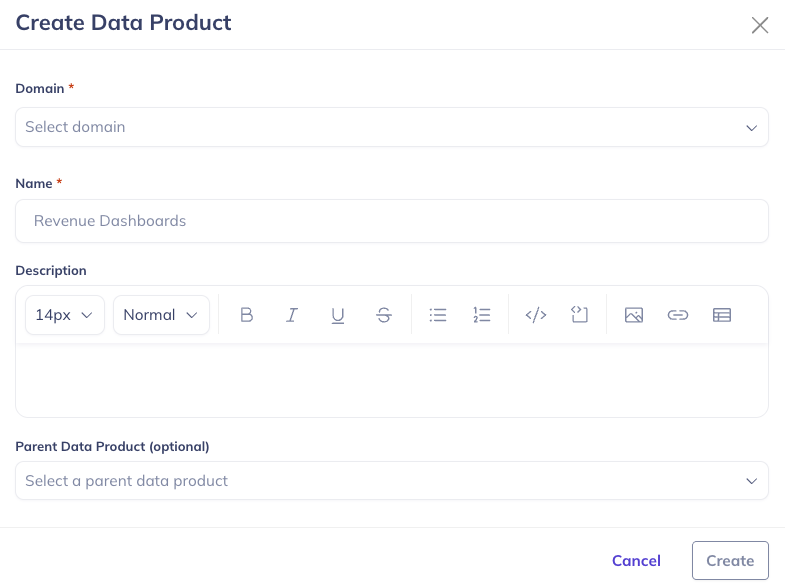
- Open Govern → Data Product
- Click Create Data Product
- Choose the Domain the product belongs to (required)
- Provide a Name for the data product (required)
- Optionally provide a Description (recommended)
- Optionally choose a Parent Data Product
- Click Create
The new product appears as a root (or under the parent you chose) in the Data Product sidebar. You may need to refresh for the new Data Product to appear.
Option 2 Navigate to the Domain that will contain this Data Product
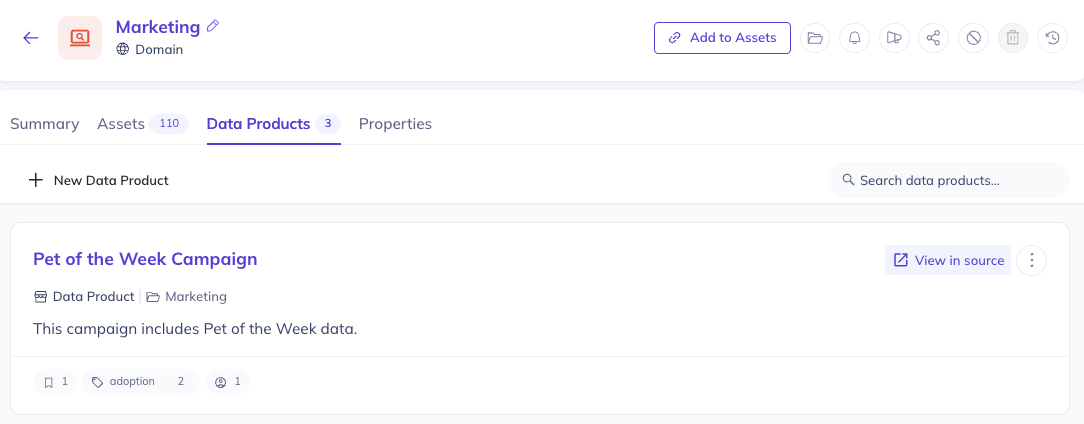
Then navigate to the Data Products tab on the Domain's home page, and click '+ New Data Product'. This will open a new modal where you can configure the settings for your data product. Inside the form, you can choose a name for your Data Product. Most often, this will align with the logical purpose of the Data Product, for example 'Customer Orders' or 'Revenue Attribution'. You can also add documentation for your product to help other users easily discover it. Don't worry, this can be changed later.
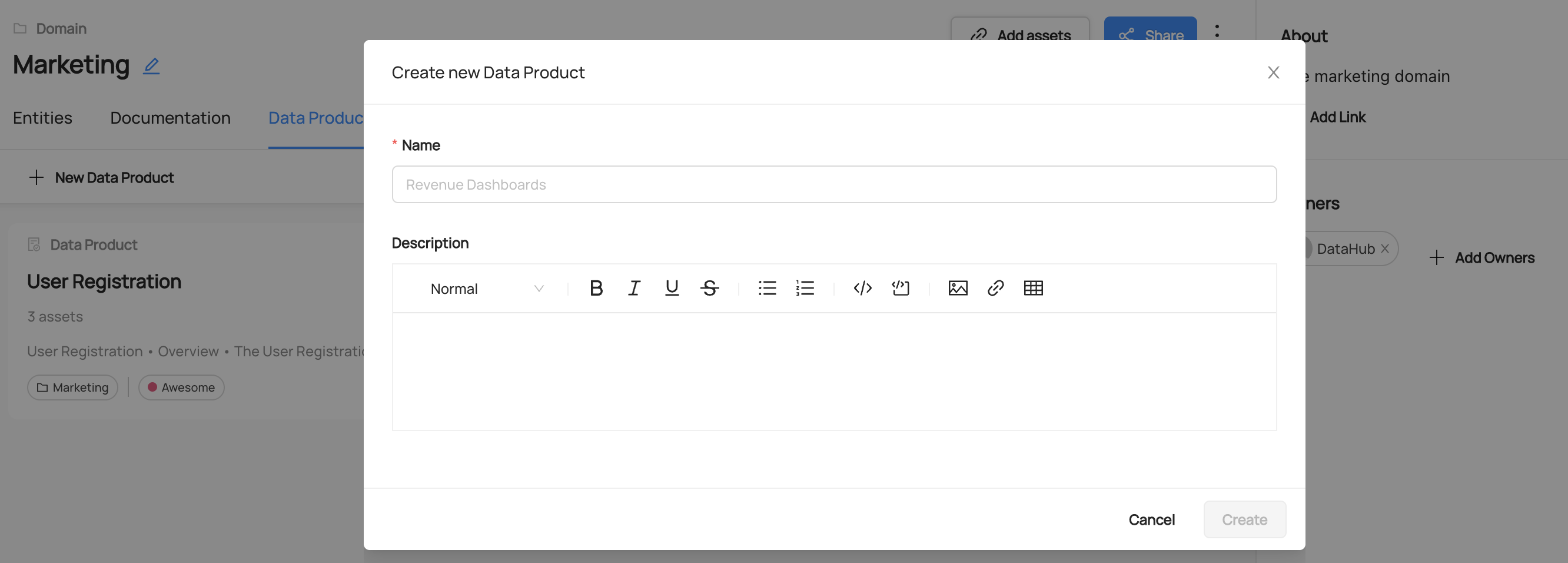
Once you've chosen a name and a description, click 'Create' to create the new Data Product. Once you've created the Data Product, you can click on it to continue on to the next step, adding assets to it.
Assigning an Asset to a Data Product (UI)
You can assign an asset to a Data Product either using the Data Product page as the starting point or the Asset's page as the starting point. On a Data Product page, click the 'Add Assets' button on the top right corner to add assets to the Data Product.
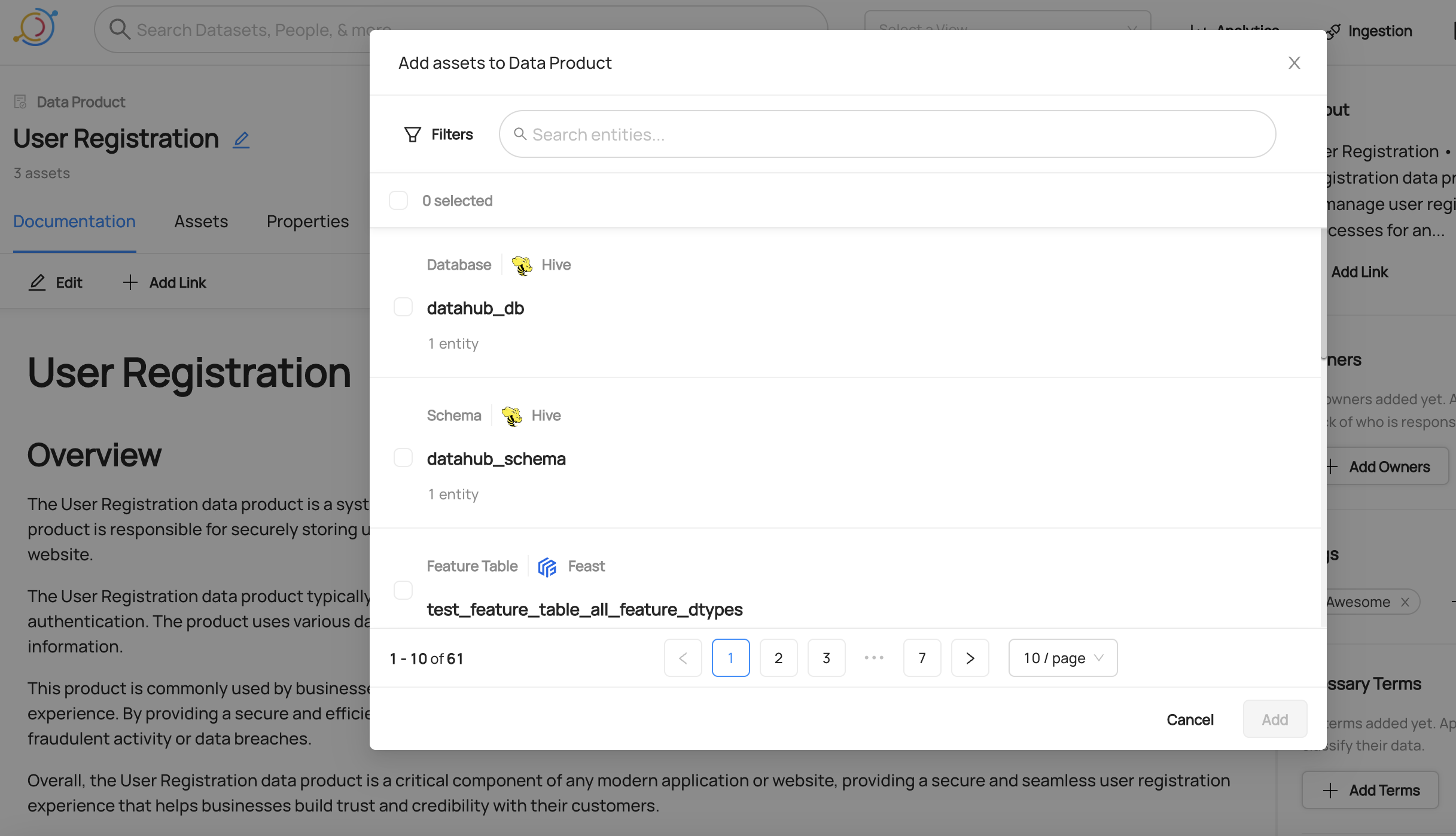
On an Asset's profile page, use the right sidebar to locate the Data Product section. Click 'Set Data Product', and then search for the Data Product you'd like to add this asset to. When you're done, click 'Add'.
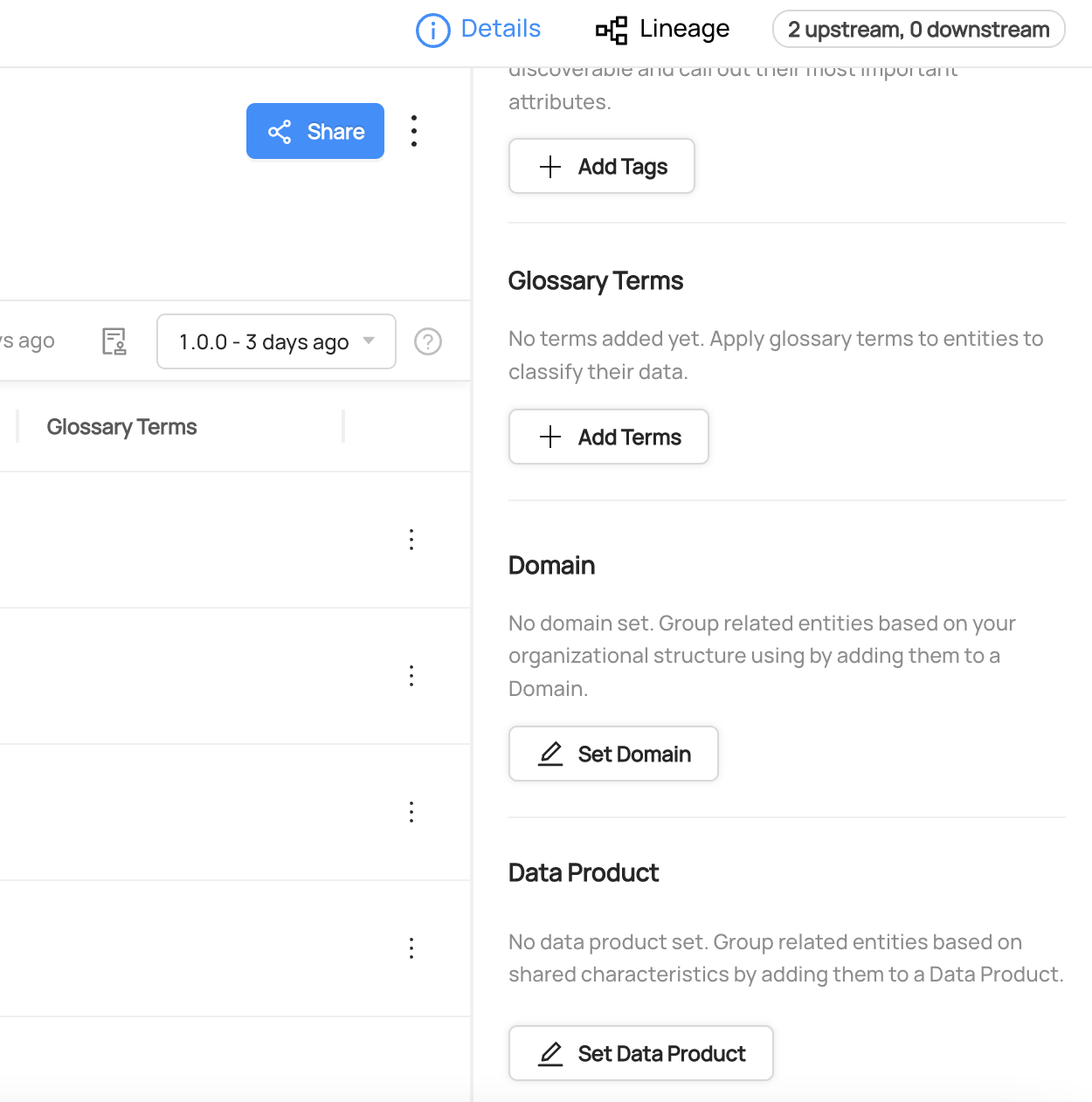
To remove an asset from a Data Product, click the 'x' icon on the Data Product label on either the asset profile or the Data Product page (each path uses the privilege listed in the table above).
Multiple Data Products per Asset
By default, assets can be associated with multiple Data Products simultaneously. This provides flexibility for different organizational perspectives - for example, a dataset might be part of both a domain-specific product and a cross-functional analytics product.
With this default behavior:
- Assets can belong to multiple Data Products at once
- The UI allows you to add an asset to multiple Data Products without removing it from existing ones
- You can view all Data Products an asset belongs to from the asset's profile page
If you prefer the behavior where an asset can only belong to a single Data Product at a time (automatically removing it from other Data Products when assigned to a new one), you can disable this feature by setting the MULTIPLE_DATA_PRODUCTS_PER_ASSET environment variable to false:
MULTIPLE_DATA_PRODUCTS_PER_ASSET=false
See the Environment Variables documentation for more details on configuring feature flags.
Discover Data Products
Discover Data Products by opening Govern → Data Products, or navigating directly to /dataProducts.
Data Product Home Page
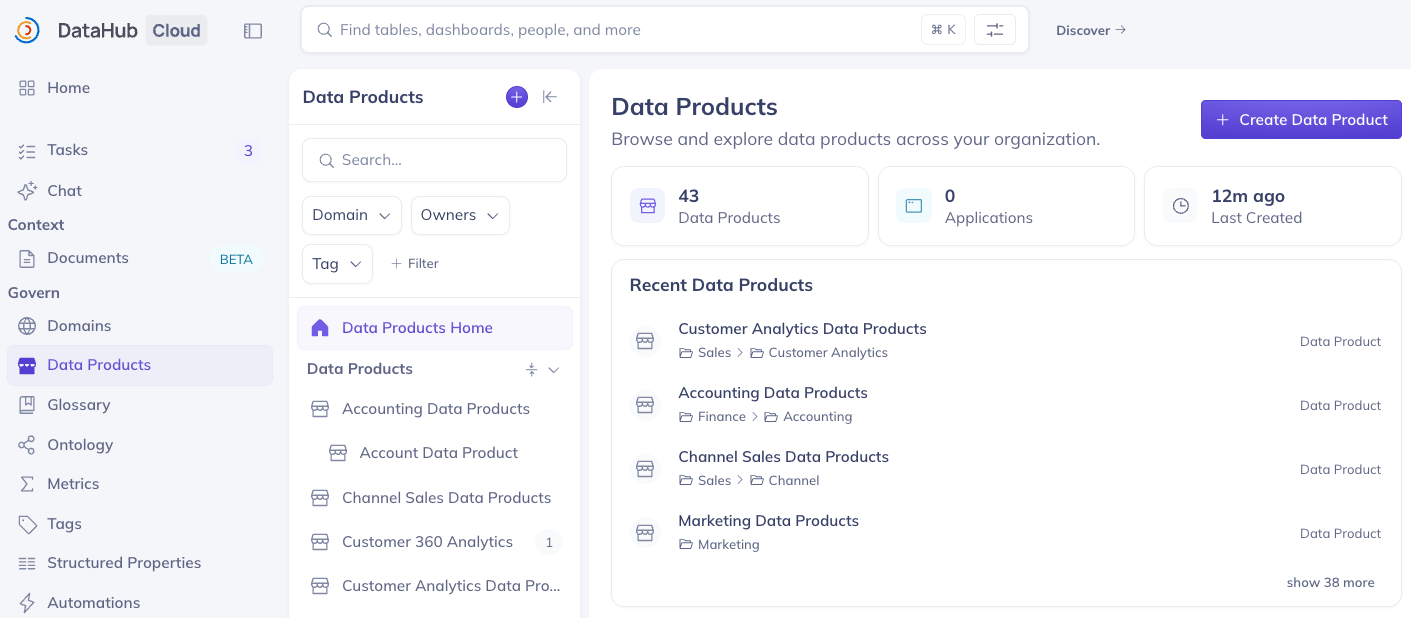
The Data Product Home page shows:
- Summary cards: total Data Products, Applications (or Domains if Applications are off), Last Created
- Recent Data Products, with owners, domain, tags, and deprecation when present
- Create Data Product to add a new Data Product without leaving the Data Product landing page
Data Product sidebar
The left sidebar lists Data Products. Expand a row to load direct children (not the full subtree at once). Scroll to load more. Opening a product keeps this sidebar visible; ancestors of the selected product expand automatically.
Search and Filters
Use the sidebar search box to find products by name. Apply filters for Domain, owner, tags, glossary terms, and Application (when Applications are enabled). Search/filter mode shows a flat result list instead of the tree; clear filters to return to the hierarchy.
Opening a Data Product
Click a product in the sidebar or on the home page to open /dataProduct/:urn. The Data Product sidebar stays on the left. From here you can manage the data product, add assets, edit documentation, view Output Ports, Assets, Lineage, Properties, sub-products and assets.
Data Product Profile
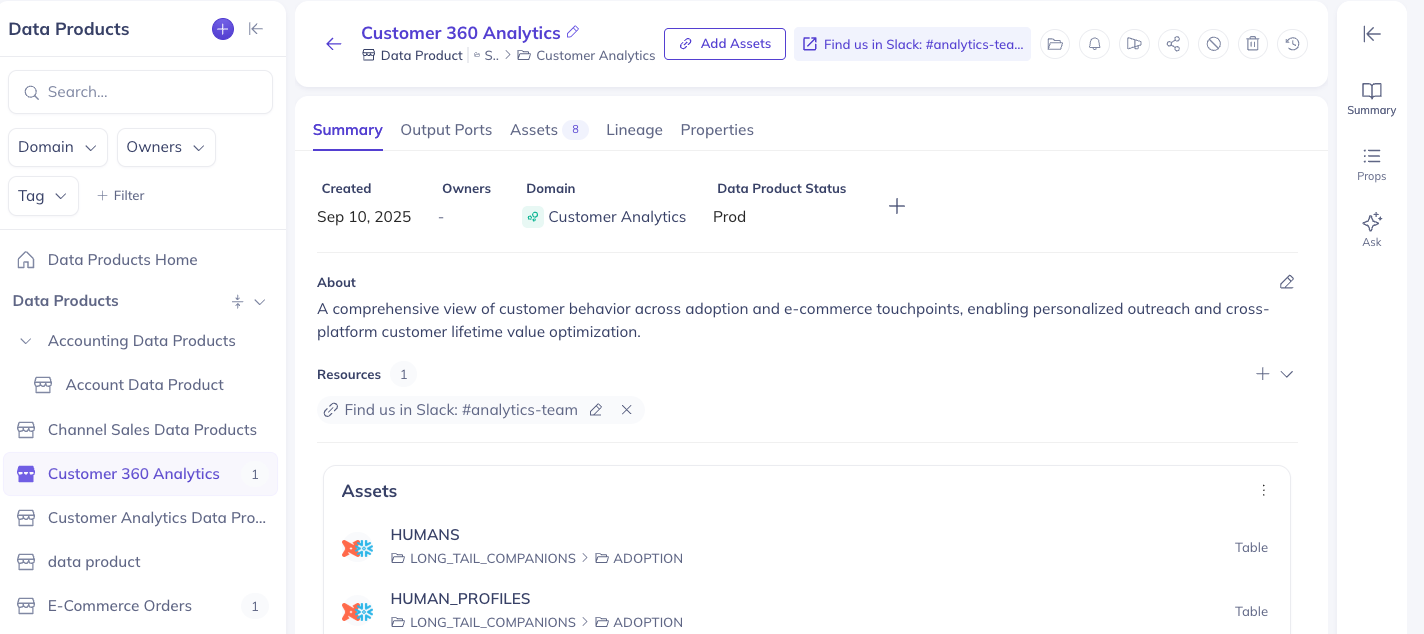
The Data Product profile includes:
- Summary → Assets — assets associated with the Data Product
- Summary → Sub-products — direct children in the hierarchy
- Output Ports tab — full list of output-port assets
- Move (profile menu) — set or clear the parent without editing name/description/assets
Breadcrumbs show Domain → immediate parent.
Data Product Lineage
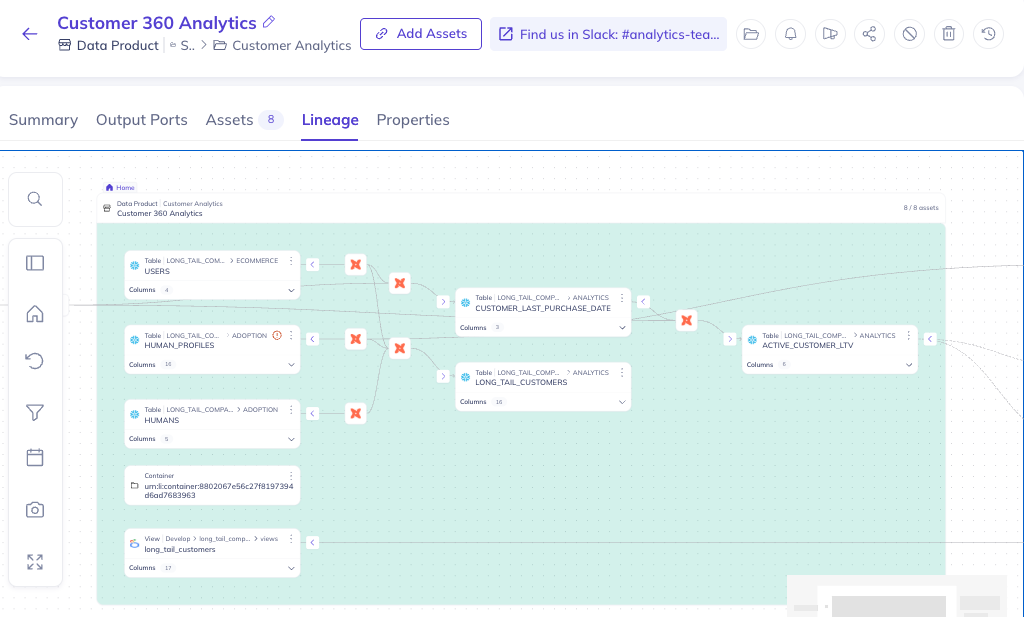
Data Product lineage enables users to visually discover assets in a data product and understand the associations between assets in data products.
Define Data Product Hierarchy
Data Products can nest under other Data Products via an optional parentDataProduct pointer or from the DataHub UI, forming a multi-level taxonomy.
Key behaviors:
- A Data Product may have at most one parent (a tree, not a DAG).
- Nesting depth is arbitrary.
- A child may belong to a different Domain than its parent; Domain membership is independent of the parent-child relationship.
- Permissions remain scoped to each Data Product's own Domain; Manage Data Products privilege is not inherited from the parent.
- A product cannot be moved under one of its own descendants.
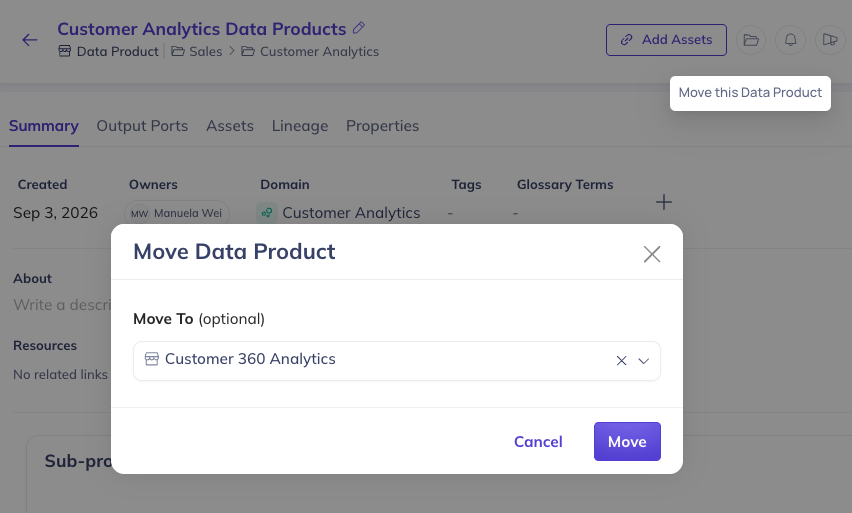
You can set the parent when creating or editing a Data Product in the UI or declare it in YAML:
id: portfolio_analytics
domain: Trading
display_name: Portfolio Analytics
description: Internal product derived from the vendor equities feed.
parent_data_product: urn:li:dataProduct:vendor_equities
assets:
  - urn:li:dataset:(urn:li:dataPlatform:snowflake,analytics.portfolio_summary,PROD)
parent_data_product accepts a fully-qualified Data Product URN or a resolvable id/name (same resolution rules as domain).
Creating a Data Product (YAML + git)
DataHub ships with a YAML-based Data Product spec for defining and managing Data Products as code.
Here is an example of a Data Product named "Pet of the Week" which belongs to the Marketing domain and contains three data assets, followed by the JSON Schema spec for a DataHub data product file.
# Inlined from /metadata-ingestion/examples/data_product/dataproduct.yaml
id: pet_of_the_week
domain: Marketing
display_name: Pet of the Week Campaign
description: |-
  This campaign includes Pet of the Week data.

# List of assets that belong to this Data Product
assets:
  - urn:li:dataset:(urn:li:dataPlatform:snowflake,long_tail_companions.analytics.pet_details,PROD)
  - urn:li:dashboard:(looker,dashboards.19)
  - urn:li:dataFlow:(airflow,snowflake_load,prod)

output_ports:
  - urn:li:dataset:(urn:li:dataPlatform:snowflake,long_tail_companions.analytics.pet_details,PROD)

owners:
  - id: urn:li:corpuser:jdoe
    type: BUSINESS_OWNER
  - id: urn:li:corpuser:fbar
    type: urn:li:ownershipType:architect  # Maps to a custom ownership type

# Tags associated with this Data Product
tags:
  - urn:li:tag:adoption

# Glossary Terms associated with this Data Product
terms:
  - urn:li:glossaryTerm:ClientsAndAccounts.AccountBalance

institutional_memory:
  elements:
    - title: URL for campaign
      description: |-
        Go here to see the campaign.
      url: https://example.com/pet_of_the_week

# Custom Properties
properties:
  lifecycle: production
  sla: 7am every day
When bare domain names like Marketing is used, datahub will first check if a domain like urn:li:domain:Marketing is provisioned, failing that; it will check for a provisioned domain that has the same name. If we are unable to resolve bare domain names to provisioned domains, then yaml-based ingestion will refuse to proceed until the domain is provisioned on DataHub.
This applies to other fields as well, such as owners, ownership types, tags, and terms.
You can also provide fully-qualified domain names (e.g. urn:li:domain:dcadded3-2b70-4679-8b28-02ac9abc92eb) to ensure that no ingestion-time domain resolution is needed.
{
  "$defs": {
    "InstitutionMemory": {
      "additionalProperties": false,
      "properties": {
        "elements": {
          "anyOf": [
            {
              "items": {
                "$ref": "#/$defs/InstitutionMemoryElement"
              },
              "type": "array"
            },
            {
              "type": "null"
            }
          ],
          "default": null,
          "title": "Elements"
        }
      },
      "title": "InstitutionMemory",
      "type": "object"
    },
    "InstitutionMemoryElement": {
      "additionalProperties": false,
      "properties": {
        "url": {
          "title": "Url",
          "type": "string"
        },
        "description": {
          "title": "Description",
          "type": "string"
        }
      },
      "required": [
        "url",
        "description"
      ],
      "title": "InstitutionMemoryElement",
      "type": "object"
    },
    "Ownership": {
      "additionalProperties": false,
      "properties": {
        "id": {
          "title": "Id",
          "type": "string"
        },
        "type": {
          "title": "Type",
          "type": "string"
        }
      },
      "required": [
        "id",
        "type"
      ],
      "title": "Ownership",
      "type": "object"
    }
  },
  "additionalProperties": false,
  "description": "This is a DataProduct class which represents a DataProduct\n\nArgs:\n    id (str): The id of the Data Product\n    domain (str): The domain that the Data Product belongs to. Either as a name or a fully-qualified urn.\n    owners (Optional[List[str, Ownership]]): A list of owners and their types.\n    institutional_memory (Optional[InstitutionMemory]): A list of institutional memory elements\n    display_name (Optional[str]): The name of the Data Product to display in the UI\n    description (Optional[str]): A documentation string for the Data Product\n    tags (Optional[List[str]]): An array of tags (either bare ids or urns) for the Data Product\n    terms (Optional[List[str]]): An array of terms (either bare ids or urns) for the Data Product\n    assets (List[str]): An array of entity urns that are part of the Data Product\n    parent_data_product (Optional[str]): Parent Data Product as a name or fully-qualified urn.",
  "properties": {
    "id": {
      "title": "Id",
      "type": "string"
    },
    "domain": {
      "title": "Domain",
      "type": "string"
    },
    "assets": {
      "anyOf": [
        {
          "items": {
            "type": "string"
          },
          "type": "array"
        },
        {
          "type": "null"
        }
      ],
      "default": null,
      "title": "Assets"
    },
    "display_name": {
      "anyOf": [
        {
          "type": "string"
        },
        {
          "type": "null"
        }
      ],
      "default": null,
      "title": "Display Name"
    },
    "owners": {
      "anyOf": [
        {
          "items": {
            "anyOf": [
              {
                "type": "string"
              },
              {
                "$ref": "#/$defs/Ownership"
              }
            ]
          },
          "type": "array"
        },
        {
          "type": "null"
        }
      ],
      "default": null,
      "title": "Owners"
    },
    "institutional_memory": {
      "anyOf": [
        {
          "$ref": "#/$defs/InstitutionMemory"
        },
        {
          "type": "null"
        }
      ],
      "default": null
    },
    "description": {
      "anyOf": [
        {
          "type": "string"
        },
        {
          "type": "null"
        }
      ],
      "default": null,
      "title": "Description"
    },
    "tags": {
      "anyOf": [
        {
          "items": {
            "type": "string"
          },
          "type": "array"
        },
        {
          "type": "null"
        }
      ],
      "default": null,
      "title": "Tags"
    },
    "terms": {
      "anyOf": [
        {
          "items": {
            "type": "string"
          },
          "type": "array"
        },
        {
          "type": "null"
        }
      ],
      "default": null,
      "title": "Terms"
    },
    "properties": {
      "anyOf": [
        {
          "additionalProperties": {
            "type": "string"
          },
          "type": "object"
        },
        {
          "type": "null"
        }
      ],
      "default": null,
      "title": "Properties"
    },
    "external_url": {
      "anyOf": [
        {
          "type": "string"
        },
        {
          "type": "null"
        }
      ],
      "default": null,
      "title": "External Url"
    },
    "output_ports": {
      "anyOf": [
        {
          "items": {
            "type": "string"
          },
          "type": "array"
        },
        {
          "type": "null"
        }
      ],
      "default": null,
      "title": "Output Ports"
    },
    "parent_data_product": {
      "anyOf": [
        {
          "type": "string"
        },
        {
          "type": "null"
        }
      ],
      "default": null,
      "title": "Parent Data Product"
    }
  },
  "required": [
    "id",
    "domain"
  ],
  "title": "DataProduct",
  "type": "object"
}
To sync this yaml file to DataHub, use the datahub cli via the dataproduct group of commands.
datahub dataproduct upsert -f user_dataproduct.yaml
Keeping the YAML file sync-ed with changes in UI
The datahub cli allows you to keep this YAML file synced with changes happening in the UI. All you have to do is run the datahub dataproduct diff command.
Here is an example invocation that checks if there is any diff and updates the file in place:
datahub dataproduct diff -f user_dataproduct.yaml --update
This allows you to manage your data product definition in git while still allowing for edits in the UI. Business Users and Developers can both collaborate on the definition of a data product with ease using this workflow.
Advanced cli commands for managing Data Products
There are many more advanced cli commands for managing Data Products as code. Take a look at the Data Products section on the CLI reference guide for more details.
What updates are planned for the Data Products feature?
The following features are next on the roadmap for Data Products
- Support for marking data assets in a Data Product as private versus shareable for other teams to consume
- Support for declaring data lineage manually to upstream and downstream data products
- Support for declaring logical schema for Data Products
- Support for associating data contracts with Data Products
- Support for semantic versioning of the Data Product entity