Policies Guide
Introduction
DataHub provides the ability to declare fine-grained access control Policies via the UI & GraphQL API. Access policies in DataHub define who can do what to which resources. A few policies in plain English include
- Dataset Owners should be allowed to edit documentation, but not Tags.
- Jenny, our Data Steward, should be allowed to edit Tags for any Dashboard, but no other metadata.
- James, a Data Analyst, should be allowed to edit the Links for a specific Data Pipeline he is a downstream consumer of.
- The Data Platform team should be allowed to manage users & groups, view platform analytics, & manage policies themselves.
In this document, we'll take a deeper look at DataHub Policies & how to use them effectively.
What is a Policy?
There are 2 types of Policy within DataHub:
- Platform Policies
- Metadata Policies
We'll briefly describe each.
Platform Policies
Platform policies determine who has platform-level privileges on DataHub. These privileges include
- Managing Users & Groups
- Viewing the DataHub Analytics Page
- Managing Policies themselves
Platform policies can be broken down into 2 parts:
- Actors: Who the policy applies to (Users or Groups)
- Privileges: Which privileges should be assigned to the Actors (e.g. "View Analytics")
Note that platform policies do not include a specific "target resource" against which the Policies apply. Instead, they simply serve to assign specific privileges to DataHub users and groups.
Metadata Policies
Metadata policies determine who can do what to which Metadata Entities. For example,
- Who can edit Dataset Documentation & Links?
- Who can add Owners to a Chart?
- Who can add Tags to a Dashboard?
and so on.
A Metadata Policy can be broken down into 3 parts:
- Resources: The 'which'. Resources that the policy applies to, e.g. "All Datasets".
- Privileges: The 'what'. What actions are being permitted by a policy, e.g. "Add Tags".
- Actors: The 'who'. Specific users, groups that the policy applies to.
Resources
Resources can be associated with the policy in a number of ways:
- Resource types - The entity's type, for example: dataset, chart, dashboard
- Resource URNs - Specific entity URNs to target
- Tags - Assets tagged with specific tags
- Domains - Assets within specific domains
- Containers - Assets within specific containers (e.g., databases, schemas)
- Glossary Terms or Term Groups - Assets annotated with specific glossary terms or any term within a term group (see Glossary-Based Policy Targeting below)
The associations in the list above are an intersection or an AND operation. For example, if the policy targets
1. resource type: dataset and 3. resources tagged: 'myTag', it will apply to datasets that are tagged with tag 'myTag'.
Match Conditions
Each resource filter has a match condition that controls how its values are compared against the asset. You can set the condition for each filter in the policy builder UI, or through the condition field of a criterion in the API.
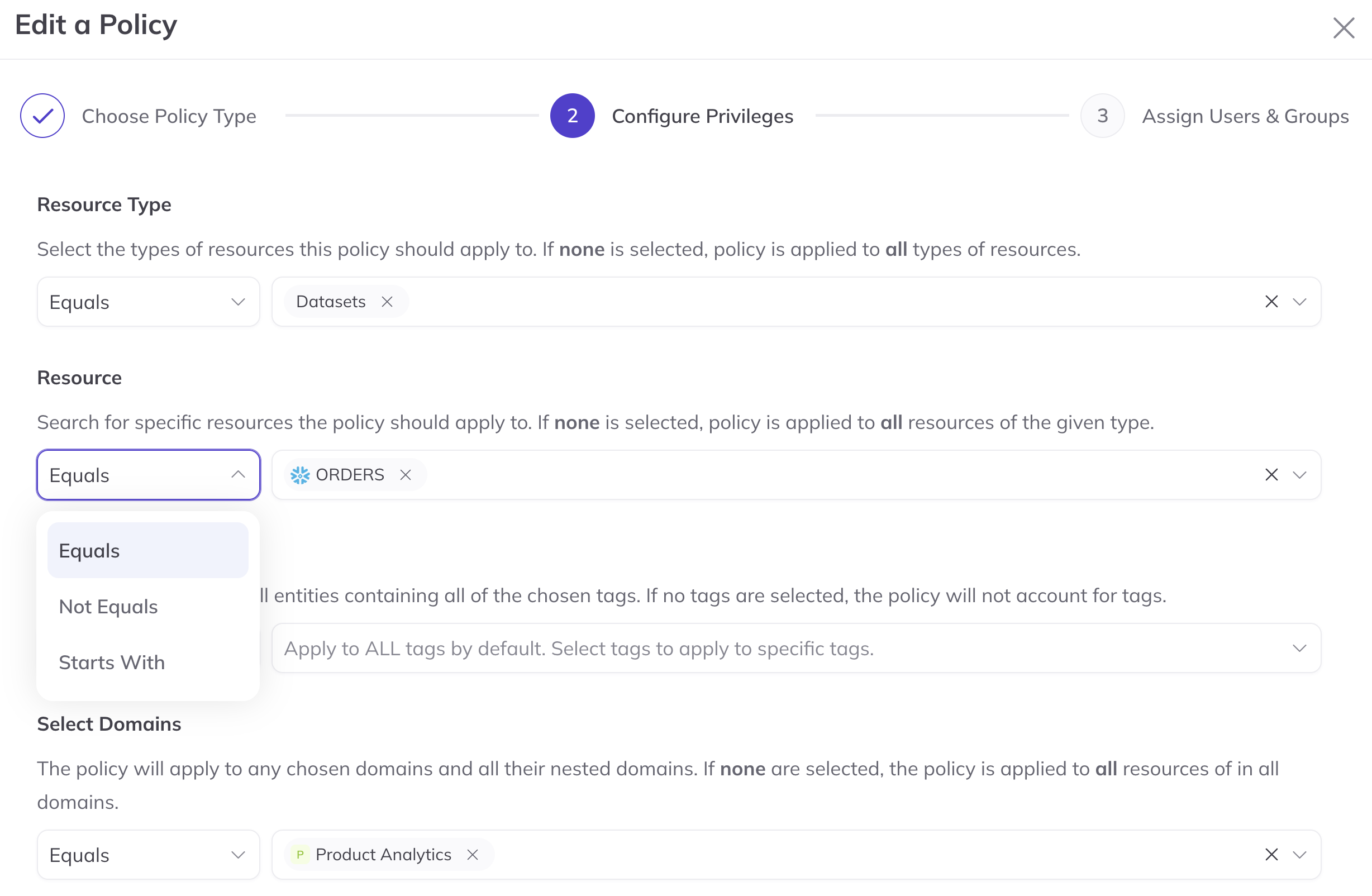
| Condition | UI label | The filter matches an asset when... |
|---|---|---|
EQUALS | Equals | The asset has at least one of the selected values. This is the default. |
NOT_EQUALS | Not Equals | The asset has none of the selected values. |
STARTS_WITH | Starts With | At least one of the asset's values starts with the entered prefix (for example a URN prefix). |
For example, a policy with resource type Equals dataset and domain Not Equals Finance applies to every dataset that is not in the Finance domain.
Keep the following in mind when using conditions:
- Hierarchies are respected. Domain and container filters compare against the asset's full parent chain.
Not Equalson a domain or container therefore also excludes assets in its nested child domains or containers. Starts Withcompares raw values. For resource URNs, tags, domains, containers, and glossary terms, the prefix is matched against the URN, for exampleurn:li:tag:pii_matchesurn:li:tag:pii_emailandurn:li:tag:pii_phone.- Resource types do not offer
Starts Within the UI. The privileges you can choose depend on the selected resource types, so a prefix would leave no privileges to select. UseEqualsorNot Equalsinstead. - Changing to or from
Starts Withclears the filter's values, because a prefix and a list of selected assets are not interchangeable. Switching betweenEqualsandNot Equalskeeps your selections.
Domain-Based Policy Targeting
Policies can be targeted to assets based on Domains. This allows you to apply permissions to all assets within a specific business domain.
When you target a policy by domain, the policy applies recursively to any asset that belongs to that domain as well as any assets in nested child domains.
Example: A policy targeting the "Marketing" domain will apply to all datasets, dashboards, and other assets assigned to that domain, as well as assets in child domains like "Marketing Analytics" or "Marketing Campaigns".
Domain-separated writers vs elevated ingestion
Write policies usually fall into one of two patterns:
| Pattern | Typical privileges | Domain filter |
|---|---|---|
| Elevated writer (platform / shared ingestion) | Unscoped Create Entity + Edit Entity | Optional; domains are not required for auth |
| Domain-separated writer | Create Entity + Edit Entity scoped to Domain X | Required: writers must establish Domain X on create (or on the first domains write) |
The elevated writer pattern is more common: an asset’s domain is often inherent to the source (platform, database, schema, or pipeline) rather than to the principal that creates the metadata. Platform or shared ingestion jobs therefore usually get unscoped create/edit, and domain membership is applied as metadata (or derived from the source) instead of being used as the write-authorization boundary. Use domain-separated writers when you need hard isolation between writers that must only create into a specific domain.
How to authorize CREATE_ENTITY with a domain-scoped policy
There are two halves: the policy (which domains are allowed) and the create write (which domain the new asset proposes). Both must agree.
1. Policy: list the allowed domain(s) as a resource filter
Create a Metadata policy (UI: Settings → Permissions → Policies → Create Policy, or GraphQL
createPolicy). The domain allowlist is the policy Resources → Domains filter — not an unscoped
“all resources” policy, and not privilegeConstraints (that experimental field is for tag
and structured-property sub-resources only).
| Field | Value |
|---|---|
| Type | Metadata |
| Resources → Domains | Domain X (and any other domains this writer may create into). Child domains of X are included recursively. |
| Resources → Entity types (optional) | e.g. Dataset only |
| Privileges | Create Entity (CREATE_ENTITY) and Edit Entity (EDIT_ENTITY) |
| Actors | The writer user or group |
Do not also grant those actors an unscoped Create Entity policy (resources = all assets / no domain filter) — that bypasses domain isolation.
GraphQL example — policy whose resources are Domain engineering only:
mutation {
  createPolicy(
    input: {
      type: METADATA
      name: "Engineering domain writers"
      state: ACTIVE
      description: "Create and edit assets only inside the Engineering domain"
      privileges: ["CREATE_ENTITY", "EDIT_ENTITY"]
      actors: {
        allUsers: false
        allGroups: false
        resourceOwners: false
        users: []
        groups: ["urn:li:corpGroup:engineering-ingestion"]
      }
      resources: {
        allResources: false
        resources: []
        filter: {
          criteria: [
            {
              field: "DOMAIN"
              condition: EQUALS
              values: ["urn:li:domain:engineering"]
            }
          ]
        }
      }
    }
  )
}
To allow more than one domain, add those URNs to values (or create separate policies). Optional
TYPE criteria can further restrict entity types (AND with the domain filter).
2. Write: propose a domain from that allowlist on create
On create, include the domains aspect in the same request, set to a domain listed on the
policy (for example urn:li:domain:engineering). DataHub matches the policy against the
proposed domain because the entity has no persisted domain yet. Omitting domains, or proposing
a domain that is not on the policy filter, fails authorization for domain-scoped writers.
After domains is persisted, later edits match against the stored domain. Using CREATE_ENTITY
against an entity that already exists is denied for create-only principals (OpenAPI and Rest.li
authorize each URN with existence-aware create vs edit checks). Moving domains via a domains
PATCH requires Edit Entity on both the before and after domains — see Domain-scoped Edit
Entity and domains PATCH.
Domain-scoped Edit Entity and domains PATCH
ChangeType.PATCH always requires Edit Entity (EDIT_ENTITY) — never Create Entity, even when
the target entity is missing. Domain-scoped writers that PATCH the domains aspect are authorized
as follows:
Before domains | After (resolved patch) | Policy match |
|---|---|---|
| Present | Present | Actor must be allowed for both before and after domain sets |
| Absent | Present | Actor must be allowed for the after domains only (first-domains / establish pattern) |
Authorization runs on the request thread in validateProposed (with an early apply of the JSON
patch against current or in-batch prior domains). On sync writes, the same before/after Edit
check runs again inside the DB transaction after the pipeline converts PATCH → UPSERT
(validatePreCommit). On async ingest, the MCE consumer uses the system principal: user
domain auth is not re-evaluated there — the API/validateProposed check before Kafka is the
authoritative user authorization (same pattern as other aspect auth plugins).
Elevated writers with unscoped Edit Entity continue to pass both checks without a domain filter.
Example: create a dataset in Domain X (Python SDK)
Emit the entity with changeType=CREATE_ENTITY and include domains in the same emit (same batch /
same create call). Other aspects (key, properties, and so on) can sit alongside domains. The
domain URN must be one listed on the writer’s policy resource filter above.
from datahub.emitter.mcp import MetadataChangeProposalWrapper
from datahub.metadata.schema_classes import (
    ChangeTypeClass,
    DatasetPropertiesClass,
    DomainsClass,
)
from datahub.emitter.rest_emitter import DatahubRestEmitter
import datahub.emitter.mce_builder as builder

dataset_urn = builder.make_dataset_urn("hive", "db.table", "PROD")
domain_urn = "urn:li:domain:engineering"

emitter = DatahubRestEmitter("http://localhost:8080", token="<token>")

# CREATE_ENTITY + domains in one batch — required for domain-scoped Create Entity
emitter.emit_mcps(
    [
        MetadataChangeProposalWrapper(
            entityUrn=dataset_urn,
            changeType=ChangeTypeClass.CREATE_ENTITY,
            aspect=DatasetPropertiesClass(name="table", description="Owned by Engineering"),
        ),
        MetadataChangeProposalWrapper(
            entityUrn=dataset_urn,
            changeType=ChangeTypeClass.CREATE_ENTITY,
            aspect=DomainsClass(domains=[domain_urn]),
        ),
    ]
)
OpenAPI createEntity / createGenericEntities works the same way: put a domains aspect on the
entity payload in the create body (same batch as the other create aspects), using a domain URN from
the policy’s Domains resource filter. Aspect-only create of domains on an existing entity that has
no domains yet is authorized via Edit Entity against the proposed domain.
Elevated writers with unscoped create/edit continue to work without proposing a domain.
When view-based access control is enabled, domain filters can be expensive: DataHub walks the domain hierarchy for each authorization check. Prefer ownership-based policies for entity access when possible, and keep domain hierarchies shallow when using domain-separated writers.
Container-Based Policy Targeting
Policies can be targeted to assets based on Containers (e.g., databases, schemas, projects). This allows you to apply permissions based on technical organization.
When you target a policy by container, the policy applies recursively to all assets within that container as well as any assets in nested child containers.
Example: A policy targeting a "production" database container will apply to all schemas within that database and all tables within those schemas.
When view-based access control is enabled, container filters walk the container hierarchy sequentially for each authorization check. Avoid container-based policies on deep warehouse hierarchies (database → schema → table). See Domains and containers for alternatives.
Glossary-Based Policy Targeting
Policies can be targeted to assets based on Glossary Terms or Glossary Term Groups. This allows you to apply permissions based on business vocabulary rather than technical properties.
When you target a policy by glossary terms or groups:
- Individual Terms: The policy applies to any asset annotated with that specific glossary term
- Term Groups: The policy applies recursively to assets annotated with any term within that group, including all nested child terms and groups
This works similarly to domain and container-based policies, automatically covering assets as your glossary evolves.
Example: A policy targeting the "Sensitive Data" term group will apply to all assets tagged with child terms like "PII", "PHI", or any terms in nested groups, without requiring policy updates when new terms are added to the hierarchy.
Privileges
Check out the list of privileges here . Note, the privileges are semantic by nature, and does not tie in 1-to-1 with the aspect model.
All edits on the UI are covered by a privilege, to make sure we have the ability to restrict write access. See the Reference section below.
Actors
We currently support 3 ways to define the set of actors the policy applies to:
- list of users (or all users)
- list of groups (or all groups)
- owners of the entity
Unlike resources, the definitions for actors are a union of the actors. For example, if user 1. Alice is associated
with the policy as well as 3. owners of the entity. This means that Alice OR any owner of
the targeted resource(s) will be included in the policy.
Managing Policies
Policies can be managed on the page Settings > Permissions > Policies page. The Policies tab will only
be visible to those users having the Manage Policies privilege.
Out of the box, DataHub is deployed with a set of pre-baked Policies. The set of default policies are created at deploy
time and can be found inside the policies.json file within metadata-service/war/src/main/resources/boot. This set of policies serves the
following purposes:
- Assigns immutable super-user privileges for the root
datahubuser account (Immutable) - Assigns all Platform privileges for all Users by default (Editable)
The reason for #1 is to prevent people from accidentally deleting all policies and getting locked out (datahub super user account can be a backup)
The reason for #2 is to permit administrators to log in via OIDC or another means outside of the datahub root account
when they are bootstrapping with DataHub. This way, those setting up DataHub can start managing policies without friction.
Note that these privilege can and likely should be altered inside the Policies page of the UI.
To login using the datahub account, simply navigate to <your-datahub-domain>/login and enter datahub, datahub. Note that the password can be customized for your
deployment by changing the user.props file within the datahub-frontend module. Notice that JaaS authentication must be enabled.
Configuration
By default, the Policies feature is enabled. This means that the deployment will support creating, editing, removing, and most importantly enforcing fine-grained access policies.
In some cases, these capabilities are not desirable. For example, if your company's users are already used to having free reign, you may want to keep it that way. Or perhaps it is only your Data Platform team who actively uses DataHub, in which case Policies may be overkill.
For these scenarios, we've provided a back door to disable Policies in your deployment of DataHub. This will completely hide the policies management UI and by default will allow all actions on the platform. It will be as though each user has all privileges, both of the Platform & Metadata flavor.
To disable Policies, you can simply set the AUTH_POLICIES_ENABLED environment variable for the datahub-gms service container
to false. For example in your docker/datahub-gms/docker.env, you'd place
AUTH_POLICIES_ENABLED=false
REST API Authorization
Policies only affect REST APIs when the environment variable REST_API_AUTHORIZATION is set to true for GMS. Some policies only apply when this setting is enabled, marked above, and other Metadata and Platform policies apply to the APIs where relevant, also specified in the table above.
Designing policies for view-based access control
This section covers how to design access policies when view-based access control (VBAC) is enabled — that is, when policies restrict what users can view or discover, not just edit. Poor policy design in VBAC deployments can cause slow search, slow entity pages, and high load on the metadata service.
When this guidance applies
| Deployment | VBAC prerequisite | What it enables |
|---|---|---|
| DataHub Cloud | Search Access Controls enabled | View Entity privilege; search results filtered at query time |
| DataHub Core | VIEW_AUTHORIZATION_ENABLED=true on GMS | View Entity Page privilege; entity page gating and optional post-search result masking — not Elasticsearch query pushdown |
When VBAC is enabled (VIEW_AUTHORIZATION_ENABLED on OSS, or Cloud Search Access Controls), entity types are
restricted by default. Types marked viewUnrestricted: true in entity-registry.yml, plus optional
VIEW_UNRESTRICTED_ENTITY_TYPES / _ADD / _REMOVE overlays (see
Environment Variables), bypass view checks. Stock VIEW_UNRESTRICTED_ENTITY_TYPES does not include
document, schemaField, or container — those types are under view policy by default (container is no longer
viewUnrestricted in the registry). For schemaField, View Entity Page inherits from the parent dataset
encoded in the schemaField URN (then a direct column grant). GraphQL container loads use field-strip redaction.
On OSS the unrestricted list only affects entity-page / masking behavior — query-time search pushdown remains
DataHub Cloud–only.
Performance considerations
Policy evaluation is grant-only and first-match-wins: DataHub checks policies in order until one grants access. Under VBAC, view and discovery privileges trigger authorization on search results, entity pages, and browse — often once per entity.
Keep these factors in mind when designing policies:
| Factor | Impact | Recommendation |
|---|---|---|
| Number of active policies | Every user session evaluates actor match against all policies; each authorization request may iterate policies until one grants access | Consolidate policies; avoid duplicating the same privilege across many policies |
| Domain resource filters | Each check may walk the full domain parent hierarchy | Prefer ownership for entity access; keep domain trees shallow; use domain filters for domain entities or Cloud discovery only |
| Container resource filters | Each check walks the container chain (database → schema → table) | Avoid container-based view policies on deep hierarchies |
| Group membership | Users in many groups increase matching and role-resolution cost and can impact performance | Limit each user to no more than 200 groups for best performance; one group per team policy boundary; avoid listing many groups on a single policy |
| Search under VBAC | Each search hit may be authorized individually with full policy evaluation | Fewer domain-scoped view policies; prefer ownership-based grants |
| Policy cache | Policy changes may take up to ~120 seconds to propagate (POLICY_CACHE_REFRESH_INTERVAL_SECONDS) | Plan for brief delay after policy updates |
Groups
Groups are the preferred way to assign policies to teams. When VBAC is enabled:
- Sync from your IdP when possible (Okta, Azure AD) so group membership stays current without manual updates.
- Assign one group per policy boundary — e.g. a "Team A Developers" group on a single owner-based policy, rather than listing many groups on one policy.
- Limit overlapping group membership — users in many groups increase matching and role-resolution cost and can impact performance. DataHub recommends limiting each user to no more than 200 groups for best performance.
- Prefer group-level policies over per-user policies — easier to maintain and fewer actor entries to evaluate.
For SCIM-based group provisioning, see Okta identity provisioning and Microsoft Entra identity provisioning.
Domains and containers
Domains organize metadata for curation; they can also be used as policy resource filters. Under VBAC, using domains as the primary boundary for entity view access is expensive because DataHub resolves parent domains recursively on every authorization check.
Prefer:
- Ownership-based policies for dataset and other entity access (see Ownership-based access)
- Domain filters only for domain entity visibility (so users can navigate the domain tree) or for Cloud Search Access Controls discovery boundaries
- Shallow domain hierarchies when domain filters are required
Avoid:
- One full-metadata view policy per team domain when ownership can express the same boundary
- Deep nested domain trees as the primary access boundary
- Container-based view policies on deep warehouse hierarchies
Roles and VBAC
When VBAC is enabled, Admin, Editor, and Reader roles override view-based policy restrictions. Users assigned any of these roles can view all entities regardless of domain- or ownership-based view policies.
Do not assign Editor or Reader to users who should have restricted discovery. Reserve the Admin role for platform operators. See Roles and Search Access Controls.
Recommended patterns
These patterns assume VBAC is enabled and separate teams need isolated metadata visibility. Use generic team and domain names when implementing.
Pattern A — Multi-team isolation (ownership-first)
Use when separate teams or business units should only access their own metadata:
- Platform Admins —
Adminrole only (hardcoded super-privileges). - Central platform team — one metadata policy: actors = IdP group(s), resources = broad (by entity type), privileges = view/edit as needed.
- Team-scoped users — one owner-based metadata policy per team: actors = resource owners (group ownership type), privileges include view/edit metadata; assign ownership at ingestion (see Ownership-based access).
- Domain visibility only — one narrow policy per team targeting domain entities (not datasets) so users can navigate the domain structure without domain-scoped dataset policies.
Resource matching via ownership uses a single ownership aspect fetch instead of walking domain parents on every dataset.
Pattern B — Domain-scoped discovery (DataHub Cloud)
On DataHub Cloud with Search Access Controls enabled:
- Use domain-based
View Entitypolicies for discovery boundaries. - Keep the domain hierarchy shallow, policy count low, and do not assign Editor/Reader roles to restricted users.
Anti-patterns
- One policy per user instead of per group.
- Many overlapping domain policies for the same privilege (e.g. one full-metadata policy per team domain instead of consolidating).
- Deep nested domain trees as the primary access boundary.
- Container-based policies on deep database → schema → table chains.
- Assigning Reader or Editor while expecting domain or ownership isolation.
- Relying on OSS
VIEW_AUTHORIZATION_ENABLEDalone to prevent users from discovering other teams' data in search (OSS does not filter search at query time). - Large numbers of URN-specific policies instead of tags plus one tag-based policy.
Ownership-based access
Assign ownership at ingestion so owner-based policies can grant view and edit access without domain-scoped resource filters. Use the pattern_add_dataset_ownership transformer to match dataset URNs and assign group owners by pattern.
Schema ownership: Ingestion recipes that assign ownership only to datasets may leave schemas without owners. If team-scoped users need to view schemas via owner-based policies, assign schema ownership through the UI or extend ingestion to cover schema entities.
Troubleshooting slow search or UI
If search or entity pages feel slow after enabling VBAC:
- Count active policies — reduce overlapping or redundant policies.
- Review domain-scoped view policies — replace dataset boundaries with ownership-based policies where possible.
- Check domain depth — flatten nested domains used in policy filters.
- Review group membership — reduce users in many overlapping groups; aim for no more than 200 groups per user.
- Check role assignments — Editor/Reader on restricted users won't cause slowness but indicates misconfiguration if isolation is expected.
- Wait for cache refresh — policy changes may take up to
POLICY_CACHE_REFRESH_INTERVAL_SECONDS(default 120) to apply.
Policy propagation
Policy definitions are cached in GMS and refreshed periodically. After creating or editing policies, allow up to POLICY_CACHE_REFRESH_INTERVAL_SECONDS seconds (default 120) before changes fully propagate. See environment variables for configuration.
Reference
For a complete list of privileges see the privileges here.
Platform-level privileges
These privileges are for DataHub operators to access & manage the administrative functionality of the system.
Access & Credentials
| Platform Privileges | Description | |
|---|---|---|
| Generate Personal Access Tokens | Allow actor to generate personal access tokens for use with DataHub APIs. | |
| Manage Policies | Allow actor to create and remove access control policies. Be careful - Actors with this privilege are effectively super users. | |
| Manage Secrets | Allow actor to create & remove Secrets stored inside DataHub. | |
| Manage Users & Groups | Allow actor to create, remove, and update users and groups on DataHub. | |
| Manage All Access Tokens | Allow actor to create, list and revoke access tokens on behalf of users in DataHub. Be careful - Actors with this privilege are effectively super users that can impersonate other users. | |
| Manage User Credentials | Allow actor to manage credentials for native DataHub users, including inviting new users and resetting passwords | |
| Manage Connections | Allow actor to manage connections to external DataHub platforms. |
Product Features
| Platform Privileges | Description |
|---|---|
| Manage Home Page Posts | Allow actor to create and delete home page posts |
| Manage Business Attribute | Allow actor to create, update, delete Business Attribute |
| Manage Documentation Forms | Allow actor to manage forms assigned to assets to assist in documentation efforts. |
| Manage Documents | Allow actor to view, create, edit, move, delete, and import any document. |
| Manage Metadata Ingestion | Allow actor to create, remove, and update Metadata Ingestion sources. Recipes run as Python on the ingestion executor — grant only to trusted operators. See Ingestion executor security. |
| Manage Features | Umbrella privilege to manage all features. |
| View Analytics | Allow actor to view the DataHub analytics dashboard. |
| Manage Public Views | Allow actor to create, update, and delete any Public (shared) Views. |
| Manage Ownership Types | Allow actor to create, update and delete Ownership Types. |
| Create Business Attribute | Allow actor to create new Business Attribute. |
| Manage Structured Properties | Manage structured properties in your instance. |
| View Tests | View Asset Tests. |
| Manage Tests1 | Allow actor to create and remove Asset Tests. |
| View Metadata Proposals1 | Allow actor to view the requests tab for viewing metadata proposals. |
| Create metadata constraints2 | Allow actor to create metadata constraints. |
| Manage Platform Settings1 | Allow actor to view and change platform-level settings, like integrations & notifications. |
| Manage Monitors1 | Allow actor to create, update, and delete any data asset monitors, including Custom SQL monitors. Grant with care. |
| View Manage Tags | Allow the actor to view the Manage Tags page. |
| View All Queries | Allow actor to view every Query entity, including ones with no recorded subject dataset (orphan queries), which View Entity Queries alone can never grant access to — see Query entities. |
Entity Management
| Platform Privileges | Description |
|---|---|
| Manage Domains | Allow actor to create and remove Asset Domains. |
| Manage Glossaries | Allow actor to create, edit, and remove Glossary Entities |
| Manage Tags | Allow actor to create and remove Tags. |
System Management
| Platform Privileges | Description | |
|---|---|---|
| Restore Indices API3 | Allow actor to use the Restore Indices API. | |
| Get Timeseries index sizes API3 | Allow actor to use the get Timeseries indices size API. | |
| Truncate timeseries aspect index size API3 | Allow actor to use the API to truncate a timeseries index. | |
| Get ES task status API3 | Allow actor to use the get task status API for an ElasticSearch task. | |
| Enable/Disable Writeability API3 | Allow actor to enable or disable GMS writeability for data migrations. | |
| Apply Retention API3 | Allow actor to apply retention using the API. | |
| Analytics API access3 | Allow actor to use API read access to raw analytics data. | |
| Explain ElasticSearch Query API3 | Allow actor to use the Operations API explain endpoint. | |
| Produce Platform Event API3 | Allow actor to produce Platform Events using the API. | |
| Manage System Operations | Allow actor to manage system operation controls. This setting includes all System Management privileges. | |
| View System Status | Allow actor to view non-sensitive system status (consumer lag, messaging transport). Does not include system information, full system configuration, or operational controls. |
Common Metadata Privileges
These privileges are to view & modify any entity within DataHub.
Entity Privileges
| Entity Privileges | Description |
|---|---|
| View Entity Page | Allow actor to view the entity page. |
| Edit Entity | Allow actor to edit any information about an entity. Super user privileges for the entity. |
| Delete | Allow actor to delete this entity. |
| Create Entity | Allow actor to create an entity if it doesn't exist. |
| Entity Exists | Allow actor to determine whether the entity exists. |
| Execute Entity | Allow actor to run ingestion for an entity. Together with Edit on an ingestion source, this runs that source's recipe as Python on the executor. |
| Get Timeline API3 | Allow actor to use the GET Timeline API. |
| Get Entity + Relationships API3 | Allow actor to use the GET Entity and Relationships API. |
| Get Aspect/Entity Count APIs3 | Allow actor to use the GET Aspect/Entity Count APIs. |
| View Entity1 | Allow actor to view the entity in search results. This privilege can be explicitly granted, but is also implied by the View Entity Page privilege. |
| Share Entity1 | Allow actor to share an entity with another DataHub Cloud instance. |
Aspect Privileges
| Aspect Privileges | Description |
|---|---|
| Edit Tags | Allow actor to add and remove tags to an asset. |
| Edit Glossary Terms | Allow actor to add and remove glossary terms to an asset. |
| Edit Description | Allow actor to edit the description (documentation) of an entity. |
| Edit Links | Allow actor to edit links associated with an entity. |
| Edit Status | Allow actor to edit the status of an entity (soft deleted or not). |
| Edit Domain | Allow actor to edit the Domain of an entity. |
| Edit Data Product | Allow actor to add or remove Data Product membership from an asset (asset profile / batchAddToDataProducts, batchRemoveFromDataProducts, unset via batchSetDataProduct). Does not authorize editing a Data Product's assets list from the product page — see Manage Data Products. |
| Edit Deprecation | Allow actor to edit the Deprecation status of an entity. |
| Edit Incidents | Allow actor to create and remove incidents for an entity. |
| Edit Lineage | Allow actor to add and remove lineage edges for this entity. |
| Edit Properties | Allow actor to edit the properties for an entity. |
| Edit Owners | Allow actor to add and remove owners of an entity. |
| Get Timeseries Aspect API3 | Allow actor to use dedicated timeseries GET APIs (Rest.li getTimeseriesAspectValues, OpenAPI timeseries scroll, and getTimeseriesStats when REST API authorization is enabled). Profile, usage, and operation aspects also require the matching View Dataset Profile / Usage / Operations privileges. |
Proposals
| Proposals Privileges | Description |
|---|---|
| Propose Tags1 | Allow actor to propose adding a tag to an asset. |
| Propose Glossary Terms1 | Allow actor to propose adding a glossary term to an asset. |
| Propose Owners1 | Allow actor to propose adding an owner to an asset. |
| Propose Domains1 | Allow actor to propose adding a domain to an asset. |
| Propose Data Contract1 | Allow actor to propose adding a data contract to a dataset. |
| Propose Structured properties1 | Allow actor to propose adding a structured property to an asset. |
| Propose Documentation1 | Allow actor to propose updates to an asset's documentation. |
| Propose Dataset Column Glossary Terms1 | Allow actor to propose a glossary term to a dataset schema column (field). |
| Propose Dataset Column Tags1 | Allow actor to propose a tag to a dataset schema column (field). |
| Propose Dataset Column Descriptions1 | Allow actor to propose a updates to dataset's schema column (field) description |
| Propose Dataset Column Structured Properties1 | Allow actor to propose a structured property to a dataset schema column (field). |
| Propose Create Glossary Term1 | Allow actor to propose creation of a new glossary term. |
| Propose Create Glossary Node1 | Allow actor to propose creation of a new glossary node. |
| Manage Tag Proposals1 | Allow actor to manage a proposal to add a tag to an asset. |
| Manage Glossary Term Proposals1 | Allow actor to manage a proposal to add a glossary term to an asset. |
| Manage Domain Proposals1 | Allow actor to manage a proposal to add a domain to an asset. |
| Manage Owner Proposals1 | Allow actor to manage a proposal to add an owner to an asset. |
| Manage Property Proposals1 | Allow actor to manage a proposal to add a structured property to an asset. |
| Manage Data Contract Proposals1 | Allow actor to manage a proposal to add a data contract to a dataset. |
| Manage Documentation Proposals1 | Allow actor to manage updates to asset's documentation. |
| Manage Dataset Column Tag Proposals1 | Allow actor to manage a proposal to add a tag to dataset schema field (column). |
| Manage Dataset Column Glossary Term Proposals1 | Allow actor to manage a proposal to add a glossary term to dataset schema field (column). |
| Manage Dataset Column Property Proposals1 | Allow actor to manage a proposal to add a structured property to dataset schema field (column). |
Derived authorization rules
Some APIs authorize against related entities rather than only the URN in the request. These rules apply across GraphQL, Rest.li, and MCP ingestion (unless the change uses a system ingestion source).
Documents
| To... | You need | Granted by default to |
|---|---|---|
| Create a document | Edit Entity or Create Entity on documents, or Manage Documents | Admins and Editors |
| Edit or move a document | Edit Entity on the document, or Manage Documents | Admins, Editors, and its owners |
| Delete a document | Delete on the document, or Manage Documents | Admins and its owners |
| Manage any document | Manage Documents | Admins |
Editors can create and edit documents but cannot delete documents they don't own. Document owners can always delete their own documents.
Data Products
| Operation | Privilege evaluated | Resource |
|---|---|---|
| Create Data Product | Manage Data Products | Domain from create input |
| Update / delete Data Product | Manage Data Products | At least one Domain on the product |
Change dataProductProperties.assets (MCP / ingestion) | Manage Data Products on any product Domain or Edit Data Product on every changed asset | Product Domain(s) and/or each changed asset |
Change dataProductProperties.assets (product page / batchSetDataProduct with urn) | Manage Data Products | At least one Domain on the product |
| Add/remove Data Product from asset profile | Edit Data Product | Target asset |
Rename Data Product (updateName) | Manage Data Products on any Domain or Edit Entity on the Data Product | Domains and/or product URN |
Domain URNs are read from the product's domains aspect, preferring domainAssociations and falling back to the legacy domains array. Duplicate entries are deduplicated. Products with no Domain associations are denied for product-side manage operations. Product and asset Domains do not need to match — authorization succeeds when either product-side manage or asset-side edit checks pass.
Known issue: Domain alignment is not enforced after membership is written. Changing a product's or asset's domains aspect does not re-validate or prune existing assets links.
Query entities
| Operation | Privilege evaluated | Resource |
|---|---|---|
| Create / update / delete Query | Edit Dataset Queries (or Edit Entity) | Each subject dataset in querySubjects |
| Read Query (GraphQL, Rest.li, OpenAPI v1/v2/v3) | View Entity Queries, Edit Dataset Queries, or all privileges — or View All Queries | At least one subject dataset in querySubjects under QUERY_ENTITY_AUTHORIZATION_REQUIRE_ALL_SUBJECTS=false; every subject dataset under true; the default COMPAT picks one or the other from VIEW_AUTHORIZATION_ENABLED (see below) |
View All Queries is a platform privilege, not tied to any dataset, and is checked before the subject-dataset logic above: an actor who holds it can read any Query regardless of subjects. This is the only way to read a Query with no subjects at all — such a Query has no dataset for the ordinary privileges to be checked against, so it is otherwise denied to every actor, including root/admin, in both modes. It is also the only way to read one under QUERY_ENTITY_AUTHORIZATION_REQUIRE_ALL_SUBJECTS=true when the Query has subjects but the actor's grant doesn't cover all of them.
QUERY_ENTITY_AUTHORIZATION_REQUIRE_ALL_SUBJECTS takes three values, and they differ on two things: how many of a Query's subject datasets must grant the privilege, and what happens to topSqlQueries in dataset usage statistics (bare SQL strings with no per-statement subject list, so they can only ever be checked against the one dataset they belong to).
false: a grant on any one subject dataset reads the Query;topSqlQueriesneeds View Entity Queries on that dataset.VIEW_AUTHORIZATION_ENABLEDhas no effect on either.true: every subject dataset must grant the privilege;topSqlQueriesis denied outright unless the actor holds View All Queries, because there is no subject list to prove the strict rule against.VIEW_AUTHORIZATION_ENABLEDhas no effect on either.COMPAT(the default): behaves asfalsewhileVIEW_AUTHORIZATION_ENABLEDis off, which is exactly DataHub's behavior before this privilege existed. Once it is on, Query-entity reads switch to thetruerule on every path — direct Query reads,listQueries, Rest.li/OpenAPI, and search-result / related-entity masking — because that is the require-all rule view authorization already applied to Query entities through View Entity Page.topSqlQueries, however, keeps thefalserule in both states: View Entity Queries on the dataset is enough, and it is never denied outright. That last point is the only way COMPAT-with-view-authorization differs fromtrue.
Practical consequence of the default when you enable view authorization: a user who holds View Entity Queries on only some of a multi-dataset query's subjects, and does not hold View All Queries, stops seeing that query everywhere — including the dataset's Queries tab, not just search. Default users are unaffected because the default policy grants the privilege on all datasets. Set the variable to false explicitly to keep any-subject reads under view authorization.
Schema field subjects are resolved to their parent dataset for authorization. Read enforcement is controlled by QUERY_ENTITY_AUTHORIZATION_ENABLED (default true), independently of the general VIEW_AUTHORIZATION_ENABLED switch (default false) — disabling the latter does not disable query read authorization.
Schema field entities (view)
When schemaField is view-restricted, View Entity Page on a schema field succeeds if the actor
can view the containing parent URN in the schemaField key (typically a dataset) or has a direct
grant on the schemaField URN. This uses the same parent-candidate order as logical-parent writes.
Entity-page VIEW for schema fields uses parent-dataset inheritance (then a direct column grant). Query-time search filtering of columns is a DataHub Cloud Search Access Controls concern and is not part of OSS VBAC.
View authorization is controlled by VIEW_AUTHORIZATION_ENABLED (see Environment Variables).
Logical parent (logicalParent aspect)
Setting a logical parent requires Edit Entity on both the child and the proposed parent. Clearing a logical parent requires Edit Entity on the child side only. There is no OR between child and parent — access to only one side is insufficient when setting a link.
Each side is evaluated independently. For a dataset, that side passes when the actor has Edit Entity on that dataset. For a schema field, that side passes when the actor has Edit Entity on the containing dataset or on the schema field URN. Child and parent may satisfy their respective checks via different grant types (for example, dataset grant on the physical side and schema-field grant on the logical side).
| Child entity | Parent entity (when set) | How access is evaluated |
|---|---|---|
dataset | dataset | Edit Entity on child dataset and parent dataset |
schemaField | schemaField | Edit Entity on each side (containing dataset or schema field URN), independently |
dataset | schemaField | Edit Entity on child dataset and on parent (containing dataset or schema field URN) |
schemaField | dataset | Edit Entity on child (containing dataset or schema field URN) and parent dataset |
Applies to MCP ingestion, GraphQL (setLogicalParent), and OpenAPI logical-model relationship
endpoints.
Specific Entity-level Privileges
These privileges are not generalizable.
Users & Groups
| Entity | Privilege | Description |
|---|---|---|
| Group | Edit Group Members | Allow actor to add and remove members to a group. |
| Group | Manage Group Notification Settings1 | Allow actor to manage notification settings for a group. |
| Group | Manage Group Subscriptions1 | Allow actor to manage subscriptions for a group. |
| Group | Edit Contact Information | Allow actor to change the contact information such as email & chat handles. |
| User | Edit Contact Information | Allow actor to change the contact information such as email & chat handles. |
| User | Edit User Profile | Allow actor to change the user's profile including display name, bio, title, profile image, etc. |
Dataset
| Entity | Privilege | Description |
|---|---|---|
| Dataset | View Dataset Usage | Allow actor to access dataset usage information (numeric statistics). Also required to read dashboard dashboardUsageStatistics timeseries data. When QUERY_ENTITY_AUTHORIZATION_REQUIRE_ALL_SUBJECTS=true, holding View Entity Queries on the dataset is not sufficient to see the SQL text of the dataset's most frequently run queries — View All Queries is also required. See Query entities. |
| Dataset | View Dataset Profile | Allow actor to access dataset profile (snapshot statistics) on GraphQL, Rest.li, and OpenAPI. |
| Dataset | Edit Dataset Column Descriptions | Allow actor to edit the column (field) descriptions associated with a dataset schema. |
| Dataset | Edit Dataset Column Tags | Allow actor to edit the column (field) tags associated with a dataset schema. |
| Dataset | Edit Dataset Column Glossary Terms | Allow actor to edit the column (field) glossary terms associated with a dataset schema. |
| Dataset | Edit Dataset Column Properties | Allow actor to edit the column (field) properties associated with a dataset schema. |
| Dataset | Propose Dataset Column Glossary Terms1 | Allow actor to propose column (field) glossary terms associated with a dataset schema. |
| Dataset | Propose Dataset Column Tags1 | Allow actor to propose new column (field) tags associated with a dataset schema. |
| Dataset | Manage Dataset Column Glossary Terms1 | Allow actor to manage column (field) glossary term proposals associated with a dataset schema. |
| Dataset | Propose Dataset Column Descriptions1 | Allow actor to propose new descriptions associated with a dataset schema. |
| Dataset | Manage Dataset Column Tag Proposals1 | Allow actor to manage column (field) tag proposals associated with a dataset schema. |
| Dataset | Edit Assertions | Allow actor to add and remove assertions from an entity. |
| Dataset | Edit Dataset Queries | Allow actor to edit the Queries for a Dataset. Query entity read visibility is derived from View Entity Queries or Edit Dataset Queries (or all privileges) on all subject datasets linked via querySubjects. |
| Dataset | View Dataset Operations | Allow actor to view operations on a Dataset, including the operation timeseries aspect on GraphQL, Rest.li, and OpenAPI. |
| Dataset | Create erModelRelationship | Allow actor to add erModelRelationship on a dataset. |
| Dataset | Edit Monitors1 | Allow actor to edit monitors for the entity. |
| Dataset | Edit SQL Assertion Monitors1 | Allow actor to edit custom SQL assertion monitors for the entity. Note that this gives read query access to users with through the Custom SQL assertion builder. Grant with care. |
| Dataset | Edit Data Contract1 | Allow actor to edit the Data Contract for an entity. |
| Dataset | Manage Data Contract Proposals1 | Allow actor to manage a proposal for a Data Contract |
| Tag | Edit Tag Color | Allow actor to change the color of a Tag. |
| Domain | Manage Data Products | Allow actor to create, update, and delete Data Products scoped to a Domain, including changing a product's assets membership from the product side when the actor has this privilege on at least one Domain associated with the product. |
| GlossaryNode | Manage Direct Glossary Children | Allow actor to create and delete the direct children of this entity. |
| GlossaryNode | Manage All Glossary Children | Allow actor to create and delete everything underneath this entity. |
Queries
| Entity | Privilege | Description |
|---|---|---|
| Dataset, Chart, Data Job | View Entity Queries | Allow actor to view Queries for a Dataset, Chart, or Data Job. Granted by the default policies, and on upgrade a one-time system-update step adds it to every existing policy that grants View Entity Page, so existing users keep query visibility; remove it from policies to restrict. |
Misc
| Entity | Privilege | Description |
|---|---|---|
| Tag | Edit Tag Color | Allow actor to change the color of a Tag. |
| Domain | Manage Data Products | Allow actor to create, update, and delete Data Products scoped to a Domain, including changing a product's assets membership from the product side when the actor has this privilege on at least one Domain associated with the product. |
| GlossaryNode | Manage Direct Glossary Children | Allow actor to create and delete the direct children of this entity. |
| GlossaryNode | Manage All Glossary Children | Allow actor to create and delete everything underneath this entity. |
Coming Soon
Experimental
Support for Policy Constraints based on entity sub-resources (tags, glossary terms, domains, containers, etc.) is currently in development and in an experimental phase.
Currently supported sub-resources are tags and structured properties. These are configured through the
privilegeConstraints field in DataHubPolicyInfo (API-only; no UI option yet). The constraint applies to the
sub-resource targeted by the action rather than the primary entity. For example, a policy constrained to
urn:li:structuredProperty:io.acryl.dataManagement.certifier for the EDIT_ENTITY_PROPERTIES privilege lets a
user set/change/remove only that structured property on matching assets. NOT_EQUALS is supported to block
specific properties. These policies apply by default in the UI and can be configured to apply
to API operations as well through the MCP_VALIDATION_PRIVILEGE_CONSTRAINTS environment variable which should be applied globally (GMS, MCE Consumer, and DataHub Upgrade specifically), which is enabled by default.
Example JSON of a policy with constraints:
{
  "actors": {
    "resourceOwners": false,
    "groups": [],
    "allGroups": false,
    "allUsers": false,
    "users": ["urn:li:corpuser:ryan@email.com"]
  },
  "lastUpdatedTimestamp": 0,
  "privileges": ["EDIT_ENTITY_TAGS", "EDIT_DATASET_COL_TAGS"],
  "editable": true,
  "displayName": "Ryan Policy",
  "resources": {
    "filter": { "criteria": [] },
    "allResources": false,
    "privilegeConstraints": {
      "criteria": [
        {
          "field": "URN",
          "condition": "EQUALS",
          "values": ["urn:li:tag:PII", "urn:li:tag:Business Critical"]
        }
      ]
    }
  },
  "description": "",
  "state": "ACTIVE",
  "type": "METADATA"
}
To constrain which structured properties a policy allows, target the structured-property URNs (the governing
privilege here is EDIT_ENTITY_PROPERTIES):
"privilegeConstraints": {
  "criteria": [
    {
      "field": "URN",
      "condition": "EQUALS",
      "values": ["urn:li:structuredProperty:test1", "urn:li:structuredProperty:test2"]
    }
  ]
}
mutation {
  createPolicy(
    input: {
      type: METADATA
      name: "my-policy"
      state: ACTIVE
      description: "My policy"
      privileges: ["EDIT_ENTITY_TAGS"]
      actors: {
        allUsers: true
        users: []
        groups: []
        resourceOwners: true
        allGroups: true
      }
      resources: {
        allResources: true
        resources: []
        filter: { criteria: [] }
        policyConstraints: {
          criteria: [
            {
              field: "URN"
              values: ["urn:li:tag:PII", "urn:li:tag:Business Critical"]
              condition: EQUALS
            }
          ]
        }
      }
    }
  )
}
Feedback / Questions / Concerns
We want to hear from you! For any inquiries, including Feedback, Questions, or Concerns, reach out on Slack!