Google Cloud Knowledge Catalog (Dataplex) Metadata Sync
This feature is in Public Beta in DataHub Cloud. Reach out to your DataHub Cloud representative if you run into issues.
What it does
This automation pushes DataHub Tags, Glossary Terms, and Structured Properties to Google Cloud Knowledge Catalog (Dataplex). Tags and Structured Properties become custom aspects on Google Cloud Knowledge Catalog (Dataplex) entries. Glossary Terms become native Google Cloud Knowledge Catalog (Dataplex) Business Glossary terms with entry links to your data assets. Only available in DataHub Cloud.
In the DataHub UI, the automation is still listed as Dataplex Metadata Sync.
Why use it
- Keep metadata in sync between DataHub and Google Cloud Knowledge Catalog (Dataplex) without manual work
- Make DataHub governance metadata (tags, glossary terms) visible in the Google Cloud console
- Map DataHub Glossary Node hierarchies to Google Cloud Knowledge Catalog (Dataplex) Business Glossary categories
- Sync Structured Properties to Google Cloud Knowledge Catalog (Dataplex) so teams using the Google Cloud console see the same metadata
Supported platforms
The automation syncs metadata for assets on these Google Cloud platforms:
- BigQuery
- Cloud SQL
- Spanner
- Pub/Sub
- Bigtable
- Vertex AI
The asset must already have an entry in Google Cloud Knowledge Catalog (Dataplex), and its DataHub URN must match the one the Dataplex ingestion source produces. Assets ingested by other connectors with a different naming scheme are skipped. Other platforms, such as Dataproc Metastore and Cloud Storage, are not supported.
What gets synced
| DataHub source | Google Cloud Knowledge Catalog (Dataplex) target | Notes |
|---|---|---|
| Column Tags | Custom Aspect (datahub-tags) | Stored as a key-value map in a custom aspect on the entry |
| Table Tags | Custom Aspect (datahub-tags) | All supported platforms except BigQuery (see note below) |
| Column Glossary Terms | Native Business Glossary Term | Creates glossary terms, categories, and entry links |
| Table Glossary Terms | Native Business Glossary Term | Creates glossary terms, categories, and entry links |
| Structured Properties | Custom Aspect (datahub-properties) | All structured properties synced as a single map aspect |
All sync is one-way: DataHub → Google Cloud Knowledge Catalog (Dataplex).
- Table-level Tags on BigQuery tables are not synced here. BigQuery Metadata Sync handles them as BigQuery Labels.
- Glossary Node hierarchies map to Google Cloud Knowledge Catalog (Dataplex) Business Glossary categories (up to 3 levels deep, the most the Business Glossary allows).
- Term renames are detected automatically. If a glossary term or category display name changes in DataHub, Google Cloud Knowledge Catalog (Dataplex) gets updated too.
How it works
Tags
When you tag a supported asset or one of its columns in DataHub, the automation:
- Looks up the Google Cloud Knowledge Catalog (Dataplex) entry for that asset
- Writes the tag as a key-value pair in a
datahub-tagscustom aspect, scoped to the column for column-level tags - Tracks the mapping so the tag can be removed later if needed
Glossary Terms
When you apply a Glossary Term to a supported asset or one of its columns, the automation:
- Creates the Google Cloud Knowledge Catalog (Dataplex) Business Glossary if it doesn't exist yet (named
datahubby default) - Recreates the DataHub glossary node hierarchy as Google Cloud Knowledge Catalog (Dataplex) categories (up to 3 levels)
- Creates a Google Cloud Knowledge Catalog (Dataplex) glossary term under the right category
- Links the glossary term to the asset via an entry link (with column path for column-level terms)
- Deletes the entry link when you remove the term in DataHub
If DataHub ingestion has recorded that a term link on an entry was created directly in Google Cloud Knowledge Catalog (Dataplex), the automation leaves that link alone rather than overwriting it.
Structured Properties
When Structured Properties change on a supported asset, the automation:
- Fetches all structured property assignments for the entity
- Resolves display names from the property definitions
- Writes everything as a single
datahub-propertiescustom aspect map on the Google Cloud Knowledge Catalog (Dataplex) entry
Prerequisites
GCP permissions
Your service account needs these permissions:
| Task | Required Permissions | Suggested Role |
|---|---|---|
| Google Cloud Knowledge Catalog (Dataplex) Access | dataplex.entries.getdataplex.entries.updatedataplex.aspectTypes.createdataplex.aspectTypes.updatedataplex.aspectTypes.get | Google Cloud Knowledge Catalog (Dataplex) Editor |
| Data Catalog Lookup | datacatalog.entries.get | Data Catalog Viewer |
| Business Glossary Management | dataplex.glossaries.createdataplex.glossaryTerms.createdataplex.glossaryTerms.updatedataplex.glossaryCategories.createdataplex.glossaryCategories.update | Google Cloud Knowledge Catalog (Dataplex) Editor |
| Entry Link Management | dataplex.entryLinks.createdataplex.entryLinks.delete | Google Cloud Knowledge Catalog (Dataplex) Editor |
| Project Number Resolution | resourcemanager.projects.get | Browser |
Note: Grant these in every GCP project where you want metadata synced, for every platform you sync. Data Catalog Viewer is needed because BigQuery, Pub/Sub, and Bigtable URNs in DataHub don't include region info, so the automation uses Data Catalog to look up which region the asset lives in. Cloud SQL, Spanner, and Vertex AI URNs already include it.
Connection requirements
- GCP service account credentials (or application default credentials)
- Network access from DataHub to Google Cloud APIs
- Assets registered in Google Cloud Knowledge Catalog (Dataplex) (automatic for the supported platforms)
Setup
Step 1: Open Automations
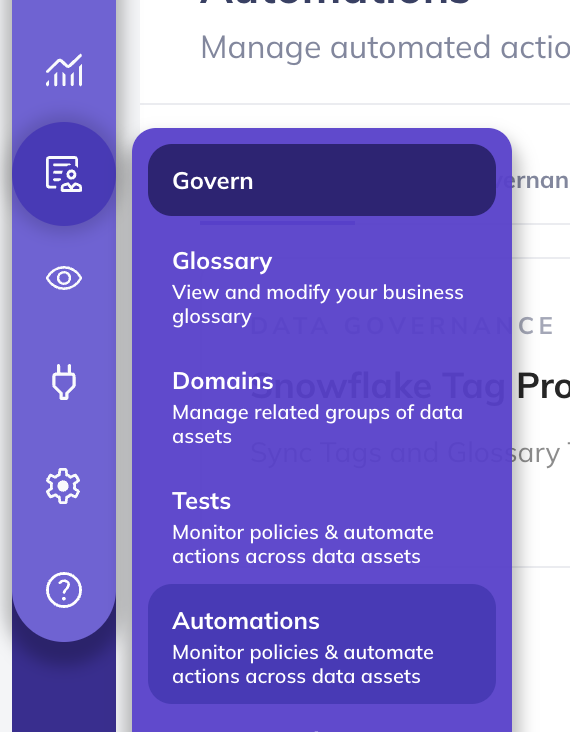
- Go to Govern > Automations in the navigation bar.
Step 2: Create the automation
- Click Create
- Select Dataplex Metadata Sync
Step 3: Pick what to sync
Each automation syncs one type of metadata. To sync more than one, create one automation per type.
| Type | What happens |
|---|---|
| Column Tags as Aspects | Tags → Google Cloud Knowledge Catalog (Dataplex) custom aspects |
| Glossary Terms | Glossary Terms → native Google Cloud Knowledge Catalog (Dataplex) Business Glossary |
| Structured Properties | Structured Properties → Google Cloud Knowledge Catalog (Dataplex) custom aspects |
You can limit Tag and Glossary Term sync to specific Tags or Terms. If you don't pick any filter, everything gets synced. We recommend leaving the filter empty to avoid inconsistent states.
Step 4: Configure the connection
Enter the details from your GCP service account JSON key: project ID, private key ID, private key, client email, and client ID.
The automation creates its custom aspect types and the Business Glossary in the service account's project. The Business Glossary uses the ID datahub in the global location.
Step 5: Save and run
Click Save and Run. The automation will:
- Create custom aspect types in Google Cloud Knowledge Catalog (Dataplex) (
datahub-tagsanddatahub-properties) if they don't exist - Start listening for metadata change events in DataHub
- Push changes to Google Cloud Knowledge Catalog (Dataplex) in real time
Back-filling existing assets
If you already have Tags or Glossary Terms on your BigQuery assets, you can back-fill them to Google Cloud Knowledge Catalog (Dataplex). This may take a while depending on how many BigQuery assets you have.
- Open the automation you created above
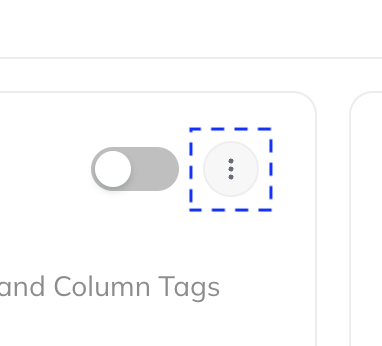
- Click the three-dot More menu
- Select Initialize
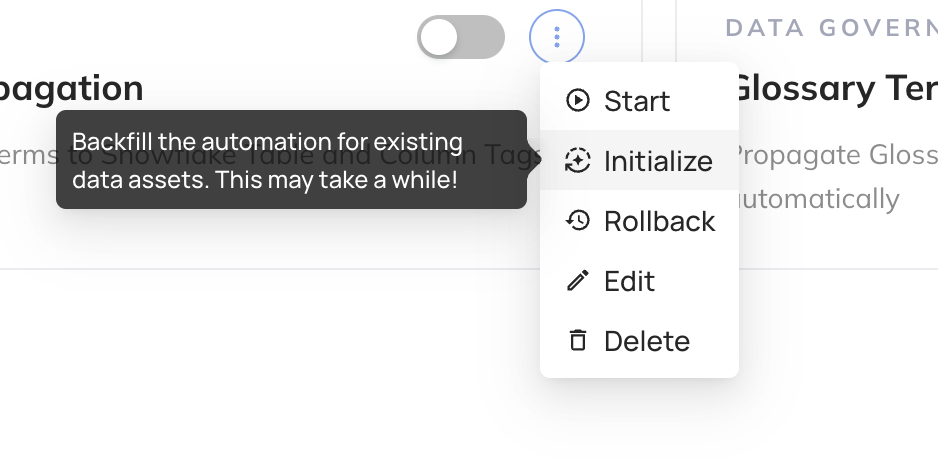
This is a one-time step. If you only want to sync metadata going forward, skip it.
Back-fill covers Tags and Glossary Terms on BigQuery assets only. Structured Properties, and assets on the other supported platforms, sync as they change from then on.
Viewing synced metadata
Tags and Structured Properties
In the Google Cloud console, open the Google Cloud Knowledge Catalog (Dataplex) entry for an asset. You'll see custom aspects named datahub-tags and datahub-properties with the synced values.
Glossary Terms
In the Google Cloud console, go to the Google Cloud Knowledge Catalog (Dataplex) Business Glossary section:
- The glossary is named
datahubby default - Categories mirror the DataHub Glossary Node hierarchy (up to 3 levels)
- Terms are linked to data assets via entry links, visible on the entry's relationships
Troubleshooting
Why is an asset not syncing?
Check that it's on one of the supported platforms, that it has a Google Cloud Knowledge Catalog (Dataplex) entry, and that it was ingested into DataHub by the Dataplex ingestion source. Assets the automation can't find in Google Cloud Knowledge Catalog (Dataplex) are skipped.
Why do I need Data Catalog Viewer permissions?
BigQuery, Pub/Sub, and Bigtable URNs in DataHub don't include region info (e.g., us-east1, eu). The automation calls the Data Catalog LookupEntry API to find which region an asset is in, then builds the Google Cloud Knowledge Catalog (Dataplex) entry path from that.
I see a custom aspect named datahub on older entries
Earlier versions of this automation wrote Structured Properties to an aspect named datahub. They now go to datahub-properties. Entries synced before the change may still carry the old aspect.
Will the Dataplex ingestion source import this metadata back into DataHub?
No. The Dataplex ingestion source skips custom aspects whose type starts with datahub-. When it ingests glossary terms this automation created, it maps them back to the original DataHub terms instead of creating duplicates. Mapping terms back requires the ingestion run to be connected to DataHub (not a dry run or file sink).
What if a Glossary Term hierarchy is deeper than 3 levels?
Google Cloud Knowledge Catalog (Dataplex) Business Glossary only supports 3 nested category levels. If a term's hierarchy goes deeper, that term is skipped and a warning is logged.
Where should I manage my Business Glossary?
In DataHub. Treat the Google Cloud Knowledge Catalog (Dataplex) glossary as a read-only mirror, not the source of truth.
Are there limitations on resource IDs?
Google Cloud Knowledge Catalog (Dataplex) resource IDs must match ^[a-z][a-z0-9-]{0,62}$. The automation sanitizes DataHub names automatically: lowercasing, replacing special characters with hyphens, collapsing consecutive hyphens, and prefixing with t- if the result starts with a digit. Names are truncated to 63 characters.
What happens if I rename a Glossary Term in DataHub?
The automation detects the display name change and updates the Google Cloud Knowledge Catalog (Dataplex) glossary term or category. The resource ID (derived from the original name) stays the same. Only the display name and description change.
How fast are changes synced?
Within a few seconds. The automation listens for metadata change events and processes them as they arrive.
What happens if Google Cloud Knowledge Catalog (Dataplex) API calls fail?
The automation has error rate limiting built in. If more than 15 errors happen within an hour (configurable), it pauses event processing to avoid cascading failures. Transient errors (permission denied, network issues) are logged but don't permanently block sync.
Can I use this alongside BigQuery Metadata Sync?
Yes. BigQuery Metadata Sync handles BigQuery table-level tags (as BigQuery Labels). This automation handles column-level tags (as custom aspects), glossary terms (as native Business Glossary), and structured properties. They work well together.