Recipes
A recipe is a YAML file that configures one metadata ingestion job. It names a source (the system metadata is read from) and a sink (where that metadata is written, usually DataHub).
# recipe.dhub.yaml — the smallest valid recipe
source:
  type: mysql
  config:
    host_port: localhost:3306
    username: root
    password: ${MYSQL_PASSWORD} # read from the environment, never hard-coded
Run it with datahub ingest -c recipe.dhub.yaml. New to ingestion? Start at Minimal recipe. Looking up a field? Go to Recipe structure. Hitting an error? Go to Troubleshooting.
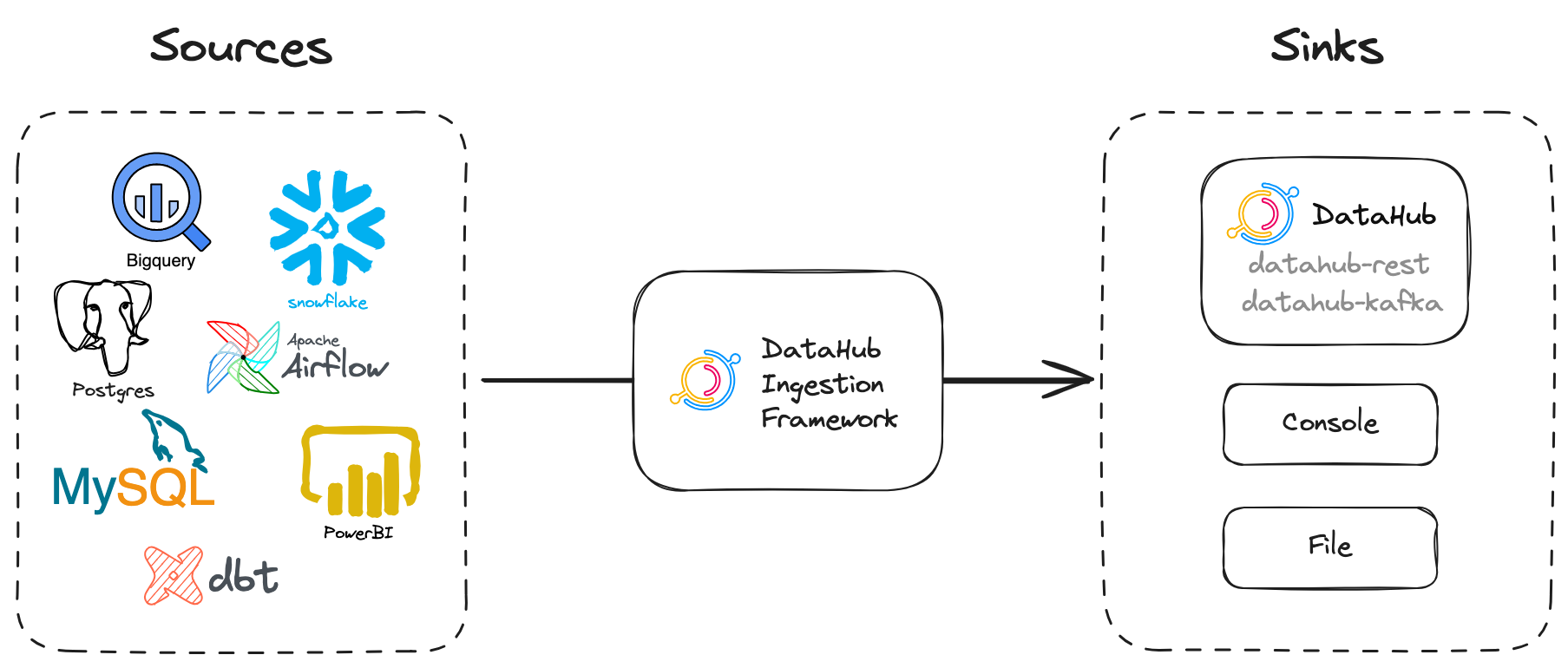
Minimal recipe
Only source is required. Everything else has a default.
# recipe.dhub.yaml
source:
  type: mysql
  config:
    host_port: localhost:3306
    username: root
    password: ${MYSQL_PASSWORD}
With no sink, metadata is by default written to datahub-rest at the DataHub instance configured by datahub init. To be explicit, name the sink yourself:
# recipe.dhub.yaml
source:
  type: mysql
  config:
    host_port: localhost:3306
    username: root
    password: ${MYSQL_PASSWORD}

sink:
  type: datahub-rest
  config:
    server: http://localhost:8080
Install the connector plugin for your source before running — connectors ship separately from the CLI:
pip install --upgrade 'acryl-datahub[mysql]'
datahub ingest -c recipe.dhub.yaml
A recipe contains exactly one source and one sink. To ingest from several systems, write several recipes, and give each one its own pipeline_name.
More examples live in examples/recipes. Every connector's page also carries a complete starter recipe — see the list of integrations.
Recipe structure
A recipe has the following top-level fields. Everything else is nested underneath them. In particular, a connector's own options always go under source.config, never at the top level.
| Field | Type | Required | Default | Description | Example |
|---|---|---|---|---|---|
source | object | Yes | — | The system metadata is read from, and its connector options. See Source. | type: mysql |
sink | object | No | datahub-rest | Where metadata is written. See Sink. | type: datahub-rest |
transformers | list of objects | No | [] | Transformations applied in order before the sink. See Transformers. | - type: simple_add_dataset_tags |
pipeline_name | string | No | none | Stable identifier for this recurring job. Must be unique per source configuration. See Pipeline name. | mysql-prod-orders |
datahub_api | object | No | taken from a datahub-rest sink | Connection used to read from DataHub. See Connecting to DataHub. | server: http://localhost:8080 |
run_id | string | No | auto-generated per run | Identifies one execution. See Run identification. | leave unset |
reporting | list of objects | No | [] | Where to send run telemetry. See Reporting. | - type: datahub |
failure_log | object | No | disabled | Writes rejected records to a local file. See Failure logging. | enabled: true |
recording | object | No | disabled | Records a run for later replay. Beta. See Recording runs. | enabled: true |
Unknown top-level fields are rejected rather than ignored, so a typo fails the run instead of silently doing nothing. See Common mistakes.
Source
The source is the system metadata is read from. It is the only required field. type selects the connector; config holds that connector's own options.
| Field | Type | Required | Default | Description | Example |
|---|---|---|---|---|---|
type | string | Yes | — | Connector to run. Valid values are the connector names listed on the integrations page. | snowflake |
config | object | No | {} | Connector-specific options. Each connector's page documents its own fields. | host_port: localhost:3306 |
extractor | string | No | generic | Advanced. How source records become work units. Change only if a connector's docs say to. | generic |
extractor_config | object | No | {} | Advanced. Options passed to the extractor named above. | {} |
source:
  type: mysql
  config:
    host_port: localhost:3306 # replace with your MySQL host and port
    username: root
    password: ${MYSQL_PASSWORD}
    database: orders # optional: limit ingestion to one database
Install the plugin for your connector before running, or the run fails with is disabled due to a missing dependency:
pip install --upgrade 'acryl-datahub[mysql]'
Connector options are documented per connector, not here: see Sources and the list of integrations.
Sink
The sink is where extracted metadata is written. If you omit sink, DataHub uses datahub-rest with the connection from datahub init.
type | What it does | When to use it |
|---|---|---|
datahub-rest | Writes to DataHub over HTTP. The default. | Almost always, including DataHub Cloud. |
datahub-kafka | Publishes metadata events to Kafka. | High-volume ingestion that must not block GMS. |
file | Writes the metadata events to a local JSON file. | Inspecting output without writing to DataHub. |
console | Prints the metadata events to stdout. | Quick debugging. |
Fields for datahub-rest:
| Field | Type | Required | Default | Description | Example |
|---|---|---|---|---|---|
server | string | Yes | — | GMS endpoint of your DataHub instance. | http://localhost:8080 |
token | string | No | none | Personal access token. Required when authentication is enabled. | ${DATAHUB_TOKEN} |
timeout_sec | float | No | none | Per-request timeout in seconds. | 30 |
retry_max_times | integer | No | none | How many times to retry a failed request. | 3 |
max_threads | integer | No | 15 | Concurrent requests, in async modes. | 15 |
ca_certificate_path | string | No | none | Custom CA bundle for TLS verification. | /etc/ssl/ca.pem |
disable_ssl_verification | boolean | No | false | Skip TLS verification. Not recommended outside local testing. | false |
- Self-hosted
- DataHub Cloud
- File (debugging)
sink:
  type: datahub-rest
  config:
    server: http://localhost:8080
sink:
  type: datahub-rest
  config:
    server: https://<your-instance>.acryl.io/gms # replace with your instance
    token: ${DATAHUB_TOKEN}
Generate a token under Settings → Access Tokens in the DataHub UI. DataHub Cloud supports only the datahub-rest sink.
sink:
  type: file
  config:
    filename: ./metadata-output.json
Nothing is written to DataHub. Useful for inspecting exactly what a recipe produces.
Full details for each sink are in Sinks.
Transformers
Transformers modify metadata between the source and the sink — for example attaching default ownership or tags to everything one recipe produces. They run in the order listed.
| Field | Type | Required | Default | Description | Example |
|---|---|---|---|---|---|
transformers[].type | string | Yes | — | Name of the transformer to run. | simple_add_dataset_tags |
transformers[].config | object | No | {} | Options for that transformer. | tag_urns: [...] |
source:
  type: mysql
  config:
    host_port: localhost:3306
    username: root
    password: ${MYSQL_PASSWORD}

transformers:
  - type: simple_add_dataset_tags
    config:
      tag_urns:
        - "urn:li:tag:Important"
See the transformers guide for the full list and for writing your own.
Pipeline name
pipeline_name is a stable, unique name for a recurring ingestion job. It identifies the job across runs; run_id identifies a single execution of it.
pipeline_name: mysql-prod-orders

source:
  type: mysql
  config:
    host_port: localhost:3306
    username: root
    password: ${MYSQL_PASSWORD}
    database: orders
| Field | Type | Required | Default | Description | Example |
|---|---|---|---|---|---|
pipeline_name | string | Yes, for stateful ingestion | none | Unique, stable name for this recurring job. Unique per source configuration. | mysql-prod-orders |
It is optional, but four features depend on it:
- Stateful ingestion. Checkpoints — the record of what each run saw — are stored against this name. Without it, stateful ingestion cannot be enabled, so stale entity removal and redundant run elimination are unavailable.
- Run telemetry. The reporting framework groups a job's run history under this name.
- Provenance. Every aspect the run emits is stamped with
systemMetadata.pipelineName, so you can tell which recipe wrote a given piece of metadata. datahub ingest deploy. When--urnis not given, the command falls back topipeline_nameto decide whether to update an existing ingestion source or create a new one.
Stateful ingestion turns on automatically when you omit the stateful_ingestion block entirely, pipeline_name is set, and the pipeline can reach DataHub (a datahub-rest sink, or an explicit datahub_api). If you write a stateful_ingestion block, it is disabled unless you set enabled: true in it.
Use a unique pipeline name for every source configuration
pipeline_name per source configuration — never sharedTwo recipes must never use the same pipeline_name. Ingestion state is keyed on the pipeline name, so sharing one makes separate recipes read and overwrite each other's checkpoints.
Checkpoints are stored per pipeline name and per job, where the job id is derived from the connector — for most connectors <platform>_stale_entity_removal, though several keep legacy names (see StaleEntityRemovalHandler.compute_job_id):
urn:li:dataJob:(urn:li:dataFlow:(datahub,<pipeline_name>,PROD),<job_id>)
Two recipes running the same connector under one name share that state, so each run reads what the other wrote:
| Feature | What goes wrong when the name is shared |
|---|---|
| Stale entity removal | Each run compares what it just saw against the other recipe's entity list and soft-deletes the difference. |
| Redundant run elimination | A run skips a time window the other recipe already covered, leaving a permanent gap in usage or query data. |
| Incremental / resumable sources | A run resumes from a checkpoint written against different data and silently skips records. |
Whether those deletions happen quietly depends on how much the two scopes overlap. stateful_ingestion.fail_safe_threshold (default 75.0) measures the change against the previous state as (1 - overlap / previous entity count) × 100 and blocks deletion above that:
- Nested scopes — a broad recipe plus a narrower one inside it — keep enough overlap to stay under the threshold when the narrow scope is at least a quarter of the broad one. Everything outside the narrow scope is then soft-deleted silently. This is the dangerous case. A much smaller narrow scope trips the guard instead.
- Disjoint scopes — two separate schemas, say — share no entities, so every run scores 100% and trips the guard: nothing is deleted, but the run reports a failure each time.
Two recipes running different connectors under one name do not collide in state, because the job id differs. They do still interleave run telemetry, leave systemMetadata.pipelineName ambiguous about which recipe wrote an entity, and point datahub ingest deploy at the wrong ingestion source.
Give each of these its own pipeline_name:
- different accounts, hosts, projects, or
platform_instancevalues; - different
envvalues (PRODandDEV); - different filter patterns, when you deliberately split one system across several recipes (for example one recipe per database);
- different connector types (
snowflakeandbigquery) — for telemetry, provenance and deploy, as above.
Keep the pipeline name stable across runs
The name is the key to the job's history. Renaming it orphans everything stored under the old name: the next run starts from an empty checkpoint, re-scans from scratch, and never cleans up entities the old name was responsible for. Telemetry history is detached too.
Do not put anything that varies per run — timestamps, hostnames, random suffixes — in the name. Use run_id for that.
To force a full re-ingest, set stateful_ingestion.ignore_old_state: true for that run instead of changing the name:
pipeline_name: mysql-prod-orders

source:
  type: mysql
  config:
    host_port: localhost:3306
    username: root
    password: ${MYSQL_PASSWORD}
    stateful_ingestion:
      enabled: true
      ignore_old_state: true # this run only — remove afterwards
Choosing a pipeline name
Use a descriptive, stable name that captures what makes the source configuration unique, such as <platform>-<instance>-<scope>:
pipeline_name: snowflake-prod-finance
Pipeline names in UI ingestion
Ingestion sources created in the DataHub UI get a pipeline_name injected automatically: the URN of the ingestion source, for example urn:li:dataHubIngestionSource:f38bd060-4ea8-459c-8f24-a773286a2927. That guarantees uniqueness, so you do not need to set one yourself. An explicit pipeline_name in the recipe is kept and not overwritten.
Connecting to DataHub
datahub_api is the connection the pipeline uses to read from DataHub — checkpoints, reporting, and any connector feature that resolves entities already in the catalog.
You usually do not need it. When the sink is datahub-rest, that connection is reused. Set datahub_api explicitly when the sink is something else (datahub-kafka, file) but you still want stateful ingestion or reporting.
| Field | Type | Required | Default | Description | Example |
|---|---|---|---|---|---|
server | string | Yes | — | GMS endpoint. | http://localhost:8080 |
token | string | No | none | Personal access token, when authentication is enabled. | ${DATAHUB_TOKEN} |
timeout_sec | float | No | none | Per-request timeout in seconds. | 30 |
retry_status_codes | list of integers | No | none | HTTP status codes to retry. | [429, 502] |
retry_max_times | integer | No | none | Maximum retry attempts. | 3 |
extra_headers | object | No | none | Extra HTTP headers sent with each request. | X-Env: prod |
ca_certificate_path | string | No | none | Custom CA bundle for TLS verification. | /etc/ssl/ca.pem |
client_certificate_path | string | No | none | Client certificate for mutual TLS. | /etc/ssl/client.pem |
disable_ssl_verification | boolean | No | false | Skip TLS verification. Not recommended outside local testing. | false |
pipeline_name: mysql-prod-orders

source:
  type: mysql
  config:
    host_port: localhost:3306
    username: root
    password: ${MYSQL_PASSWORD}

# Sink is Kafka, so reads need their own connection.
sink:
  type: datahub-kafka
  config:
    connection:
      bootstrap: localhost:9092
      schema_registry_url: http://localhost:8081

datahub_api:
  server: http://localhost:8080
  token: ${DATAHUB_TOKEN}
Run identification
run_id identifies a single execution, where pipeline_name identifies the recurring job. It is stamped on every emitted aspect as systemMetadata.runId, and it is what rollback operates on.
| Field | Type | Required | Default | Description | Example |
|---|---|---|---|---|---|
run_id | string | No | <source type>-<timestamp>-<random suffix> | Identifier for this one execution. | leave unset |
Leave it unset in almost all cases. The generated default keeps every run distinguishable. Setting a fixed run_id in a recipe makes all runs share one identifier, which defeats per-run rollback.
Reporting
reporting lists destinations for run telemetry: whether a run succeeded, how long it took, what it produced. Telemetry is sent to every entry in the list.
| Field | Type | Required | Default | Description | Example |
|---|---|---|---|---|---|
reporting[].type | string | Yes | — | Valid values: datahub (report to DataHub), file (write the summary to disk). | datahub |
reporting[].config | object | No | the pipeline's datahub_api | Options for that reporter. | {} |
reporting[].required | boolean | No | false | When false, reporting errors are warnings. true fails the run if telemetry can't be sent. | false |
pipeline_name: mysql-prod-orders

source:
  type: mysql
  config:
    host_port: localhost:3306
    username: root
    password: ${MYSQL_PASSWORD}

reporting:
  - type: datahub
    config:
      report_recipe: false # omit the recipe itself from the report
The datahub reporter requires pipeline_name to be set. See the reporting framework guide.
Failure logging
failure_log writes records the sink rejected to a local file, so you can inspect exactly what failed instead of digging through logs. Disabled by default.
| Field | Type | Required | Default | Description | Example |
|---|---|---|---|---|---|
enabled | boolean | No | false | Whether rejected records are written to disk. | true |
log_config.filename | string | Yes, when enabled | — | File the rejected records are written to. | ./failures.json |
source:
  type: mysql
  config:
    host_port: localhost:3306
    username: root
    password: ${MYSQL_PASSWORD}

failure_log:
  enabled: true
  log_config:
    filename: ./failures.json
Recording runs
recording captures a full run — the recipe and the metadata it produced — into an encrypted archive that can be replayed later for debugging. Equivalent to the datahub ingest --record flag.
Recording and replay is in beta. The archive format may change between releases.
Recording needs an optional extra; without it the run fails when recording starts:
pip install --upgrade 'acryl-datahub[debug-recording]'
| Field | Type | Required | Default | Description | Example |
|---|---|---|---|---|---|
enabled | boolean | No | false | Whether to record this run. | true |
password | string | Yes, when enabled | — | Encrypts the archive, which contains metadata from your systems. | ${RECORDING_PASSWORD} |
output_path | string | Yes, when s3_upload | INGESTION_ARTIFACT_DIR env var, else a temp dir | Local path, or an s3:// URL when s3_upload is true. | ./recordings |
s3_upload | boolean | No | false | Upload the archive straight to S3. Requires an s3:// output_path. | false |
source:
  type: mysql
  config:
    host_port: localhost:3306
    username: root
    password: ${MYSQL_PASSWORD}

recording:
  enabled: true
  password: ${RECORDING_PASSWORD}
  output_path: ./recordings
Secrets and environment variables
Never hard-code credentials in a recipe. DataHub expands environment variables in the recipe before parsing it, using ${VAR} syntax, similar to bash or docker-compose:
source:
  type: mysql
  config:
    host_port: localhost:3306
    username: root
    password: ${MYSQL_PASSWORD} # resolved from the environment at run time
export MYSQL_PASSWORD='...'
datahub ingest -c recipe.dhub.yaml
Constraints:
- A variable that is referenced but not set fails the run with
unbound variable. It does not resolve to an empty string. - Variable names may contain letters, digits and underscores only — no whitespace or other special characters.
For UI ingestion, store the value as a DataHub secret (Ingestion → Secrets) and reference it with the same ${VAR} syntax. See the Secret Resolution guide.
Loading values as files
Some connectors (kafka, bigquery, mysql) need a path to a file rather than a value. That does not work for UI ingestion, where the recipe has to be self-contained. The __DATAHUB_TO_FILE_ directive writes a value to a temporary file and substitutes the path.
__DATAHUB_TO_FILE_<property>: <value> becomes <property>: <path to a file containing value>. The value can be inline or come from an environment variable or secret.
source:
  type: mysql
  config:
    host_port: localhost:3306
    username: root
    password: ${MYSQL_PASSWORD}
    options:
      connect_args:
        __DATAHUB_TO_FILE_ssl_key: "${MYSQL_SSL_KEY}"
        # becomes:
        # ssl_key: /tmp/path/to/file   # file contains the value of ${MYSQL_SSL_KEY}
Running a recipe
- CLI
- UI
Install the CLI and the plugin for your connector, then run the recipe:
python3 -m pip install --upgrade acryl-datahub
pip install --upgrade 'acryl-datahub[mysql]'
datahub ingest -c recipe.dhub.yaml
Useful flags when testing a new recipe:
| Flag | What it does |
|---|---|
--dry-run / -n | Extracts from the source as normal but does not write to the sink. Disables stateful ingestion. |
--preview | Stops after 10 work units, for a fast sanity check. Disables stateful ingestion. |
--preview-workunits N | Changes how many work units --preview produces. |
--test-source-connection | Only tests that the source credentials and connectivity work. Extracts nothing. |
--strict-warnings | Exit non-zero if the run produced warnings. Useful in CI. |
There is no offline "validate only" flag: --dry-run still connects to the source. To check a recipe without writing to DataHub, use --dry-run, or point the recipe at a file sink and inspect the output.
See the CLI Ingestion Guide and the datahub ingest reference.
Configure and run the recipe from the Ingestion tab in DataHub.

- Make sure you have the Manage Metadata Ingestion and Manage Secrets privileges.
- Go to the Ingestion tab.
- Create an ingestion source and paste in the recipe.
- Click Execute.
UI ingestion sets pipeline_name for you, to the URN of the ingestion source. See Pipeline names in UI ingestion and the UI Ingestion Guide.
Scheduling a recipe
A recipe describes one job; it does not schedule itself. Run it on a schedule with:
- DataHub UI ingestion — set a cron schedule on the ingestion source. See the UI Ingestion Guide.
- Airflow, cron, or Kubernetes — see the Scheduling Ingestion Guide.
Each source system needs its own recipe file and its own pipeline_name, so schedules can be managed independently.
Common mistakes
| Mistake | What happens | Fix |
|---|---|---|
Reusing one pipeline_name across recipes | The recipes overwrite each other's ingestion state and soft-delete each other's entities. | Give every source configuration its own name. See Pipeline name. |
Changing pipeline_name between runs | State is orphaned: a full re-scan, and entities from the old name are never cleaned up. | Keep the name stable; use stateful_ingestion.ignore_old_state: true for a one-off full re-ingest. |
| Putting connector options at the top level | Extra inputs are not permitted — the run fails immediately. | Nest connector options under source.config. |
| Two sources in one recipe | Only one source key is allowed; YAML keeps the last one silently. | Write one recipe per source. |
| Hard-coding passwords | Credentials end up in version control. | Use ${VAR} and set the environment variable, or a DataHub secret for UI ingestion. |
| Forgetting the connector plugin | is disabled due to a missing dependency. | pip install 'acryl-datahub[<connector>]'. |
Enabling stateful ingestion without pipeline_name | The run fails at startup. | Set a unique pipeline_name. |
Setting a fixed run_id | Every run shares one id, so per-run rollback no longer works. | Leave run_id unset. |
Troubleshooting
Find the error text from your run below.
Extra inputs are not permitted [type=extra_forbidden]
A field name is not recognised at the level you put it. The error names the offending field and the model it was checked against — PipelineConfig means a top-level field, a connector config class such as MySQLConfig means a field under source.config.
Common causes: a typo (pipelineName instead of pipeline_name), a connector option placed at the top level instead of under source.config, or an option that belongs to a different connector.
Did not find a registered class for <type>
The value of source.type (or sink.type) is not a known connector. Check the spelling against the list of integrations.
<connector> is disabled due to a missing dependency
The connector's plugin is not installed. The message includes the command to run:
pip install --upgrade 'acryl-datahub[<connector>]'
'<VAR>: unbound variable'
The recipe references ${<VAR>} but that environment variable is not set. Export it before running, or define it as a DataHub secret for UI ingestion. See Secrets and environment variables.
Field required [type=missing]
A required connector option is absent. The error names the field and the connector config class. Check that connector's page for which options are required.
pipeline_name must be set when stateful ingestion is enabled
Stateful ingestion needs a name to store state against. Add a pipeline_name that is unique to this source configuration and stable across runs — see Pipeline name.
Entities are being soft-deleted unexpectedly
Usually two recipes sharing one pipeline_name, so each run treats the other's entities as stale. Give each source configuration its own name. See Use a unique pipeline name for every source configuration.
Skipping stateful ingestion / stale entity removal
The entity count changed by more than stateful_ingestion.fail_safe_threshold (default 75%) since the last run, so deletions were blocked as a safety measure. This is reported as a failure, so the run shows as failed even though ingestion itself completed.
Check whether the source configuration changed. If it did not, check whether another recipe writes to the same pipeline_name over a different scope — two recipes sharing a name over disjoint scopes score 100% change and trip this on every run. If the change is intentional, raise the threshold for that run.
FAQ
How do I write my first recipe? Name a source and run it. See Minimal recipe.
Can one recipe ingest from two systems?
No. A recipe has exactly one source and one sink. Write one recipe per system, each with its own pipeline_name.
Do I have to set pipeline_name?
Not for a one-off run. You do need it for stateful ingestion, run telemetry, and datahub ingest deploy. When you set one, it must be unique to that source configuration — see Pipeline name.
Can two recipes share a pipeline_name if they ingest different systems?
No. Different connectors do not overwrite each other's ingestion state, but they still interleave run telemetry, make it ambiguous which recipe wrote an entity, and send datahub ingest deploy to the wrong ingestion source. Two recipes on the same connector additionally corrupt each other's state.
What is the difference between pipeline_name and run_id?
pipeline_name names the recurring job and stays the same across runs. run_id identifies one execution and is generated fresh each time.
How do I keep secrets out of the recipe?
Reference environment variables with ${VAR}, or DataHub secrets for UI ingestion. See Secrets and environment variables.
How do I test a recipe without writing to DataHub?
Run it with --dry-run, or point it at a file sink and inspect the output. See Running a recipe.
How do I run ingestion on a schedule? Use UI ingestion's cron schedule, Airflow, cron, or Kubernetes. See Scheduling a recipe.
Where do I find the options for my connector?
On that connector's page — see the list of integrations. They all go under source.config.
Why did my run fail validation? Find the error text in Troubleshooting.
Editor autocomplete
Name your recipe with the .dhub.yaml extension — for example myrecipe.dhub.yaml — to get autocomplete and schema validation in VS Code or IntelliJ. Install the YAML plugin for your editor:
- VS Code: Red Hat's YAML plugin
- IntelliJ: official YAML plugin