Configuring Change Data Capture (CDC) Mode
CDC mode ensures metadata changes are processed in exact database commit order by generating MetadataChangeLogs (MCLs) from database change events instead of directly from the GMS service. This is critical for use cases requiring strict ordering guarantees. CDC uses Debezium to capture database changes and route them through Kafka to DataHub's MCE Consumer. Not enabled by default - requires explicit configuration.
Overview
DataHub supports CDC (Change Data Capture) mode for generating MetadataChangeLogs (MCLs). In CDC mode, MCLs are generated from database change events rather than being produced directly by GMS. This provides stronger ordering guarantees - MCLs are generated in the exact order of database transaction commits.
Use CDC mode if you need strict ordering guarantees for metadata changes.
The default deployments do not use CDC. Explicit configuration is required to switch to CDC mode.
pgQueue messaging: CDC requires Debezium and Kafka (datahub.messaging.transport=kafka). pgQueue mode does not support CDC processing.
Key Concepts (Start Here If You're New)
Before diving into CDC configuration, let's define the key terms you'll encounter:
DataHub-Specific Terms
MCL (MetadataChangeLog): A versioned event that records a change to metadata in DataHub. MCLs are the source of truth for downstream consumers like search indexers, graph builders, and data lineage systems. Every metadata update generates an MCL.
MCP (MetadataChangeProposal): An incoming request to change metadata in DataHub. MCPs are submitted by users, ingestion pipelines, or APIs and are processed by GMS.
GMS (General Metadata Service): The core backend service of DataHub. GMS receives MCPs, validates them, writes changes to the database, and (in normal mode) emits MCLs.
MCE Consumer: A separate microservice that consumes metadata events from Kafka. In CDC mode, it reads CDC events from the database change stream and generates MCLs by calling EntityService.
EntityService: The internal DataHub service responsible for reading and writing entity metadata. In CDC mode, the MCE Consumer calls
EntityService.produceMCLAsync()to generate MCLs from database change events.
Kafka & Messaging Terms
Kafka: A distributed event streaming platform (think: high-performance message queue). Kafka is used by DataHub to decouple metadata producers from consumers. All MCLs flow through Kafka topics.
Kafka Topic: A named channel or feed for events. DataHub uses multiple topics: one for CDC events (
datahub.metadata_aspect_v2) and one for MCLs (MetadataChangeLog_Versioned_v1).Kafka Partition: A subdivision of a topic for parallelism and ordering. Messages with the same partition key (e.g., same URN) always go to the same partition, guaranteeing ordering within that entity.
Kafka Connect: A framework for streaming data between Kafka and external systems (like databases). Debezium runs as a Kafka Connect plugin.
Debezium: An open-source CDC platform that captures row-level changes from databases (MySQL, PostgreSQL, etc.) and streams them to Kafka. Debezium reads database transaction logs (binary logs for MySQL, WAL for PostgreSQL) to capture changes.
Should I Use CDC Mode?
Use this decision tree to determine if CDC is right for your deployment:
┌─────────────────────────────────────────────────────────────┐
│ Do you need STRICT ORDERING of metadata changes?           │
│ (e.g., regulatory compliance, audit trails, lineage sync)  │
└───────────────┬─────────────────────────────────────────────┘
                │
        ┌───────┴───────┐
        │ YES           │ NO
        │               │
        v               v
┌───────────────┐   ┌───────────────────────────────────────┐
│ Use CDC Mode  │   │ Use Normal Mode (Default)             │
│               │   │ - Simpler setup                       │
│ Benefits:     │   │ - No additional infrastructure        │
│ ✅ Exact order │   │ - Lower latency (no CDC hop)          │
│ ✅ Replay safe │   │ - Sufficient for most use cases       │
│               │   │                                       │
│ Tradeoffs:    │   │ Tradeoffs:                            │
│ ⚠️ More infra  │   │ ⚠️ Race conditions possible for       │
│ ⚠️ Higher     │   │    rapid updates to same entity       │
│    latency    │   └───────────────────────────────────────┘
│ ⚠️ Operational │
│    complexity │
└───────────────┘
When CDC is Required
- Regulatory Compliance: Your industry requires auditable, tamper-proof change ordering
- Critical Lineage: Downstream systems depend on exact change order (e.g., data quality rules, access control)
- High-Frequency Updates: Many rapid changes to the same entities (without CDC, MCLs may be emitted out of order)
- Replay & Recovery: You need the ability to replay database changes to rebuild MCL history
When Normal Mode is Sufficient
- Standard Deployments: Most DataHub deployments work fine without CDC
- Low-to-Medium Update Frequency: Changes are spaced out enough that ordering races are unlikely
- Simpler Operations Preferred: You want to minimize infrastructure complexity
Architecture
Normal Mode (Default)
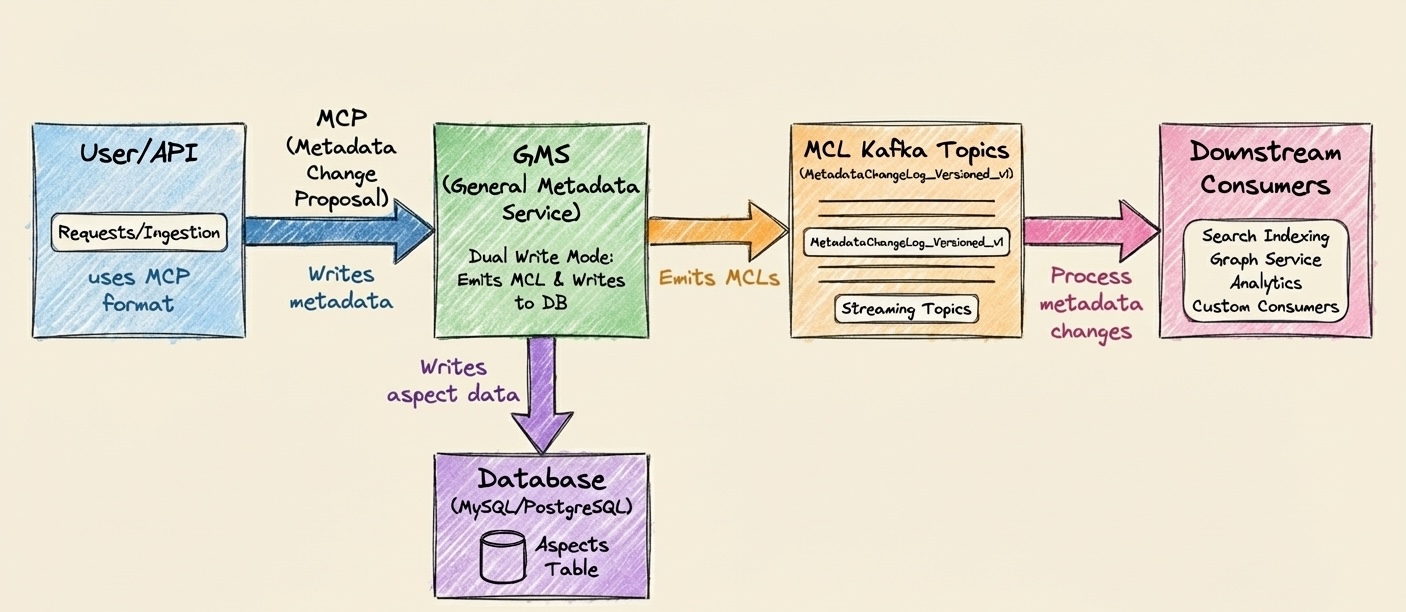
Key Point: GMS writes to the database AND emits the MCL in the same code path. If two updates to the same entity happen in rapid succession, their MCLs might be emitted in a different order than their database commits.
CDC Mode
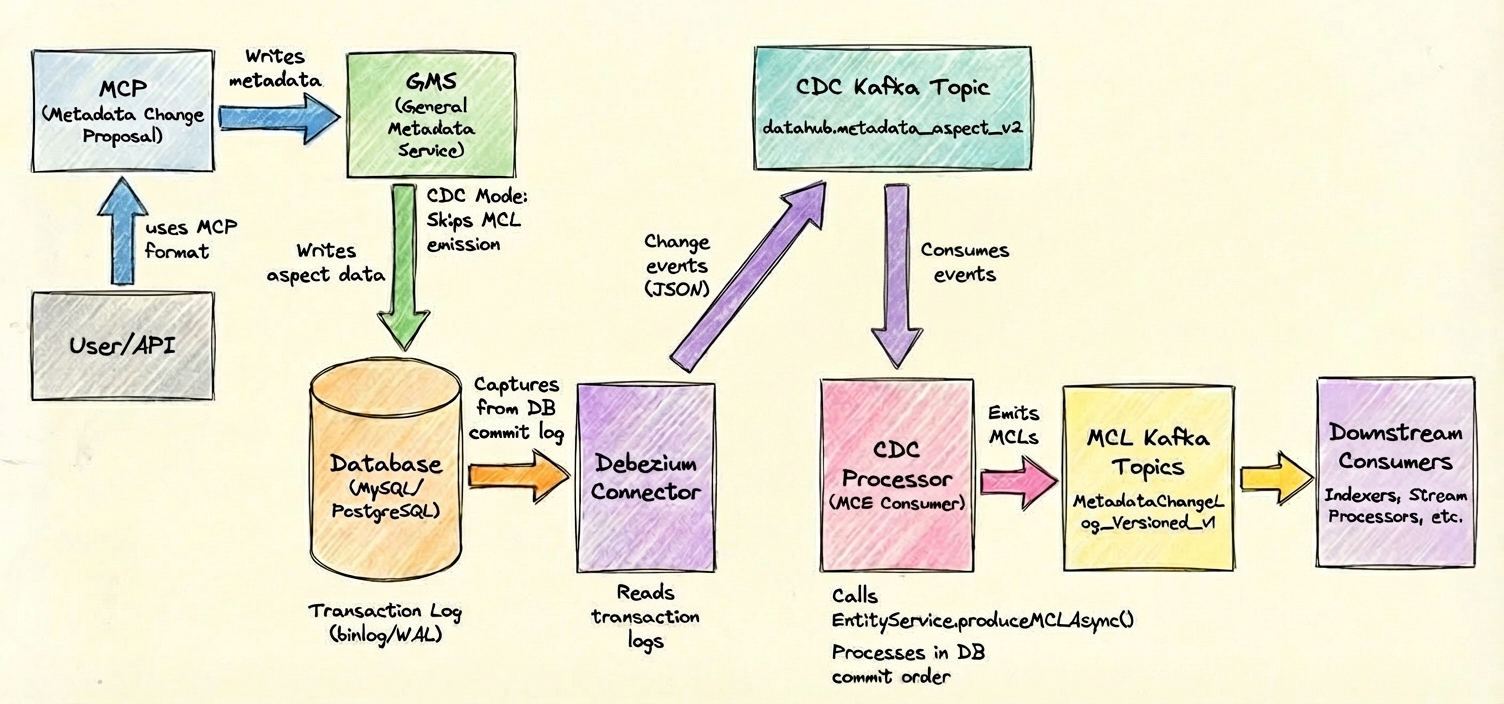
Key Point: GMS ONLY writes to the database. MCLs are generated later by the MCE Consumer reading from the database's transaction log (via Debezium). This guarantees MCLs are emitted in exact database commit order.
CDC Mode vs Normal Mode Comparison
| Aspect | Normal Mode | CDC Mode |
|---|---|---|
| Ordering Guarantee | Best-effort (may have races) | Strict (exact DB commit order) |
| Latency | Lower (~ms) | Higher (~100ms+ with CDC hop) |
| Infrastructure | GMS + Kafka only | GMS + Kafka + Kafka Connect + Debezium |
| Database Config | Standard | Requires replication enabled (binary logs or WAL) |
| Operational Complexity | Low | Medium (more moving parts) |
| Replay Capability | Limited (MCLs stored in Kafka) | High (can replay from DB) |
| Use Case | Standard deployments | Compliance, high-frequency updates, critical lineage |
Quick Start (Development/Testing)
The fastest way to get CDC running for local development or testing:
This uses auto-configuration mode where DataHub automatically sets up the database and Debezium connector. Not recommended for production.
Step 1: Ensure Prerequisites
- Docker Compose: Your environment should have Kafka Connect with Debezium plugin installed
- Database: MySQL 5.7+ or PostgreSQL 10+ (Docker containers work fine for testing)
Step 2: Enable CDC in docker-compose.yml
Add these environment variables to your docker-compose services:
datahub-gms:
  environment:
    - CDC_MCL_PROCESSING_ENABLED=true

mce-consumer:
  environment:
    - CDC_MCL_PROCESSING_ENABLED=true

datahub-upgrade:
  environment:
    - CDC_MCL_PROCESSING_ENABLED=true
    - CDC_CONFIGURE_SOURCE=true # Auto-configure DB and Debezium
    - CDC_DB_TYPE=mysql # or "postgres"
    - CDC_USER=datahub_cdc
    - CDC_PASSWORD=your_secure_password
    - CDC_KAFKA_CONNECT_URL=http://kafka-connect:8083
Step 3: Start DataHub
docker-compose up -d
DataHub will automatically:
- Create the CDC database user with required permissions
- Configure Debezium connector
- Start capturing CDC events
Step 4: Verify It's Working
# Check connector status (should show "RUNNING")
curl http://localhost:8083/connectors/datahub-cdc-connector/status | jq

# See CDC events flowing
docker exec -it broker kafka-console-consumer \
  --bootstrap-server localhost:9092 \
  --topic datahub.metadata_aspect_v2 \
  --max-messages 5
✅ You're done! Metadata changes will now flow through CDC.
Prerequisites
Before enabling CDC mode, ensure you have:
1. Supported Database
- MySQL 5.7+ or PostgreSQL 10+
How to check:
# MySQL
mysql -V

# PostgreSQL
psql --version
2. Kafka Connect with Debezium Plugin
You need a running Kafka Connect cluster with the appropriate Debezium connector plugin installed.
Docker users: Use the debezium/connect image (includes all plugins):
kafka-connect:
  image: debezium/connect:2.3
  ports:
    - "8083:8083"
  environment:
    - BOOTSTRAP_SERVERS=broker:29092
    - GROUP_ID=1
    - CONFIG_STORAGE_TOPIC=connect_configs
    - OFFSET_STORAGE_TOPIC=connect_offsets
    - STATUS_STORAGE_TOPIC=connect_status
How to check if Kafka Connect is running:
curl http://localhost:8083/connectors
# Should return: []  (empty list if no connectors are configured yet)
3. Database Permissions
You need the ability to:
- Enable binary logging (MySQL) or logical replication (PostgreSQL)
- Create a dedicated CDC user with replication privileges
- Grant read access to the
metadata_aspect_v2table
Who can do this:
- MySQL: User with
SUPERorREPLICATIONprivileges - PostgreSQL: User with
SUPERUSERorREPLICATIONrole
4. Kafka Resources
CDC adds one additional Kafka topic: datahub.metadata_aspect_v2.
Capacity planning:
- Disk: Same as your DataHub database size (CDC topic stores all aspect changes)
- Throughput: Proportional to metadata write rate
- Partitions: Recommended 3-9 partitions (same as MCL topics)
Configuration Overview
CDC mode requires configuration in three layers:
| Layer | What It Does | Auto-Config (Dev) | Manual Config (Prod) |
|---|---|---|---|
| 1. Database | Enable replication, create CDC user | ✅ Automated | ❌ Manual (recommended) |
| 2. Debezium | Configure Kafka Connect connector | ✅ Automated | ❌ Manual (recommended) |
| 3. DataHub | Enable CDC processing in GMS/MCE | ✅ Environment variables | ✅ Environment variables |
Database Configuration
For development environments: DataHub can automate database setup via the system-update service when
CDC_CONFIGURE_SOURCE=true. The system-update service will create the necessary CDC user and configure database
settings during startup.
For production environments: Manual database configuration is recommended for better control and security practices specific to your environment.
MySQL Requirements
Your MySQL instance must be configured to support CDC:
Enable Binary Logging: Configure MySQL to use ROW-based binary logging with FULL row images. This allows Debezium to capture all column changes.
Configuration (my.cnf or my.ini):
[mysqld]
log-bin=mysql-bin
binlog_format=ROW
binlog_row_image=FULL
server-id=1
How to verify:
SHOW VARIABLES LIKE 'log_bin';
SHOW VARIABLES LIKE 'binlog_format';
SHOW VARIABLES LIKE 'binlog_row_image';
Create CDC User: Create a dedicated database user for CDC with the following capabilities:
CREATE USER 'datahub_cdc'@'%' IDENTIFIED BY 'your_secure_password';
GRANT SELECT, REPLICATION CLIENT, REPLICATION SLAVE ON *.* TO 'datahub_cdc'@'%';
FLUSH PRIVILEGES;
What these privileges do:
SELECT: Read access to themetadata_aspect_v2tableREPLICATION CLIENT: Read binary logsREPLICATION SLAVE: Monitor replication status
Configure Binary Log Retention: Set appropriate binary log retention based on your operational needs and disaster recovery requirements. Consider factors like Debezium downtime tolerance and disk space.
-- Retain binary logs for 7 days
SET GLOBAL binlog_expire_logs_seconds = 604800;
Server ID: Ensure each MySQL instance (including the CDC connector) has a unique server ID for replication topology.
Configuration:
[mysqld]
server-id=1  # Must be unique
When CDC_CONFIGURE_SOURCE=true:
- Creates CDC user with required permissions on the local database
- Validates binary logging configuration
- Configures Debezium connector
PostgreSQL Requirements
Your PostgreSQL instance must be configured to support logical replication:
Enable Logical Replication: Configure PostgreSQL WAL (Write-Ahead Log) level to 'logical'. This is required for CDC to capture row-level changes.
Configuration (postgresql.conf):
wal_level = logical
max_replication_slots = 4
max_wal_senders = 4
⚠️ Requires restart: Changing
wal_levelrequires a PostgreSQL restart.How to verify:
SHOW wal_level;
-- Should return: logical
Configure Replication Slots: Allocate sufficient replication slots (at least one per CDC connector). Replication slots track the CDC consumer's position in the WAL.
Create CDC User: Create a dedicated database user for CDC with the following capabilities:
CREATE ROLE datahub_cdc WITH REPLICATION LOGIN PASSWORD 'your_secure_password';
GRANT CONNECT ON DATABASE datahub TO datahub_cdc;
GRANT SELECT ON TABLE public.metadata_aspect_v2 TO datahub_cdc;
What these privileges do:
REPLICATION: Create and read from replication slotsCONNECT: Connect to the DataHub databaseSELECT: Read themetadata_aspect_v2table
Set Replica Identity to FULL: Configure the
metadata_aspect_v2table to use FULL replica identity. This ensures Debezium receives complete before/after images of changed rows, which is critical for DataHub's MCL generation.ALTER TABLE public.metadata_aspect_v2 REPLICA IDENTITY FULL;
Why this matters: FULL replica identity ensures Debezium captures the complete row state (not just the primary key) for UPDATE and DELETE operations.
Create Publication: Create a PostgreSQL publication named
dbz_publicationfor themetadata_aspect_v2table. Publications define which tables participate in logical replication. DataHub expects this specific publication name when auto-configuring.CREATE PUBLICATION dbz_publication FOR TABLE public.metadata_aspect_v2;Create Replication Slot: When manually configuring, create a replication slot named
debeziumusing thepgoutputplugin. DataHub's default configuration uses this slot name.SELECT * FROM pg_create_logical_replication_slot('debezium', 'pgoutput');Configure WAL Senders: Ensure sufficient
max_wal_sendersfor the number of CDC connectors and any other replication consumers.
When CDC_CONFIGURE_SOURCE=true:
- Creates CDC user with required permissions
- Sets replica identity to FULL on metadata_aspect_v2 table
- Creates publication named
dbz_publicationfor the table - Creates replication slot named
debezium - Validates logical replication configuration
- Configures Debezium connector with correct publication and slot names
- Replication slots prevent WAL cleanup: Monitor disk space and configure
max_slot_wal_keep_sizeto prevent runaway growth. - When a CDC connector is stopped: Consider dropping its replication slot to allow WAL cleanup.
- Database restarts may be required: Changing WAL-related configuration parameters typically requires a restart.
- Default names: The publication name
dbz_publicationand slot namedebeziumare DataHub's defaults - if you use different names, update your Debezium connector configuration accordingly.
Debezium Configuration
You have two options for configuring Debezium:
| Option | Use Case | Setup Time | Control | Security |
|---|---|---|---|---|
| Auto-Configuration | Dev/Test envs | ~5 minutes | Low (DataHub decides) | Lower (auto-creates users) |
| Manual Configuration | Production envs | ~30 minutes | High (full control) | Higher (you control) |
Option 1: Auto-Configuration (Development/Testing)
For development and testing environments, DataHub can automatically configure Debezium via the system-update service.
Environment Variables:
# Enable CDC processing
CDC_MCL_PROCESSING_ENABLED=true

# Enable auto-configuration
CDC_CONFIGURE_SOURCE=true

# Database type (mysql or postgres)
CDC_DB_TYPE=mysql

# CDC user credentials (will be created if doesn't exist)
CDC_USER=datahub_cdc
CDC_PASSWORD=your_secure_password

# Kafka Connect endpoint
CDC_KAFKA_CONNECT_URL=http://kafka-connect:8083

# Connector name
DATAHUB_CDC_CONNECTOR_NAME=datahub-cdc-connector

# CDC topic name
CDC_TOPIC_NAME=datahub.metadata_aspect_v2
Docker Compose Example:
datahub-gms:
  environment:
    - CDC_MCL_PROCESSING_ENABLED=true

mce-consumer:
  environment:
    - CDC_MCL_PROCESSING_ENABLED=true

datahub-upgrade:
  environment:
    - CDC_MCL_PROCESSING_ENABLED=true
    - CDC_CONFIGURE_SOURCE=true
    - CDC_DB_TYPE=mysql # or postgres
    - CDC_USER=datahub_cdc
    - CDC_PASSWORD=your_secure_password
    - CDC_KAFKA_CONNECT_URL=http://kafka-connect:8083
Auto-configuration creates database users with elevated privileges automatically. This may violate your organization's security policies. Use manual configuration for production.
Option 2: Manual Configuration (Production)
For production environments, manually configure Debezium Kafka Connect for better control.
Key Configuration Requirements:
Regardless of database type, your Debezium connector must be configured with the following critical settings:
Table to Capture: The connector must capture changes from the
metadata_aspect_v2table only. This is the primary storage table for DataHub's versioned aspects.Output Topic Name: CDC events must be routed to a single consolidated topic (default:
datahub.metadata_aspect_v2). Use Debezium's routing transformation to override the default per-table topic naming.Message Format:
- Key Converter: Use
StringConverter- keys will be entity URNs as plain strings - Value Converter: Use
JsonConverter- CDC payloads must be in JSON format - Schemas Disabled: Set
value.converter.schemas.enable: false- DataHub validates aspects internally and doesn't use Kafka schema registry for CDC events
- Key Converter: Use
Partitioning Key: Messages must be partitioned by the
urncolumn. This ensures all changes for a given entity are processed in order by routing them to the same Kafka partition.
Example MySQL Connector Configuration
The following is an example configuration for MySQL similar to what DataHub auto-configures for development/test:
{
  "name": "datahub-cdc-connector",
  "config": {
    "connector.class": "io.debezium.connector.mysql.MySqlConnector",
    "tasks.max": "1",

    "database.hostname": "mysql",
    "database.port": "3306",
    "database.user": "datahub_cdc",
    "database.password": "your_secure_password",
    "database.server.id": "184001",
    "database.server.name": "datahub",
    "database.include.list": "datahub",
    "table.include.list": "datahub.metadata_aspect_v2",

    "database.history.kafka.bootstrap.servers": "broker:29092",
    "database.history.kafka.topic": "datahub.schema-changes",

    "key.converter": "org.apache.kafka.connect.storage.StringConverter",
    "value.converter": "org.apache.kafka.connect.json.JsonConverter",
    "value.converter.schemas.enable": "false",

    "message.key.columns": "datahub.metadata_aspect_v2:urn",

    "transforms": "route",
    "transforms.route.type": "org.apache.kafka.connect.transforms.RegexRouter",
    "transforms.route.regex": ".*metadata_aspect_v2",
    "transforms.route.replacement": "datahub.metadata_aspect_v2",

    "snapshot.mode": "initial",
    "snapshot.locking.mode": "minimal",
    "decimal.handling.mode": "string",
    "bigint.unsigned.handling.mode": "long"
  }
}
Key config explanations:
database.server.id: Must be unique across all MySQL replicas and CDC connectorsmessage.key.columns: Ensures messages are partitioned by URN for orderingtransforms.route: Routes all events to a single topic instead of per-table topicssnapshot.mode: initial: Captures existing data on first run
PostgreSQL Connector Configuration
The following is an example configuration for PostgreSQL similar to what DataHub auto-configures for development/test:
{
  "name": "datahub-cdc-connector",
  "config": {
    "connector.class": "io.debezium.connector.postgresql.PostgresConnector",
    "tasks.max": "1",

    "database.hostname": "postgres",
    "database.port": "5432",
    "database.user": "datahub_cdc",
    "database.password": "your_secure_password",
    "database.dbname": "datahub",
    "database.server.name": "datahub",

    "plugin.name": "pgoutput",
    "publication.name": "dbz_publication",
    "publication.autocreate.mode": "disabled",
    "slot.name": "debezium",

    "schema.include.list": "public",
    "table.include.list": "public.metadata_aspect_v2",

    "key.converter": "org.apache.kafka.connect.storage.StringConverter",
    "value.converter": "org.apache.kafka.connect.json.JsonConverter",
    "value.converter.schemas.enable": "false",

    "message.key.columns": "public.metadata_aspect_v2:urn",

    "transforms": "route",
    "transforms.route.type": "org.apache.kafka.connect.transforms.RegexRouter",
    "transforms.route.regex": ".*metadata_aspect_v2",
    "transforms.route.replacement": "datahub.metadata_aspect_v2",

    "snapshot.mode": "initial",
    "decimal.handling.mode": "string"
  }
}
Key config explanations:
plugin.name: pgoutput: Uses PostgreSQL's native logical replication output pluginpublication.name: Must match the publication you created earlierslot.name: Must match the replication slot you created earlierpublication.autocreate.mode: disabled: Prevents Debezium from auto-creating publications
Deploy Connector
Once you've created your connector configuration JSON, deploy it to Kafka Connect:
# Create the connector
curl -X POST http://localhost:8083/connectors \
  -H "Content-Type: application/json" \
  -d @connector-config.json

# Verify it's running
curl http://localhost:8083/connectors/datahub-cdc-connector/status | jq
Environment Variables for Manual Setup:
# Enable CDC processing
CDC_MCL_PROCESSING_ENABLED=true

# Disable auto-configuration
CDC_CONFIGURE_SOURCE=false

# CDC topic name (must match connector config)
CDC_TOPIC_NAME=datahub.metadata_aspect_v2
DataHub Configuration
Once database and Debezium are configured, enable CDC mode in DataHub components:
Docker Compose Configuration
datahub-gms:
  environment:
    # Enable CDC mode (disables direct MCL emission from GMS)
    - CDC_MCL_PROCESSING_ENABLED=true

mce-consumer:
  environment:
    # Enable CDC mode (enables CDC message processing)
    - CDC_MCL_PROCESSING_ENABLED=true
    - CDC_TOPIC_NAME=datahub.metadata_aspect_v2

datahub-upgrade:
  environment:
    - CDC_MCL_PROCESSING_ENABLED=true
    - CDC_CONFIGURE_SOURCE=false # indicates manually configured Debezium
    - CDC_DB_TYPE=mysql # or postgres
    - CDC_USER=datahub_cdc
    - CDC_PASSWORD=your_secure_password
What each environment variable does:
CDC_MCL_PROCESSING_ENABLED=true(GMS): Disables direct MCL emission from GMS writesCDC_MCL_PROCESSING_ENABLED=true(MCE Consumer): Enables CDC event processingCDC_TOPIC_NAME: Name of the Kafka topic where CDC events are publishedCDC_CONFIGURE_SOURCE=false: Tells DataHub you've manually configured Debezium (no auto-setup)
Verification
1. Verify Debezium Connector
# Check connector status
curl http://kafka-connect:8083/connectors/datahub-cdc-connector/status | jq

# Expected output shows "state": "RUNNING"
- Connector state:
RUNNING - Task state:
RUNNING - No errors in
connector.tracefield
2. Verify CDC Topic
# List topics (should see datahub.metadata_aspect_v2)
kafka-topics --bootstrap-server broker:9092 --list | grep metadata_aspect_v2

# Consume CDC events
kafka-console-consumer --bootstrap-server broker:9092 \
  --topic datahub.metadata_aspect_v2 \
  --from-beginning --max-messages 10
What you should see:
{
  "before": null,
  "after": {
    "urn": "urn:li:dataset:...",
    "aspect": "datasetProperties",
    "version": 0,
    "metadata": "{...}",
    "createdon": "2024-01-01T00:00:00.000Z"
  },
  "op": "c"
}
3. Test End-to-End
Make a metadata change via DataHub UI or API
Verify CDC event is captured in the CDC topic (CDC events are in JSON format):
kafka-console-consumer --bootstrap-server broker:9092 \
  --topic datahub.metadata_aspect_v2 \
  --from-beginning --max-messages 1
Verify MCL is generated in the MCL topic (MCL events are Avro-serialized and require schema registry access):
# Using kafka-avro-console-consumer (requires schema registry)
kafka-avro-console-consumer --bootstrap-server broker:9092 \
  --topic MetadataChangeLog_Versioned_v1 \
  --property schema.registry.url=http://schema-registry:8081 \
  --from-beginning --max-messages 1
Alternatively, check the MCE consumer logs to confirm MCLs are being generated:
docker logs mce-consumer | grep -i "Emitting MCL"
Troubleshooting
Common Issues
Connector Stuck in FAILED State
Symptoms:
curl http://localhost:8083/connectors/datahub-cdc-connector/status
# Shows "state": "FAILED"
Common Causes & Fixes:
Database permissions missing
-- MySQL: Verify replication privileges
SHOW GRANTS FOR 'datahub_cdc'@'%';

-- PostgreSQL: Verify replication role
\du datahub_cdc
Binary logging not enabled (MySQL)
SHOW VARIABLES LIKE 'log_bin';
-- Should return: ON
Logical replication not enabled (PostgreSQL)
SHOW wal_level;
-- Should return: logical
Publication or slot missing (PostgreSQL)
-- Check publication exists
SELECT * FROM pg_publication WHERE pubname = 'dbz_publication';

-- Check replication slot exists
SELECT * FROM pg_replication_slots WHERE slot_name = 'debezium';
How to fix:
- Check connector logs:
curl http://localhost:8083/connectors/datahub-cdc-connector/status | jq '.tasks[0].trace' - Fix the underlying issue (permissions, replication config, etc.)
- Restart the connector:
curl -X POST http://localhost:8083/connectors/datahub-cdc-connector/restart
CDC Events Not Appearing in Topic
Symptoms:
- Connector shows
RUNNINGbut no messages indatahub.metadata_aspect_v2topic
Common Causes:
No database changes yet: Debezium only captures changes AFTER it starts. Make a test metadata change in DataHub UI.
Wrong table filter: Check
table.include.listin connector config matchesmetadata_aspect_v2.Snapshot mode issue: If
snapshot.modeis set tonever, existing data won't be captured. Change toinitialand restart.
How to fix:
- Make a test change in DataHub (edit a dataset description)
- Check CDC topic again:
kafka-console-consumer --bootstrap-server broker:9092 \
  --topic datahub.metadata_aspect_v2 \
  --from-beginning --max-messages 5
MCLs Still Being Emitted Directly from GMS
Symptoms:
- MCLs appear in MCL topic even without CDC events
- GMS logs show MCL emission
Cause:
CDC_MCL_PROCESSING_ENABLED is not set to true in all required containers (gms, mce-consumer, and datahub-upgrade).
Fix:
Ensure CDC_MCL_PROCESSING_ENABLED=true is set for all three containers:
datahub-gms:
  environment:
    - CDC_MCL_PROCESSING_ENABLED=true # Required!
mce-consumer:
  environment:
    - CDC_MCL_PROCESSING_ENABLED=true # Required!
datahub-upgrade:
  environment:
    - CDC_MCL_PROCESSING_ENABLED=true # Required!
Important: After setting these environment variables, you must restart GMS and mce-consumer for the changes to take effect:
docker-compose restart datahub-gms mce-consumer
Replication Slot Growth (PostgreSQL)
Symptoms:
SELECT slot_name, pg_size_pretty(pg_wal_lsn_diff(pg_current_wal_lsn(), restart_lsn)) AS lag
FROM pg_replication_slots;
-- Shows large "lag" value (e.g., 10GB+)
Cause: CDC connector is stopped but replication slot still exists, preventing WAL cleanup.
Fix:
If connector is permanently stopped, drop the slot:
SELECT pg_drop_replication_slot('debezium');If connector is temporarily stopped, restart it to resume WAL consumption.
Configure
max_slot_wal_keep_sizeto prevent runaway growth:# postgresql.conf
max_slot_wal_keep_size = 10GB
Performance/Latency Issues
Symptoms:
- High lag between database write and MCL emission (>1 second)
Tuning Options:
- Increase Kafka Connect resources (if CPU/memory constrained)
- Increase CDC topic partitions for parallelism:
kafka-topics --bootstrap-server broker:9092 \
  --alter --topic datahub.metadata_aspect_v2 \
--partitions 9 - Tune Debezium polling:
{
  "config": {
    "poll.interval.ms": "100",
    "max.batch.size": "2048"
  }
}
Getting Help
If you're still stuck after trying the above:
Check DataHub logs:
docker logs datahub-gms | grep -i cdc
docker logs mce-consumer | grep -i cdc
docker logs datahub-upgrade | grep -i cdc
Check Debezium connector logs:
curl http://localhost:8083/connectors/datahub-cdc-connector/status | jq '.tasks[0].trace'Ask in DataHub Slack: Join here and post in #troubleshooting
Performance & Operational Considerations
Resource Requirements
Additional Infrastructure:
- Kafka Connect: ~512MB-1GB RAM per connector
- CDC Topic Storage: ~Same size as
metadata_aspect_v2table - Database Overhead: Minimal (binary logs/WAL already exist for backups)
Expected Latency:
- Normal Mode: 1-10ms (DB write → MCL emission)
- CDC Mode: 50-200ms (DB write → CDC capture → MCL emission)
Monitoring
Key Metrics to Monitor:
Debezium Connector Health:
curl http://localhost:8083/connectors/datahub-cdc-connector/statusCDC Topic Lag:
kafka-consumer-groups --bootstrap-server broker:9092 \
  --describe --group datahub-mce-consumer-job-client
Database Replication Lag (PostgreSQL):
SELECT slot_name, pg_size_pretty(pg_wal_lsn_diff(pg_current_wal_lsn(), restart_lsn)) AS lag
FROM pg_replication_slots;
Binary Log Disk Usage (MySQL):
SHOW BINARY LOGS;
Scaling
Horizontal Scaling:
- Increase CDC topic partitions (default: 3, recommended: 9 for high throughput)
- Run multiple MCE Consumer instances (they'll partition the CDC topic automatically)
Vertical Scaling:
- Increase Kafka Connect memory if connector tasks are slow
- Increase MCE Consumer memory if processing CDC events is slow
Disabling CDC Mode (Rollback)
To revert from CDC mode back to normal mode:
Step 1: Disable CDC in DataHub
datahub-gms:
  environment:
    - CDC_MCL_PROCESSING_ENABLED=false # Changed from true

mce-consumer:
  environment:
    - CDC_MCL_PROCESSING_ENABLED=false # Changed from true

datahub-upgrade:
  environment:
    - CDC_MCL_PROCESSING_ENABLED=false # Changed from true
    - CDC_CONFIGURE_SOURCE=false
Step 2: Restart DataHub Services
docker-compose restart datahub-gms mce-consumer datahub-upgrade
Step 3: (Optional) Clean Up CDC Infrastructure
If you're permanently disabling CDC:
Delete Debezium Connector:
curl -X DELETE http://localhost:8083/connectors/datahub-cdc-connectorDrop Replication Slot (PostgreSQL):
SELECT pg_drop_replication_slot('debezium');Drop Publication (PostgreSQL):
DROP PUBLICATION dbz_publication;(Optional) Delete CDC Topic:
kafka-topics --bootstrap-server broker:9092 \
  --delete --topic datahub.metadata_aspect_v2
If you disable CDC while there are unprocessed CDC events in the topic, those events will be ignored. Ensure the CDC topic is fully consumed (check lag) before disabling CDC to avoid losing metadata changes.
Frequently Asked Questions (FAQ)
How do I enable CDC in DataHub?
Set CDC_MCL_PROCESSING_ENABLED=true in your GMS, MCE Consumer, and system-update services. For development, also set
CDC_CONFIGURE_SOURCE=true to auto-configure the database and Debezium connector.
See the Quick Start section for a step-by-step guide.
What is CDC mode in DataHub?
CDC (Change Data Capture) mode is an alternative way to generate MetadataChangeLogs (MCLs) in DataHub. Instead of GMS emitting MCLs directly when writing to the database, CDC mode captures database changes via Debezium and generates MCLs from those change events. This guarantees strict ordering based on database transaction commit order.
Why would I use CDC mode?
Use CDC mode if you need:
- Strict ordering guarantees for metadata changes (e.g., regulatory compliance, audit trails)
- Replay capability to rebuild MCL history from database changes
- Protection against race conditions when multiple rapid updates occur to the same entity
Most deployments don't need CDC - normal mode is sufficient and simpler.
What's the difference between CDC mode and normal mode?
| Aspect | Normal Mode | CDC Mode |
|---|---|---|
| MCL Generation | GMS emits MCLs directly | MCE Consumer generates MCLs from DB changes |
| Ordering | Best-effort | Strict (DB commit order) |
| Infrastructure | GMS + Kafka | GMS + Kafka + Kafka Connect + Debezium |
| Latency | Lower (~ms) | Higher (~100ms+) |
See the comparison table for more details.
Does CDC mode work with MySQL and PostgreSQL?
Yes! CDC mode supports both MySQL 5.7+ and PostgreSQL 10+. Configuration differs slightly between the two (binary logs for MySQL, logical replication for PostgreSQL).
See MySQL Requirements and PostgreSQL Requirements.
Can I enable CDC on an existing DataHub deployment?
Yes, but with caveats:
- CDC only captures changes AFTER it's enabled (not historical data)
- You'll need to configure your database for replication (may require restart)
- Test in a staging environment first
Since there db and gms/consumer restarts are required, and to avoid any diplicate MCLs, it is recommended to do this switch with a minimal gms downtime. Stop datahub services, make configuration changes, start datahub services to run in CDC mode.
What's the performance impact of CDC mode?
Latency: CDC adds ~50-200ms of latency compared to normal mode (database write → CDC capture → MCL emission).
Throughput: CDC can handle the same throughput as normal mode, but requires additional infrastructure (Kafka Connect).
Resources: Adds ~512MB-1GB RAM for Kafka Connect, plus CDC topic storage (~same size as your database).
See Performance & Operational Considerations for details.
How do I troubleshoot CDC issues?
Common issues and fixes:
- Connector not running: Check permissions, replication config, and connector logs
- No CDC events: Ensure table filter is correct and snapshot mode is
initial - MCLs still emitted directly: Verify
CDC_MCL_PROCESSING_ENABLED=truein GMS
See the full Troubleshooting section for step-by-step fixes.
Can I use CDC with DataHub Cloud?
CDC mode is currently not supported in DataHub Cloud.
How do I disable CDC mode?
Set CDC_MCL_PROCESSING_ENABLED=false in all DataHub services and restart. Optionally clean up CDC infrastructure
(connector, replication slot, CDC topic).
See Disabling CDC Mode for detailed steps.
Additional Resources
- Environment Variables Reference - Full list of CDC-related environment variables
- MCP/MCL Events Documentation - Deep dive into DataHub's event architecture
- Debezium MySQL Connector Documentation - Official Debezium MySQL docs
- Debezium PostgreSQL Connector Documentation - Official Debezium PostgreSQL docs
- Kafka Connect Documentation - Apache Kafka Connect reference