
The #1 Open Source AI Data Catalog
Enterprise-grade metadata platform enabling discovery, governance, and observability across your entire data ecosystem










Free Cloud Trial •Quick Start •Live Demo •Documentation •Slack Community •YouTube
Built with ❤️ by DataHub and LinkedIn
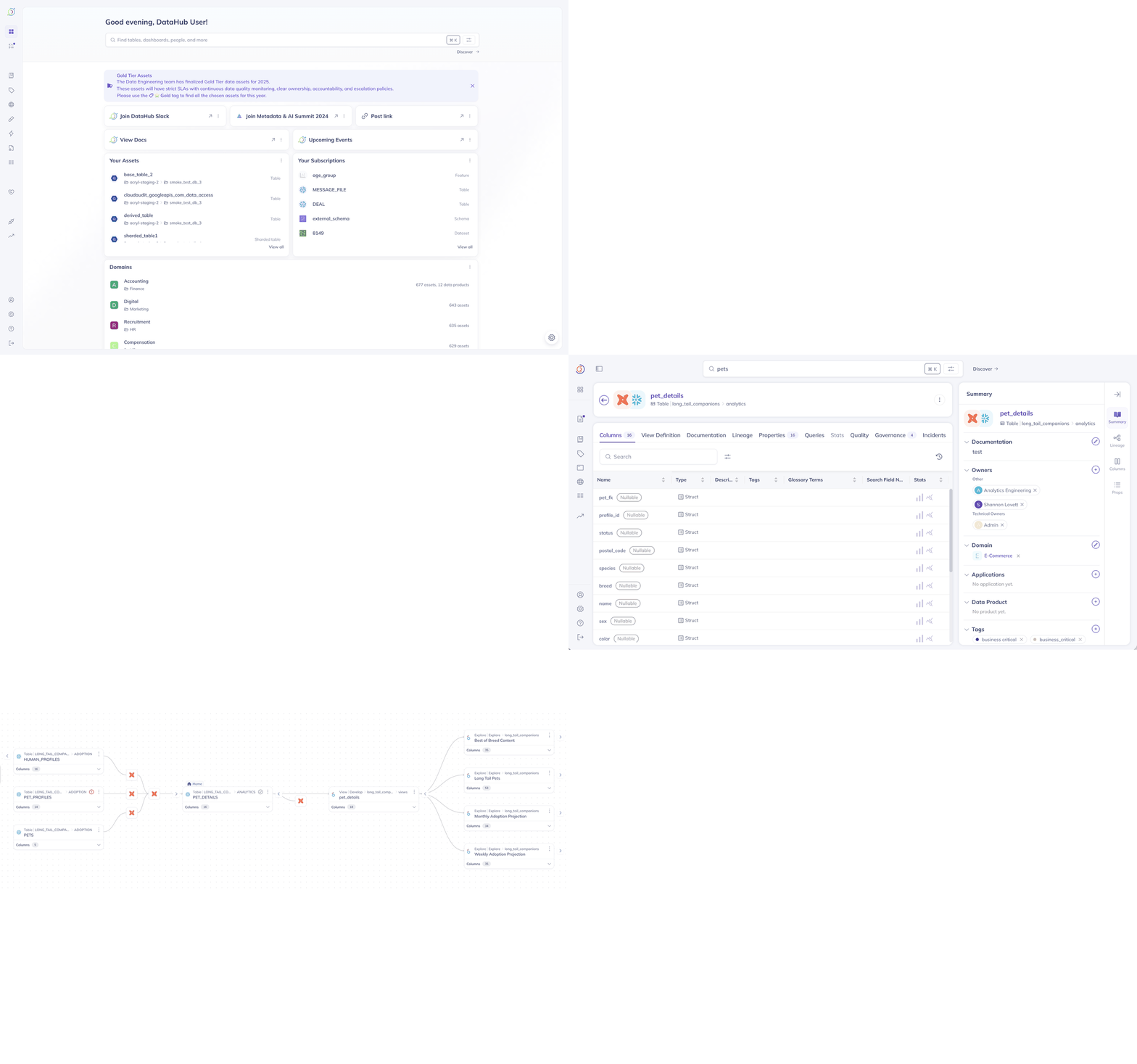
Search, discover, and understand your data with DataHub's unified metadata platform
📊 NEW: Open Source Analytics Agent
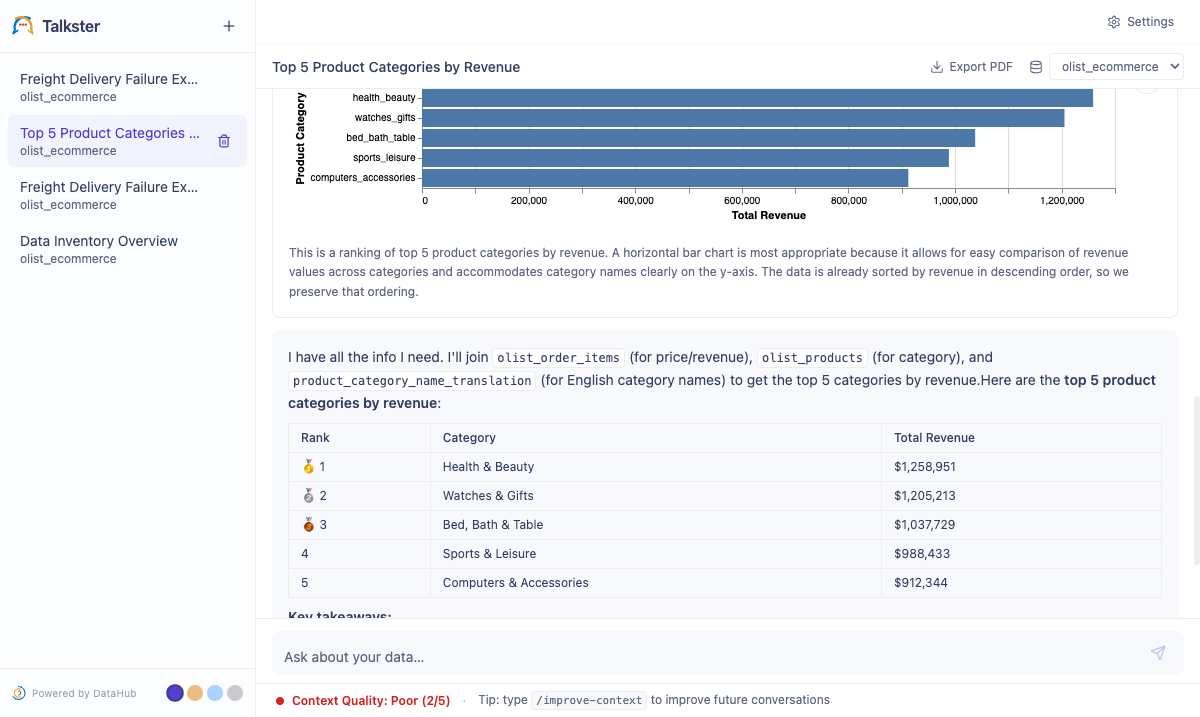
Ask data questions in plain English — get SQL, results, and charts back
Open-source agent grounded in your DataHub catalog. Apache 2.0. Bring your own LLM.
Quick start:
git clone https://github.com/datahub-project/analytics-agent.git
cd analytics-agent && bash quickstart.sh
Read the announcement → · Docs → · Repo →
Using AI coding assistants? Connect Cursor, Claude Desktop, or Cline directly to DataHub via the Model Context Protocol:
npx -y @acryldata/mcp-server-datahub init
What is DataHub?
🔍 Finding the right DataHub? This is the open-source metadata platform at datahub.com (GitHub: datahub-project/datahub). It was previously hosted at
datahubproject.io, which now redirects to datahub.com. This project is not related to datahub.io, which is a separate public dataset hosting service. See the FAQ below.
DataHub is the #1 open-source AI data catalog that enables discovery, governance, and observability across your entire data ecosystem. Originally built at LinkedIn, DataHub now powers data discovery at thousands of organizations worldwide, managing millions of data assets.
The Challenge: Modern data stacks are fragmented across dozens of tools—warehouses, lakes, BI platforms, ML systems, AI agents, orchestration engines. Finding the right data, understanding its lineage, and ensuring governance is like searching through a maze blindfolded.
The DataHub Solution: DataHub acts as the central nervous system for your data stack—connecting all your tools through real-time streaming or batch ingestion to create a unified metadata graph. Unlike static catalogs, DataHub keeps your metadata fresh and actionable—powering both human teams and AI agents.
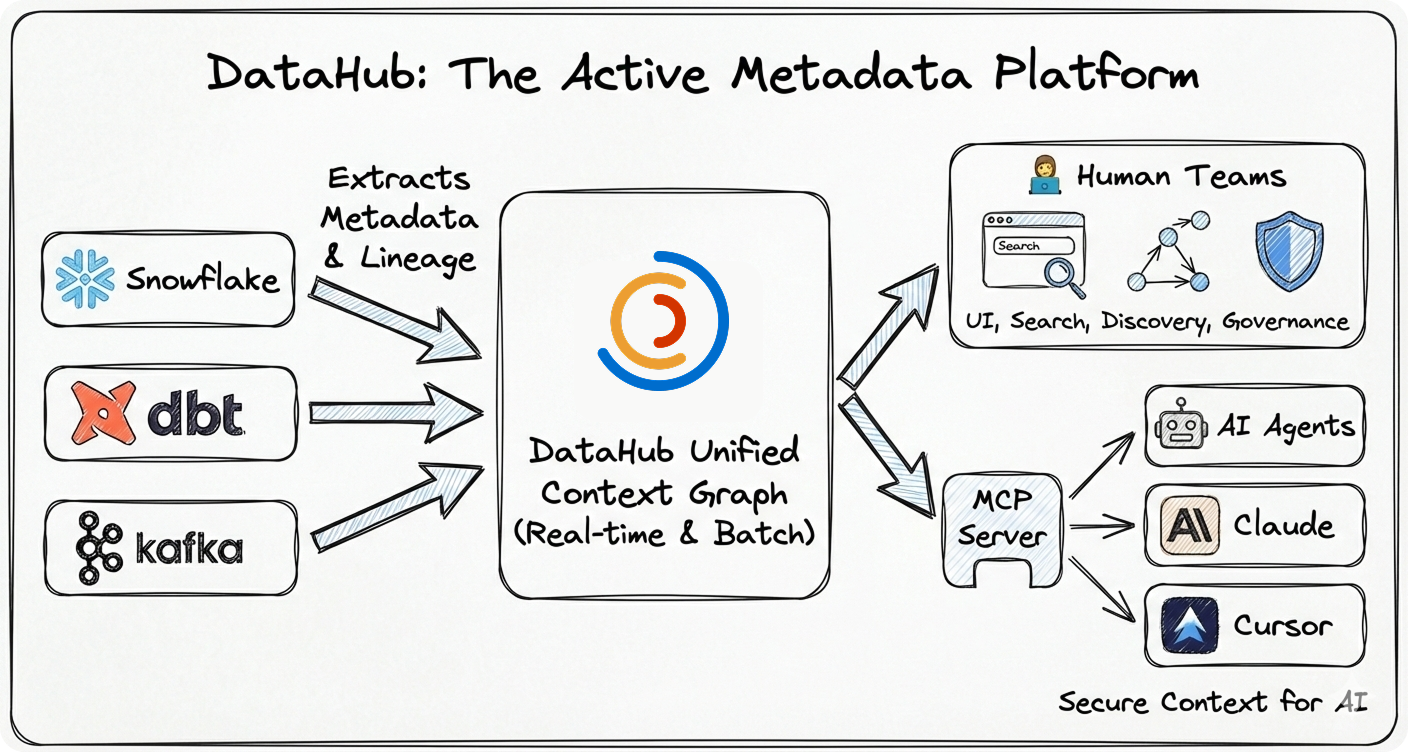
Why DataHub?
- 🚀 Battle-Tested at Scale: Born at LinkedIn to handle hyperscale data, now proven at thousands of organizations worldwide managing millions of data assets
- ⚡ Real-Time Streaming: Metadata updates in seconds, not hours or days
- 🤖 AI-Ready: Native support for AI agents via MCP, LLM integrations, and context management
- 🔌 Pioneering Ingestion Architecture: Flexible push/pull framework (widely adopted by other catalogs) with 80+ production-grade connectors extracting deep metadata—column lineage, usage stats, profiling, and quality metrics
- 👨💻 Developer-First: Rich APIs (GraphQL, OpenAPI), Python + Java SDKs, CLI tools
- 🏢 Enterprise Ready: Battle-tested security, authentication, authorization, and audit trails
- 🌍 Open Source: Apache 2.0 licensed, vendor-neutral, community-driven
🧠 The Context Foundation
Essential for modern data teams and reliable AI agents:
- Context Management Is the Missing Piece in the Agentic AI Puzzle - Why context management is essential for deploying reliable AI agents at scale
- Data Lineage: What It Is and Why It Matters - Understanding the map of how data flows through your organization
- What is Metadata Management? - A comprehensive guide for enterprise data leaders
📑 Table of Contents
- FAQ
- See DataHub in Action
- Quick Start
- Installation Options
- Architecture
- Use Cases & Examples
- Trusted By
- Ecosystem
- Community
- Contributing
- Resources
- License
❓ Frequently Asked Questions
Is this the same project as datahub.io?
No. datahub.io is a completely separate project — a public dataset hosting service with no affiliation to this project. DataHub (this project) is an open-source metadata platform for data discovery, governance, and observability, hosted at datahub.com and developed at github.com/datahub-project/datahub.
What happened to datahubproject.io?
DataHub was previously hosted at datahubproject.io. That domain now redirects to datahub.com. All documentation has moved to docs.datahub.com. If you find references to datahubproject.io in blog posts or tutorials, they refer to this same project — just under its former domain.
Is DataHub related to LinkedIn's internal DataHub?
Yes. DataHub was originally built at LinkedIn to manage metadata at scale across their data ecosystem. LinkedIn open-sourced DataHub in 2020. It has since grown into an independent community project under the datahub-project GitHub organization, now hosted at datahub.com.
How do I install the DataHub metadata platform?
# macOS / Linux (simplest)
brew install datahub-project/tap/datahub

# Or via pip (any platform)
pip install acryl-datahub

datahub docker quickstart
See the Quick Start section below for full instructions. The PyPI package is acryl-datahub; the Homebrew tap is datahub-project/homebrew-tap.
🎨 See DataHub in Action
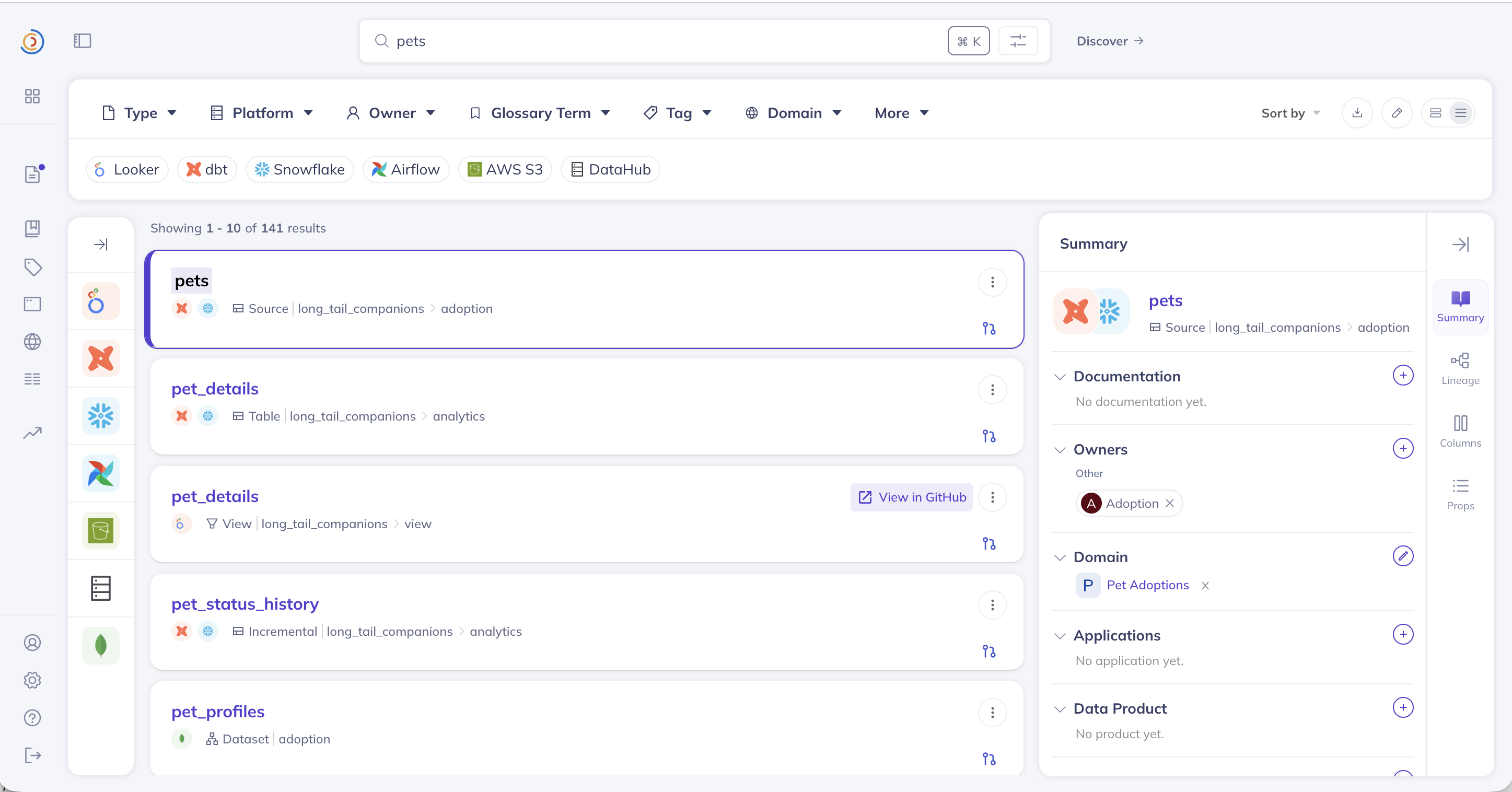 🔍 Universal Search | 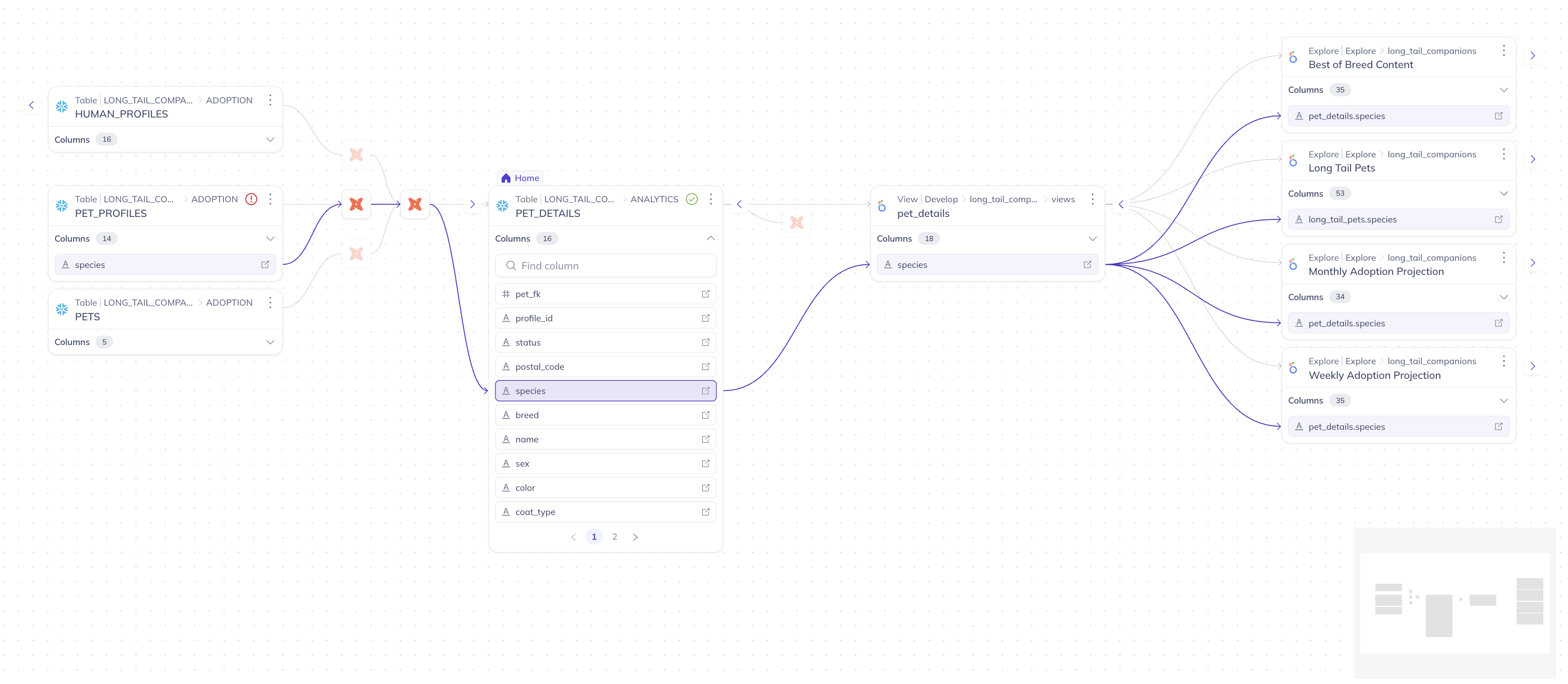 📊 Column-Level Lineage |
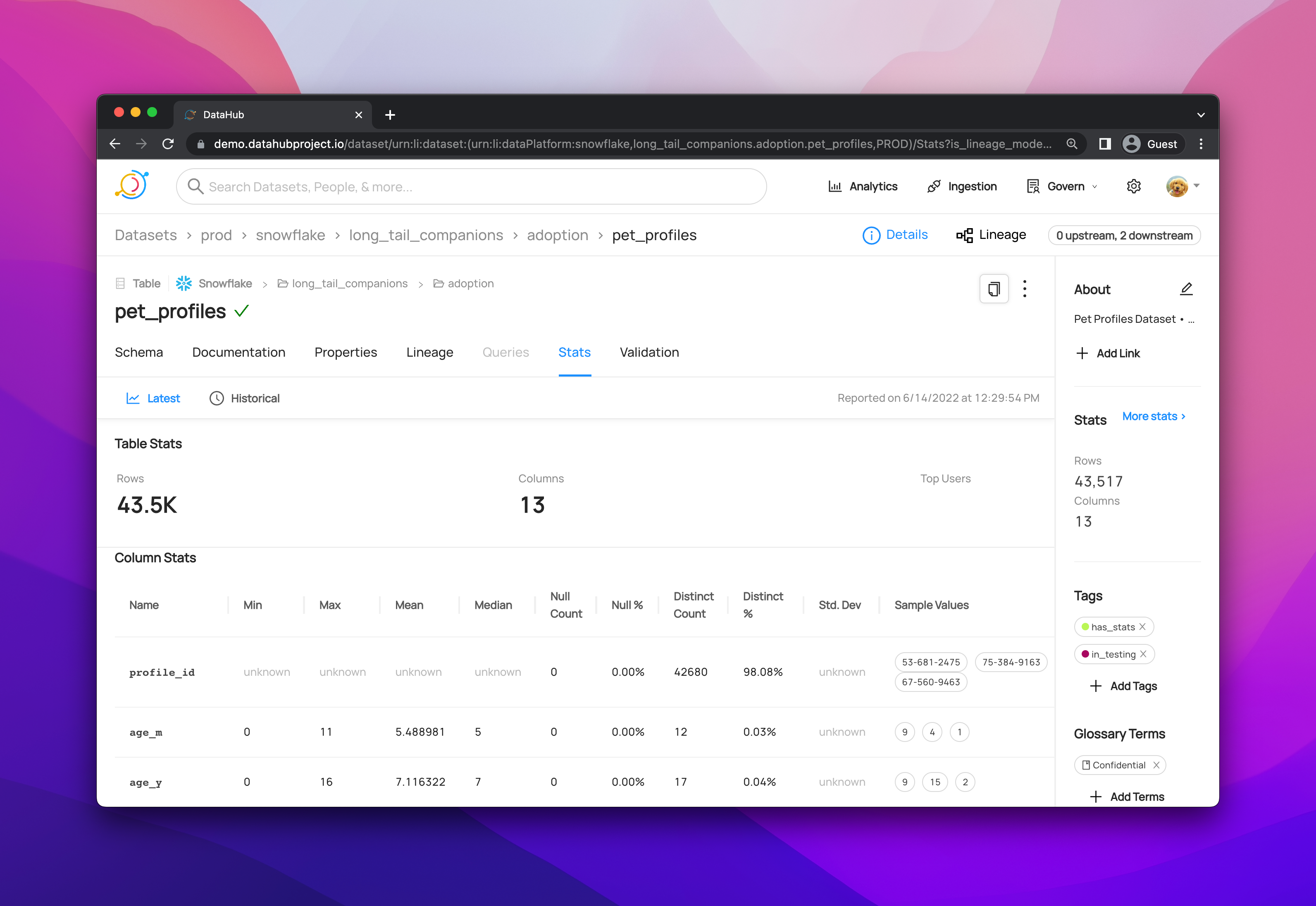 📋 Rich Dataset Profiles | 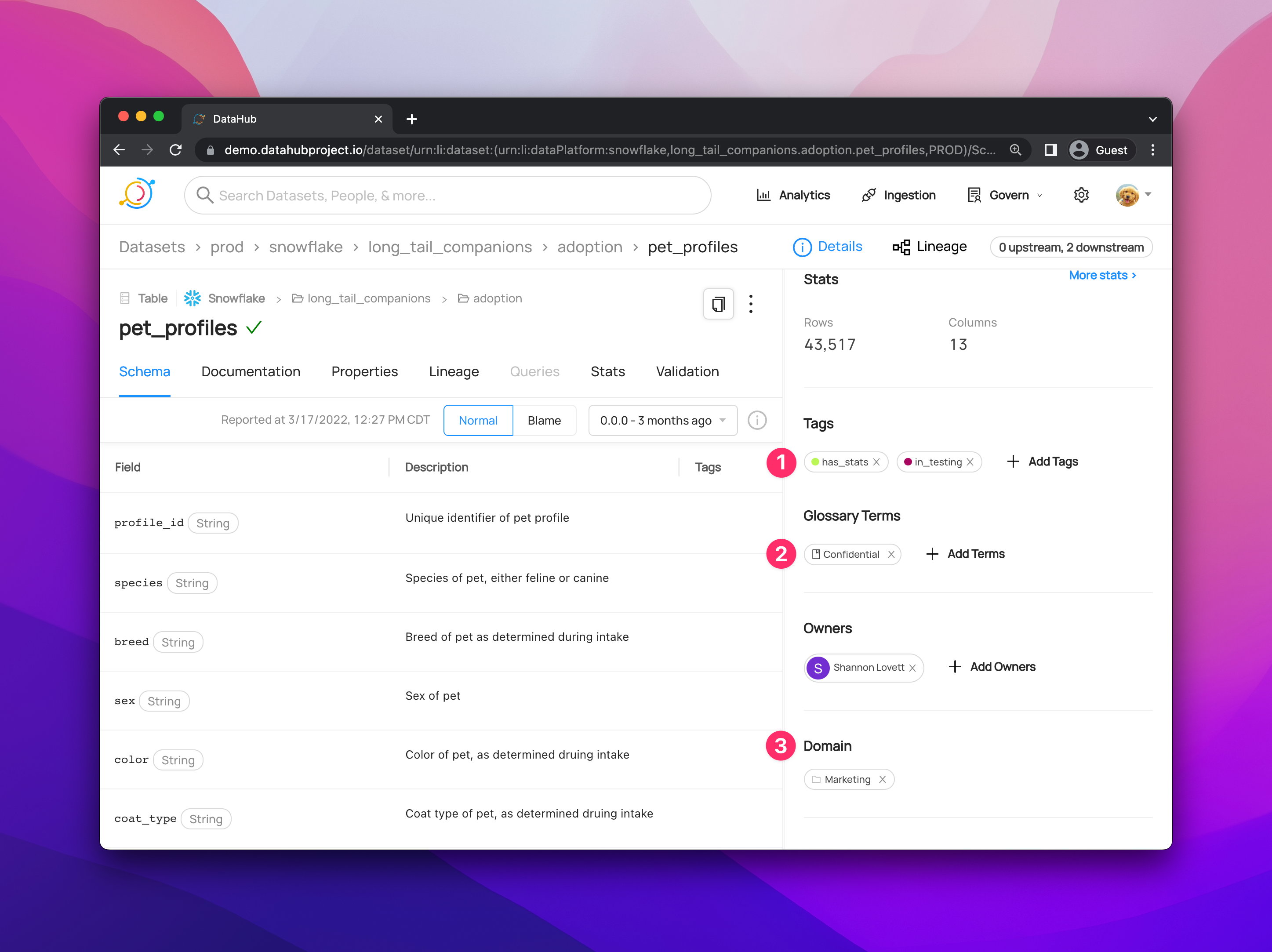 🏛️ Governance Dashboard |
▶️ Watch DataHub in Action:
- YouTube Channel (YouTube)
- Try Live Demo (No installation required)
🚀 Quick Start
Option 1: Try the Hosted Demo (Fastest)
No installation required. Explore a fully-loaded DataHub instance with sample data instantly:
🌐 Launch Live Demo: demo.datahub.com
Option 2: Run Locally (Recommended)
Get DataHub running on your machine in under 2 minutes.
Prerequisites: Docker Desktop with 8GB+ RAM allocated.
Install the DataHub CLI using either Homebrew (macOS / Linux) or pip:
# Homebrew (macOS / Linux)
brew install datahub-project/tap/datahub

# Or pip (any platform)
python3 -m pip install --upgrade pip wheel setuptools
python3 -m pip install --upgrade acryl-datahub
Then launch DataHub locally via Docker:
datahub docker quickstart

# Access DataHub at http://localhost:9002
# Default credentials: datahub / datahub
Note: For pip, you can also use uv or other Python package managers.
What's included:
- ✅ Full Stack: GMS backend, React UI, Elasticsearch, MySQL, and Kafka.
- ✅ Sample Data: Pre-loaded datasets, lineage, and owners for exploration.
- ✅ Ingestion Ready: Fully prepared to connect your own local or cloud data sources.
Option 3: Run from Source (For Contributors)
Best for advanced users who want to modify the core codebase or run directly from the repository:
# Clone the repository
git clone https://github.com/datahub-project/datahub.git
cd datahub

# One-time setup (Python CLI + dev tooling)
scripts/dev/datahub-dev.sh setup

# Start DataHub (Gradle profiles under docker/profiles)
scripts/dev/datahub-dev.sh start

# Access DataHub at http://localhost:9002
# Default credentials: datahub / datahub
Next Steps
- 🔌 Connect Your Data: Explore our Ingestion Guides for Snowflake, BigQuery, dbt, and more.
- 📚 Learn the Basics: Walk through the Getting Started Guide
- 🎓 DataHub Academy: Deep dive with our Advanced Tutorials
📦 Installation Options
DataHub supports three deployment models:
- Managed SaaS (DataHub Cloud) — zero infrastructure, SLA-backed, enterprise-ready
- Self-hosted via Docker — ideal for development and small teams
- Kubernetes (Helm) — recommended for production self-hosted deployments
→ See all deployment guides (AWS, Azure, GCP, environment variables)
🏗️ Architecture Overview
- ✅ Streaming-First: Real-time metadata updates via Kafka
- ✅ API-First: All features accessible via APIs
- ✅ Extensible: Plugin architecture for custom entity types
- ✅ Scalable: Proven to 10M+ assets and O(1B) relationships at LinkedIn and other companies in production
- ✅ Cloud-Native: Designed for Kubernetes deployment
→ Full architecture breakdown: components, storage layer, APIs, and design decisions
💻 Use Cases & Examples
Example 1: Ingest Metadata from Snowflake
Use Case: Extract table metadata, column schemas, and usage statistics from Snowflake data warehouse.
Prerequisites:
- DataHub instance running (local or remote)
- Snowflake account with read permissions
- DataHub CLI installed (
pip install 'acryl-datahub[snowflake]')
# snowflake_recipe.yml
source:
  type: snowflake
  config:
    # Connection details
    account_id: "xy12345.us-east-1"
    warehouse: "COMPUTE_WH"
    username: "${SNOWFLAKE_USER}"
    password: "${SNOWFLAKE_PASSWORD}"

    # Optional: Filter specific databases
    database_pattern:
      allow:
        - "ANALYTICS_DB"
        - "MARKETING_DB"

sink:
  type: datahub-rest
  config:
    server: "http://localhost:8080"
# Run ingestion
datahub ingest -c snowflake_recipe.yml

# Expected output:
# ✓ Connecting to Snowflake...
# ✓ Discovered 150 tables in ANALYTICS_DB
# ✓ Discovered 75 tables in MARKETING_DB
# ✓ Ingesting metadata...
# ✓ Successfully ingested 225 datasets to DataHub
What gets ingested:
- Table and view schemas (columns, data types, descriptions)
- Table statistics (row counts, size, last modified)
- Lineage information (upstream/downstream tables)
- Usage statistics (query frequency, top users)
Example 2: Search for Datasets via Python SDK
Use Case: Programmatically search DataHub catalog and retrieve dataset metadata.
Prerequisites:
- DataHub instance accessible
- Python 3.8+ installed
- DataHub Python package installed (
pip install 'acryl-datahub[datahub-rest]')
from datahub.ingestion.graph.client import DatahubClientConfig, DataHubGraph

# Initialize DataHub client
config = DatahubClientConfig(server="http://localhost:8080")
graph = DataHubGraph(config)

# Search for datasets containing "customer"
urns = graph.get_urns_by_filter(
    entity_types=["dataset"],
    query="customer",
)

for urn in urns:
    print(f"Found: {urn}")

# Example output:
# Found: urn:li:dataset:(urn:li:dataPlatform:snowflake,analytics.customer_profiles,PROD)
# Found: urn:li:dataset:(urn:li:dataPlatform:bigquery,marketing.customer_segments,PROD)
Response format: Each result is a URN string uniquely identifying the dataset. Use the URN to fetch full metadata via the GraphQL or REST API.
Example 3: Query Lineage via GraphQL
Use Case: Retrieve upstream and downstream dependencies for a specific dataset.
Prerequisites:
- DataHub GMS endpoint accessible
- Dataset URN available from search or ingestion
GraphQL Query:
query GetLineage {
  dataset(
    urn: "urn:li:dataset:(urn:li:dataPlatform:snowflake,analytics.customer_profiles,PROD)"
  ) {
    # Get upstream dependencies (source tables)
    upstream: lineage(input: { direction: UPSTREAM }) {
      entities {
        urn
        ... on Dataset {
          name
          platform {
            name
          }
        }
      }
    }

    # Get downstream dependencies (consuming tables/dashboards)
    downstream: lineage(input: { direction: DOWNSTREAM }) {
      entities {
        urn
        type
        ... on Dataset {
          name
          platform {
            name
          }
        }
        ... on Dashboard {
          dashboardId
          tool
        }
      }
    }
  }
}
Execute via cURL:
curl -X POST http://localhost:8080/api/graphql \
  -H "Content-Type: application/json" \
  -d '{"query": "query GetLineage { ... }"}'
Response structure:
upstream: Array of datasets that feed into this datasetdownstream: Array of datasets, dashboards, or ML models that consume this dataset- Each entity includes URN, type, and basic metadata
Example 4: Add Documentation via Python API
Use Case: Programmatically add or update dataset documentation and custom properties.
Prerequisites:
- DataHub Python SDK installed
- Write permissions to DataHub instance
- Dataset already exists in DataHub (from ingestion)
from datahub.metadata.schema_classes import DatasetPropertiesClass
from datahub.emitter.mce_builder import make_dataset_urn
from datahub.emitter.rest_emitter import DatahubRestEmitter

# Create emitter to send metadata to DataHub
emitter = DatahubRestEmitter("http://localhost:8080")

# Create dataset URN (unique identifier)
dataset_urn = make_dataset_urn(
    platform="snowflake",
    name="analytics.customer_profiles",
    env="PROD"
)

# Define dataset properties
properties = DatasetPropertiesClass(
    description="""
    Customer profiles aggregated from CRM and transaction data.

    **Update Schedule:** Updated nightly via Airflow DAG `customer_profile_etl`
    **Data Retention:** 7 years for compliance
    **Owner:** Data Platform Team
    """,
    customProperties={
        "owner_team": "data-platform",
        "update_frequency": "daily",
        "data_sensitivity": "PII",
        "upstream_dag": "customer_profile_etl",
        "business_domain": "customer_analytics"
    }
)

# Emit metadata to DataHub
emitter.emit_mcp(
    entityUrn=dataset_urn,
    aspectName="datasetProperties",
    aspect=properties
)

print(f"✓ Successfully updated documentation for {dataset_urn}")
What this does:
- Adds rich markdown documentation visible in DataHub UI
- Sets custom properties for governance and discovery
- Makes dataset searchable by custom property values
- Enables filtered searches (e.g., "show me all PII datasets")
Example 5: Connect AI Coding Assistants via Model Context Protocol
Use Case: Enable AI agents (Cursor, Claude Desktop, Cline) to query DataHub metadata directly from your IDE or development environment.
Prerequisites:
- DataHub instance running and accessible
- MCP-compatible AI tool installed (Cursor, Claude Desktop, Cline, etc.)
- Node.js 18+ installed
Quick Setup:
# Initialize MCP server for DataHub
npx -y @acryldata/mcp-server-datahub init

# Follow the interactive prompts to configure:
# - DataHub GMS endpoint (e.g., http://localhost:8080)
# - Authentication token (if required)
# - MCP server settings
Configure your AI tool:
For Claude Desktop, add to ~/Library/Application Support/Claude/claude_desktop_config.json:
{
  "mcpServers": {
    "datahub": {
      "command": "npx",
      "args": ["-y", "@acryldata/mcp-server-datahub"]
    }
  }
}
For Cursor, configure in Settings → Features → MCP Servers
What you can ask your AI:
- "What datasets contain customer PII in production?"
- "Show me the lineage for analytics.revenue_table"
- "Who owns the 'Revenue Dashboard' in Looker?"
- "Find all datasets in the marketing domain"
- "What's the schema for user_events table?"
- "List datasets tagged as 'critical' or 'sensitive'"
Example conversation:
You: "What datasets are owned by the data-platform team?"

AI: Based on DataHub metadata, here are the datasets owned by data-platform:
- urn:li:dataset:(urn:li:dataPlatform:snowflake,analytics.customer_profiles,PROD)
  Name: customer_profiles
  Platform: Snowflake
  Description: Aggregated customer data from CRM and transactions

- urn:li:dataset:(urn:li:dataPlatform:bigquery,marketing.campaign_performance,PROD)
  Name: campaign_performance
  Platform: BigQuery
  Description: Marketing campaign metrics and ROI tracking

[... more results]
Benefits:
- ✅ Query metadata without leaving your IDE
- ✅ Natural language interface (no SQL/GraphQL needed)
- ✅ Real-time access to DataHub's metadata graph
- ✅ Understand data context while coding
- ✅ Discover relevant datasets for your task
📖 Full Documentation: MCP Server for DataHub
Common Use Cases
| Use Case | Description | Learn More |
|---|---|---|
| 🔍 Data Discovery | Help users find the right data for analytics and ML | Guide |
| 📊 Impact Analysis | Understand downstream impact before making changes | Lineage Docs |
| 🏛️ Data Governance | Enforce policies, classify PII, manage access | Governance Guide |
| 🔔 Data Quality | Monitor freshness, volumes, schema changes | Quality Checks |
| 📚 Documentation | Centralize data documentation and knowledge | Docs Features |
| 👥 Collaboration | Foster data culture with discussions and ownership | Collaboration |
📝 DataHub in Action
Learn from teams using DataHub in production and get practical guidance:
🏆 Best Practices from the FieldReal-world metadata strategies from teams at Grab, Slack, and Checkout.com who manage data at scale. Case Studies | 📋 Data Contracts: How to Use ThemPractical guide to implementing data contracts between producers and consumers for quality and accountability. Implementation Guide | 🤖 How Block Powers AI Agents with DataHubReal-world case study: scaling data governance and AI operations across 50+ platforms using MCP. AI Case Study |
→ Explore all posts on our blog
🏢 Trusted by Industry Leaders
3,000+ organizations run DataHub in production worldwide — across both open-source deployments and DataHub Cloud — from hyperscale tech companies to regulated financial institutions and healthcare providers.
By Industry
🛒 E-Commerce & Retail: Etsy • Experius • Klarna • LinkedIn • MediaMarkt Saturn • Uphold • Wealthsimple • Wolt
🏥 Healthcare & Life Sciences: CVS Health • IOMED • Optum
✈️ Travel & Transportation: Cabify • DFDS • Expedia Group • Hurb • Peloton • Viasat
📚 Education & EdTech: ClassDojo • Coursera • Udemy
💰 Financial Services: Banksalad • Block • Chime • FIS • Funding Circle • GEICO • Inter&Co • N26 • Santander • Shanghai HuaRui Bank • Stash • Visa
🎮 Gaming, Entertainment & Streaming: Netflix • Razer • Showroomprive • TypeForm • UKEN Games • Zynga
🚀 Technology & SaaS: Adevinta • Apple • Digital Turbine • DPG Media • Foursquare • Geotab • HashiCorp • hipages • inovex • KPN • Miro • MYOB • Notion • Okta • Rippling • Saxo Bank • Slack • ThoughtWorks • Twilio • Wikimedia • WP Engine
📊 Data & Analytics: ABLY • DefinedCrowd • Grofers • Haibo Technology • Moloco • PITS Global Data Recovery Services • SpotHero
And thousands more across DataHub Core and DataHub Cloud.
Featured Case Studies
- 📰 Optum: Data Mesh via DataHub
- 🏦 Saxo Bank: Enabling Data Discovery in Data Mesh
- 🚗 SpotHero: Data Discoverability at Scale
Using DataHub? Please feel free to add your organization to the list if we missed it — open a PR or let us know on Slack.
🌐 DataHub Ecosystem
DataHub is part of a rich ecosystem of tools and integrations.
Official Repositories
| Repository | Description | Links |
|---|---|---|
| datahub | Core platform: metadata model, services, connectors, and web UI | Docs |
| datahub-actions | Framework for responding to metadata changes in real-time | Guide |
| datahub-helm | Production-ready Helm charts for Kubernetes deployment | Charts |
| static-assets | Logos, images, and brand assets for DataHub | - |
Community Plugins & Integrations
| Project | Description | Maintainer |
|---|---|---|
| datahub-tools | Python tools for GraphQL endpoint interaction | Notion |
| dbt-impact-action | GitHub Action for dbt change impact analysis | Acryl Data |
| business-glossary-sync-action | Sync business glossary via GitHub PRs | Acryl Data |
| mcp-server-datahub | Model Context Protocol server for AI integration | Acryl Data |
| meta-world | Recipes, custom sources, and transformations | Community |
Integrations by Category
📊 BI & Analytics: Tableau • Looker • Power BI • Superset • Metabase • Mode • Redash
🗄️ Data Warehouses: Snowflake • BigQuery • Redshift • Databricks • Synapse • ClickHouse
🔄 Data Orchestration: Airflow • dbt • Dagster • Prefect • Luigi
🤖 ML Platforms: SageMaker • MLflow • Feast • Kubeflow • Weights & Biases
🔗 Data Integration: Fivetran • Airbyte • Stitch • Matillion
💬 Community & Support
Join thousands of data practitioners building with DataHub!
🗓️ Town Halls
Monthly community calls with roadmap updates, live demos, and user case studies.
💬 Get Help & Connect
| Channel | Purpose | Link |
|---|---|---|
| Slack Community | Real-time chat, questions, announcements | Join 16,000+ members |
| GitHub Discussions | Technical discussions, feature requests | Start a Discussion |
| GitHub Issues | Bug reports, feature requests | Open an Issue |
| Stack Overflow | Technical Q&A (tag: datahub) | Ask a Question |
| YouTube | Tutorials, demos, talks | Subscribe |
| Company updates, blogs | Follow Us | |
| Twitter/X | Quick updates, community highlights | Follow @datahubproject |
📧 Stay Updated
- 📝 Read the Blog - Deep dives and case studies
- 📖 Monthly Release Notes - What's new
🎓 Learning Resources
- DataHub Quickstart - Get started in 15 minutes
- API Documentation - GraphQL & REST API reference
- Architecture Guide - Deep dive into internals
- Video Tutorials - Step-by-step guides
🤝 Contributing
We ❤️ contributions from the community! See CONTRIBUTING.md for setup, guidelines, and ways to get involved.
Browse Good First Issues to get started!
📚 Resources & Learning
📰 Featured Content
Blog Posts & Articles:
- DataHub: Popular Metadata Architectures Explained - LinkedIn Engineering
- Open Sourcing DataHub - LinkedIn Engineering
- Enabling Data Discovery in Data Mesh - Saxo Bank
- Data Discoverability at SpotHero - SpotHero
- Emerging Architectures for Modern Data Infrastructure - a16z
Conference Talks:
- The Evolution of Metadata: LinkedIn's Journey - Strata 2019
- Driving DataOps Culture with DataHub - DataOps Unleashed 2021
- Journey of Metadata at LinkedIn - Crunch Conference 2019
- DataHub Journey with Expedia Group - Expedia
Podcasts:
- Bringing The Power Of The Real-Time Metadata Graph To Everyone - Data Engineering Podcast
🔗 Important Links
| Resource | URL |
|---|---|
| 📖 Official Documentation | https://docs.datahub.com |
| 🏠 Project Website | https://datahub.com |
| 🌐 Live Demo | https://demo.datahub.com |
| 📊 Feature Requests | https://support.datahub.com/hc/en-us/requests/new |
| 🗓️ Town Hall Schedule | https://docs.datahub.com/docs/townhalls |
| 💬 Slack Community | https://datahub.com/slack |
| 📺 YouTube Channel | https://www.youtube.com/@DataHubCloud |
| 📝 Blog | https://datahub.com/blog/ |
| https://www.linkedin.com/company/72009941 | |
| 🐦 Twitter/X | https://twitter.com/datahubproject |
| 🔒 Security | https://docs.datahub.com/docs/security |
📄 License
DataHub is open source software released under the Apache License 2.0.
Copyright 2015-2026 LinkedIn Corporation
Copyright 2025-Present DataHub Project Contributors

Licensed under the Apache License, Version 2.0 (the "License");
you may not use this file except in compliance with the License.
What this means:
- ✅ Commercial use allowed
- ✅ Modification allowed
- ✅ Distribution allowed
- ✅ Patent use allowed
- ✅ Private use allowed
Learn more: Choose a License - Apache 2.0
⭐ If you find DataHub useful, please star the repository! ⭐
Made with ❤️ by the DataHub community